Cloud-Based WMS Solutions: Benefits, Integration, and Implementation Guide
How Cloud WMS Improves Visibility, Automates Tasks, and Supports Scalable Operations
Managing a warehouse is difficult enough when operations are contained to a single site. Across multiple locations, channels, or teams each working from different data the coordination problems multiply quickly. Orders get misrouted, stock counts diverge from reality, and the time staff spend reconciling discrepancies grows in proportion to the complexity of the operation.
Cloud-based warehouse management systems address this at the root. By storing inventory, order, and shipment data in one place and making it accessible from any internet-connected device, they give every part of the operation warehouse floor, management, suppliers, and customers access to the same information at the same time. Automated picking, packing, and stock updates remove the manual steps that slow teams down and introduce errors. The infrastructure scales as the business grows without requiring hardware purchases or system rebuilds. And the connection to ERP systems, e-commerce platforms, and carrier networks means that order data moves automatically across the supply chain rather than being re-entered at each handoff.
Getting there requires preparation. Data migration, staff training, and network reliability all need to be planned for before go-live. Businesses that do this well tend to see a smooth transition; those that treat implementation as a technical afterthought spend months correcting problems that earlier planning would have prevented.
What a Cloud-Based WMS Actually Does
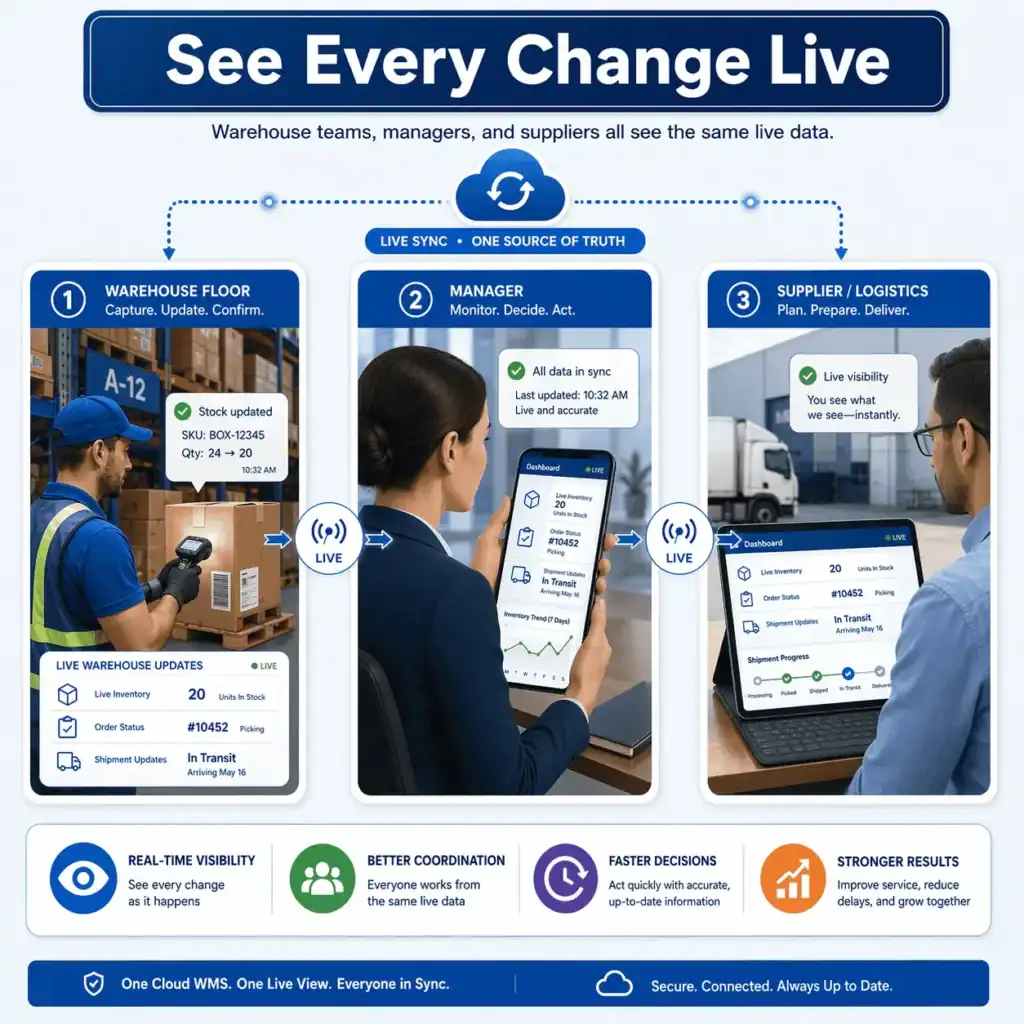
A cloud-based WMS is software that manages warehouse operations through the internet rather than on servers maintained on-site. It tracks inventory, orders, and shipments in real time, accessible from any device with a connection whether that’s a desktop in the office, a tablet in the warehouse, or a phone at a supplier meeting.
Most systems work with barcode scanners and mobile devices, so staff can update records on the warehouse floor rather than at a fixed workstation. For businesses running multiple sites, this removes the need to maintain separate databases or merge records manually a process that is both time-consuming and reliably produces errors.
The contrast with on-premise systems is significant. Traditional setups require businesses to maintain their own servers, manage upgrade cycles, and limit access to the local network. Scaling up means buying more hardware. Cloud systems remove those constraints entirely. There’s no server room to maintain, no multi-year upgrade cycle to plan around, and no requirement for staff to be physically on-site to access current data.
The Operational Case for Moving to the Cloud
Centralised Data
When every order, stock count, and shipment feeds into the same platform, reporting becomes less labour-intensive and decision-making becomes more reliable. Data doesn’t need to be pulled together from separate systems before it can be used it’s already in one place.
Shared data also reduces the coordination failures that occur when different parts of an operation work from different numbers. A warehouse in one city and a fulfilment partner in another, both drawing from the same live inventory record, have far fewer opportunities to oversell a product or miss an order than two teams reconciling records at the end of the day.
Real-Time Visibility
Staff don’t have to wait for a report or contact another team to check stock status. A manager visiting a supplier can confirm inventory levels from their phone. Warehouse teams can update records on a handheld device as they pick, rather than batching updates at a workstation. When something changes a delivery delay, a stock discrepancy, a customer query requiring an urgent check the relevant people can act on it immediately rather than waiting for information to filter through.
Automated Workflows
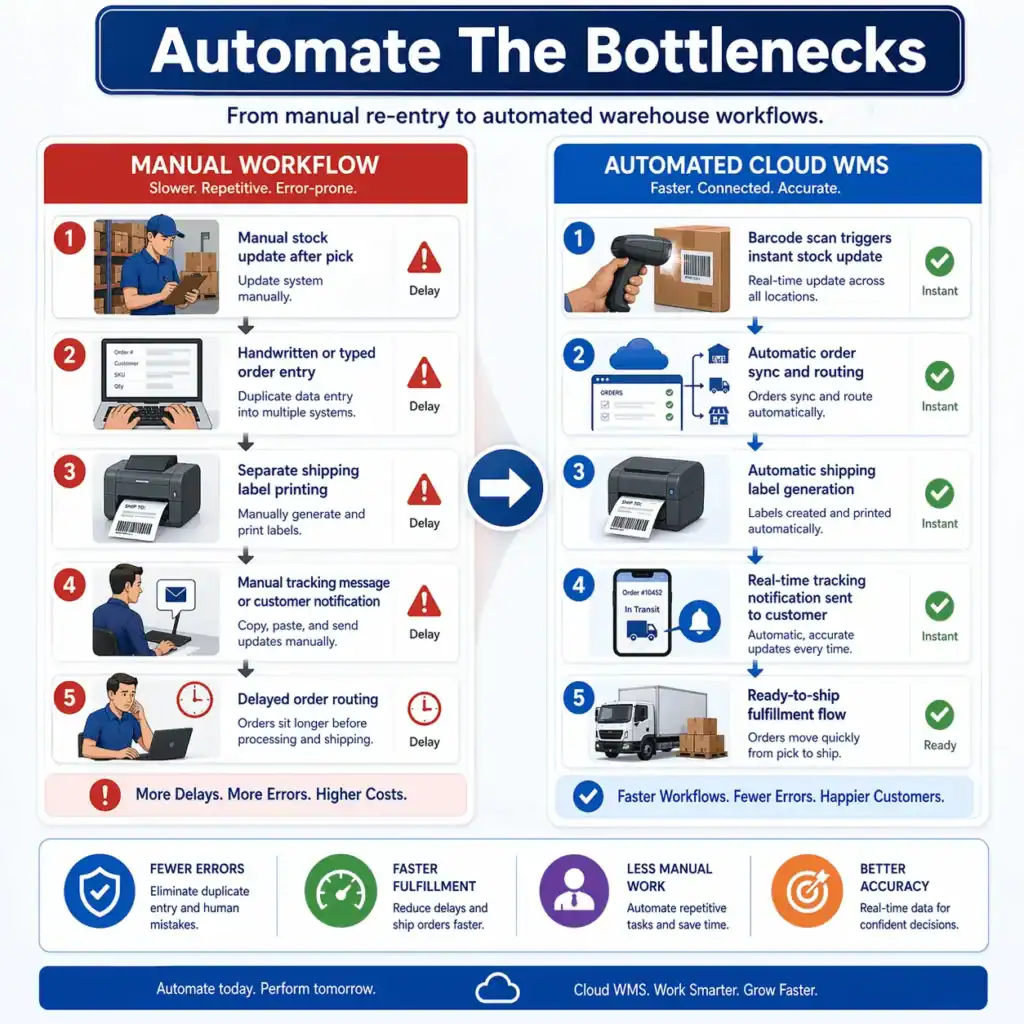
Routine tasks updating stock counts after a pick, generating shipping labels, sending tracking updates to customers happen automatically rather than requiring manual input at each step. This removes a category of work that is simultaneously time-consuming and prone to error. Faster order processing means shipments leave the warehouse sooner. Fewer manual steps means fewer points where something can go wrong.
Infrastructure That Scales
The same system that supports a small team can handle a growing network of warehouses without being rebuilt. Adding a new location or sales channel is a configuration change, not a technical project. During peak periods, capacity adjusts to match demand without requiring downtime or hardware procurement. Businesses pay for what they use, so there’s no need to purchase capacity in advance or carry the cost of infrastructure that isn’t being fully utilised.
Managed Security and Maintenance
The provider handles security patches, system updates, and data backups. Business data is protected to current industry standards, and those standards are maintained by the provider rather than depending on internal IT capacity. For smaller businesses without a large technical team, this removes a significant operational burden and the risk that comes with infrastructure that isn’t being actively maintained.
The Financial Structure of Cloud WMS
Switching from an on-premise system to a cloud-based one changes both how costs are structured and when they occur. There’s no large upfront hardware investment, no software licence to renew separately, and no implementation that stretches over months before the business sees any return. Most providers charge a monthly or annual subscription, which makes costs predictable and easier to incorporate into operational budgets.
The subscription model does come with trade-offs worth understanding. Payments are spread over time rather than concentrated upfront, and costs scale with usage so businesses aren’t paying for capacity they don’t need. The entry point is lower, which makes cloud WMS accessible to operations that couldn’t previously justify the investment in a traditional system. The offsetting consideration is that over many years, subscription fees may cumulatively exceed what a one-time purchase would have cost, and the business depends on the provider for uptime and service continuity.
Pricing in practice varies considerably by provider, feature set, and number of users. Subscription fees typically range from a few hundred to a few thousand dollars per month for small to mid-sized operations, with enterprise pricing structured separately.
The return on that investment tends to materialise relatively quickly. Because setup takes weeks rather than months, businesses start seeing the operational benefits sooner. Better inventory data reduces stockouts and overstock, which improves cash flow. The elimination of manual re-entry across systems reduces the error correction that consumes staff time. Businesses that have made the transition report meaningful improvements in forecast accuracy and order fill rates and the corresponding improvements in customer satisfaction that follow from more reliable fulfilment.
Connecting the Supply Chain
A cloud WMS becomes considerably more valuable when it’s connected to the other systems the business depends on, rather than operating as a standalone tool.
ERP Integration
When the WMS and ERP share data, sales orders, inventory movements, and financial records stay in sync without anyone entering the same information twice. Warehouse staff can see what needs picking and shipping without waiting for updates from another system. Finance and sales teams can check inventory without contacting the warehouse. Reporting becomes more reliable because both systems draw from the same numbers rather than maintaining separate records that periodically need reconciling.
For businesses operating across multiple countries, that shared visibility makes restocking decisions and financial planning considerably more tractable. The delays and errors that accumulate when teams work from disconnected systems simply don’t arise when data flows automatically between them.
E-Commerce Platforms
Cloud WMS platforms connect directly with e-commerce channels and marketplaces. When a sale is made on any channel, the system updates inventory counts automatically and routes the order to the warehouse for fulfilment. Stock levels stay accurate across every channel simultaneously, which prevents the overselling that occurs when channels maintain separate inventory records.
Customers see reliable, current availability information, which reduces the number of orders that have to be cancelled or delayed after purchase one of the more damaging experiences in e-commerce from a customer retention perspective. Businesses can sell across their own site, third-party marketplaces, and wholesale simultaneously without managing inventory separately for each channel.
Carrier Networks
Connecting to carrier networks means shipping labels and tracking numbers are generated automatically when an order is packed, rather than entered manually. The system pulls real-time delivery data from carriers to update order status and flag issues before they reach the customer. Working with multiple carriers through a single integration gives businesses the option to select the most cost-effective or fastest option for each shipment, which reduces shipping costs over time and improves the consistency of the delivery experience.
Implementation: What Goes Wrong and How to Prevent It
Getting a cloud WMS running is not purely a technical task. It requires planning, clear ownership, and realistic timelines. Businesses that treat it as an IT project alone without early input from the people who will use the system every day tend to encounter problems that earlier involvement would have caught.
Data Migration
Moving to a new system means moving data: product codes, inventory levels, order history, supplier details. The quality of that data after migration depends entirely on how well it was prepared beforehand. Migrating into a new system doesn’t fix data problems it replicates them in a new environment where they’re often harder to find.
Before migrating anything, the existing data should be reviewed systematically. Duplicate records need to be removed, errors corrected, and product codes that are no longer in use retired. Migrating in phases reduces risk moving the most important records first means issues surface early, when there’s still time to address them before the full cutover. Running migrations overnight or at weekends minimises disruption to day-to-day operations. After migration, records should be verified against what the business expects, and the system should be tested with real orders before going fully live.
Staff Adoption
The system’s value depends entirely on the people using it. Staff who understand why the new system works the way it does and how it makes their specific tasks easier adapt more quickly than those who receive only technical instruction. Training that covers real workflows, not just screen navigation, is considerably more effective for warehouse roles. A picker needs to know what to do when the screen shows a discrepancy, not just how to click through a standard order.
Support shouldn’t end after the first week. Help resources, quick reference guides, and a clear route for escalating questions all reduce the frustration that builds when people hit problems without knowing where to turn. Feedback from staff in the first weeks of operation typically surfaces small issues that are straightforward to fix before they become embedded in daily workarounds. Creating a visible mechanism for raising and acting on that feedback builds the trust that makes a new system stick rather than get avoided.
Connectivity
Cloud systems require a reliable internet connection, and in a warehouse environment that means thinking carefully about Wi-Fi coverage across the entire building not just the office. Handheld scanners and mobile devices need a consistent signal wherever staff are working. Wired connections are preferable for fixed workstations. Mobile data as a backup for handheld devices provides continuity if the primary connection drops.
If the connection goes down, work should not stop entirely. Where offline modes are available, scanning and picking can continue for a period. Staff need to know the steps to take when connectivity is lost how to reconnect, how to switch to a backup, and how to record what happened so nothing is missed when the connection is restored. Testing connectivity thoroughly before go-live avoids the kind of surprises that delay orders in the first days of operation.
The Human Side of Warehouse Technology
Automation changes what warehouse work involves, but it doesn’t remove the need for people to run operations well. Routine tasks stock counting, label generation, record updates become automated, which shifts workers toward tasks that require judgement: resolving discrepancies, managing exceptions, planning for demand changes.
That shift is a real adjustment for many warehouse staff. Workers accustomed to paper-based picking lists or manual stock counts need time and genuine support to become comfortable with screen-based tools. The transition changes daily habits, and that takes more than a single training day to stick. Businesses that invest appropriately in training see fewer errors and more consistent use of the system’s capabilities. The cost of good training is small relative to the cost of fixing data problems caused by staff who weren’t properly shown how to use the tools in front of them.
Warehouse staff who are included in decisions about how the system is configured tend to produce a better outcome. The people doing the picking know details about daily workflow that don’t appear in any planning document where the Wi-Fi signal drops, which products are consistently miscounted in the old system, which steps in the process are slower than they should be. Managers who treat that knowledge as useful input end up with a system that fits how work actually gets done, rather than how it was assumed to get done during the planning phase.
Open communication throughout the rollout matters for the same reason. When staff feel comfortable flagging problems slow load times, screens that don’t make sense, steps that take longer than expected those issues get resolved before they affect the wider operation. Without a clear route for reporting problems, they persist and accumulate into something harder to fix.
What to Expect After Go-Live
The operational improvements from a well-implemented cloud WMS tend to compound over time rather than arriving all at once. Initial gains come from removing the manual steps and reconciliation work that occupied staff before the transition. As the system accumulates sales and order data, demand forecasting improves and purchasing decisions become more precise. Supplier relationships benefit from more reliable order data and fewer discrepancies at goods receipt.
The connection to e-commerce and carrier networks becomes more valuable as order volumes grow, because the efficiency gains from automated label generation and real-time tracking scale with volume in a way that manual processes don’t. Businesses that plan to add new warehouse locations or sales channels find the process considerably more manageable once the core system is operating reliably configuration rather than infrastructure is what adding a new node requires.
The businesses that see the strongest results are typically those that treat go-live as the beginning of the process rather than the end. Reviewing system performance regularly, acting on staff feedback, and adjusting configurations as operations evolve keeps the system aligned with how the business actually works rather than how it worked at the time of implementation.
Final Thoughts
Cloud-based WMS systems give warehouse teams accurate, current data to work from and remove a category of manual tasks that slow operations and introduce errors. Costs are lower upfront, implementation takes weeks rather than months, and the infrastructure grows with the business without requiring replacement when volumes increase.
The connections to ERP systems, e-commerce platforms, and carrier networks mean that order information moves automatically across the supply chain rather than being re-entered at each step reducing errors and giving everyone involved a more reliable experience.
What determines whether a business realises those benefits is largely how the transition is managed. Clean data, realistic timelines, genuine staff training, and attention to connectivity aren’t optional components of implementation they’re what separates a smooth transition from one that costs months of corrective work after go-live. Businesses that plan those elements carefully tend to find that the investment in a cloud WMS pays back steadily and durably.