





Free Ecommerce Website Builder: Building an Ecommerce Online Store
How many ecommerce websites are built each month?
Globally, an estimated 120,000 to 180,000 new ecommerce websites are launched every month, based on aggregated data from ecommerce platform disclosures, CMS usage tracking, and small business formation trends. This figure reflects only new store creation, not redesigns or migrations. The number fluctuates seasonally, with noticeable spikes ahead of Q4 and after major platform feature releases.
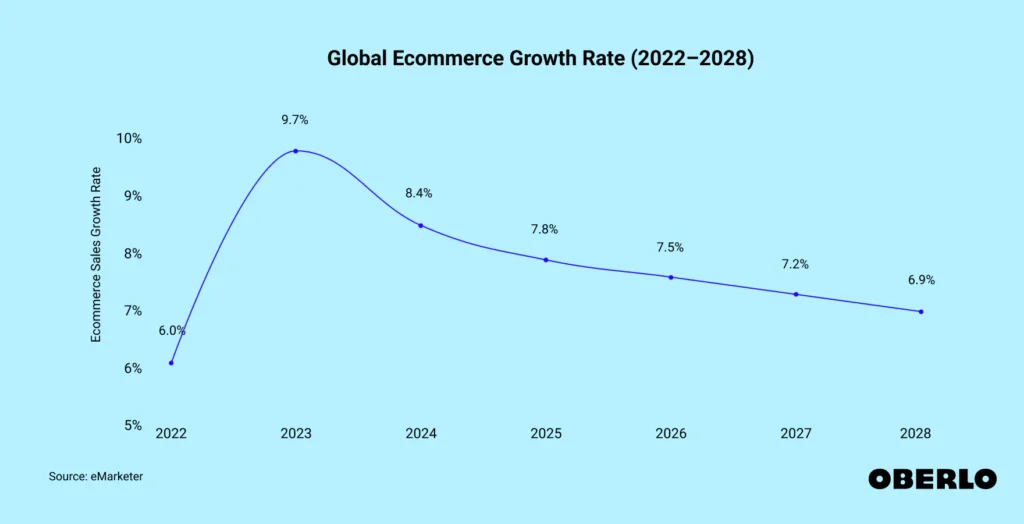
Source: eMarketer
Several forces drive this monthly volume. First, small and micro-business formation continues to rise, with many founders choosing ecommerce as their primary or first sales channel. Second, barriers to entry remain low. Hosted platforms, open-source solutions, and plug-and-play payment tools allow a store to go live in days, not months. Third, existing offline businesses increasingly add ecommerce as a secondary channel, particularly in retail, food, education products, and digital services.
Geographically, Asia-Pacific and North America account for the majority of new monthly builds, followed closely by Europe. Emerging markets contribute a growing share, especially where mobile commerce adoption is accelerating faster than traditional retail infrastructure. Not every site survives long term, but the steady inflow shows ecommerce remains a default business model rather than an exception.
It is also important to separate intent from execution. While millions of domains register ecommerce-related keywords each year, only a fraction progress to a functional storefront with payments, products, and checkout enabled. The monthly launch estimate reflects stores that reach an operational state, not abandoned drafts.
In short, ecommerce website creation is no longer an occasional business decision. At well over one hundred thousand new stores per month, it has become a continuous global activity shaped by entrepreneurship, technology access, and changing buyer habits.
E-Commerce Website Builder Essentials: Niche Strategy, Store Setup, Performance Optimization, and Growth Technologies
- Start with a well-defined niche and target audience so that your commerce website addresses clear market needs and differentiates itself from the competition.
- Select an commerce site and a domain name.
- Custom tailor your storefront, user-friendly design, high-quality photos and detailed product descriptions.
- Make sure your website is optimized for performance with mobile responsiveness, quick loading times, and a streamlined checkout process.
- Add some cutting-edge tech like AI personalization, augmented reality, and voice commerce to enhance customer engagement and stand out.
- Keep an eye on site performance, inventory, and customer support.
Ecommerce website development is creating an online platform for trading things. Your ecommerce site should allow users to shop, pay, and track their order from any device.
Site owners often use off-the-shelf platforms or bespoke tools to build them. Crucial components are product pages, secure buying processes, and easy checkout.
To get you on your way, this guide provides simple steps and advice for creating a site that clicks with shoppers.
Online Shopping | Foundational free ecommerce website builder strategy
Foundational ecommerce website strategy Founded well, an ecommerce website strategy helps brands grow revenue and boost awareness. It begins with understanding what you provide, who your audience is, and what sets you apart. Customer-oriented basics, key functionality, and an intuitive user flow are a powerful e-commerce website philosophy for building a foundation for success.
Each step should strive to offer shoppers a frictionless, enjoyable experience from click one to checkout.
Define your niche
To niche is to select a merchandise or service that distinguishes you from the competition. It allows you to address concrete needs and not get into direct battles with large generalist stores. For instance, marketing sustainable home products or pet care items can appeal to buyers interested in those niches.
Seek out trends and holes where demand is strong and choice is limited. Explore forums, keywords, and social channels to identify these gaps. A value proposition, such as quick delivery or craft items, tells buyers why they should choose you instead of someone else.
Just ensure the concept matches your own interests so you remain energized. Prior to launching, validate your idea with surveys or a mini-launch. Nothing beats direct feedback from real users to demonstrate whether there is genuine interest and what modifications might help.
Identify your audience
- Gather data on age, gender, location, and spending habits.
- Use analytics to track where users come from and what they buy.
- Ask for feedback through polls, reviews, or support chats.
- Study social media to identify what topics and products spark engagement.Divide up your audience into these characteristics. For instance, some cohorts may shop better on mobile and others want desktop. Develop buyer personas to understand their needs, objectives, and challenges.
This aids in customizing your marketing, whether it’s ads or emails. By knowing your audience intimately, it becomes simpler to provide sales and checkout features that motivate them.
Analyze market viability
See what the best players are doing right and what they are doing wrong. Check for holes in their product lines or user experience, such as sluggish support or extended checkout stages. Follow market trends with public reports or industry news to identify increasing demand.
Check your prices to make sure you remain competitive and profitable. Prices have to be value-based and correspond with what your target shoppers will pay. Use a strength, weakness, opportunity, threat (SWOT) analysis to help map these.
This can inform your decisions and prevent expensive errors.
Establish brand identity
Logo – Brand identity begins with a logo that suits your mission and values. Use complementary colors and fonts on your site, packaging, and ads. A story about why you started or what you stand for resonates with shoppers globally.
Maintain consistent tone and visuals across the board on your site, social pages, and emails. This streamlines credibility and simplifies the process for consumers to identify your brand anywhere they purchase.
How to create your ecommerce site
Every step in crafting your ecommerce web design enhances the online shopping experience for your customers, from their initial visit to checkout. These smart ecommerce decisions position your business for frictionless scale in the future.
1. Website design | Choose your platform
Begin by contrasting Shopify, WooCommerce, or Magento. Shopify is easy for new sellers, while WooCommerce is perfect for those with WordPress expertise. See what these platforms offer: integrated payment support, built-in security, and global currency handling.
Make sure this platform can scale with you. If you intend to add lots of products or attract more visitors, ensure the platform can scale. It should be easy to use for you and your customers. A platform with a clear dashboard and easy tools can save you hours.
Pick a platform with integrated checkout, payment, and order management. This eases running your store as you add features or scale up.
2. Secure your online store domain name
Choose a simple, memorable domain name, preferably 15 characters or less. Short names are fast to type and are great for making your brand memorable. Register your domain with a reputable provider so your store stays secure and in your hands.
Incorporate keywords into your domain if possible. This can aid your site in surfacing in searches so shoppers can locate you. Activate domain privacy protection so your personal information isn’t publicly visible.
3. Design and create an ecommerce website storefront
Pick a good-looking, customizable template to make your store look great and stay on brand. Limit yourself to two fonts one for titles, one for body text so there’s a clear reading hierarchy. Limit your primary menu to a handful of headers.
Trust comes from consistent colors, images, and style. With responsive design, your shop will work on phones, tablets, and computers. Just be sure that key categories are clear and easy to find, so customers locate what they’re after fast.
A strong visual hierarchy and clean design can increase sales.
4. Add your products and product description to your ecommerce business site
Cluster items by category or purpose to enhance the online shopping experience, ensuring that shopping is fast and efficient. Each product requires a neat, truthful description that highlights its benefits, focusing on the problem it solves or why potential customers would want it. Utilize quality product photography with several angles to attract visitors to your ecommerce site.
SEO is crucial; incorporate relevant keywords into your product pages to improve rankings on search engines. This strategy will help more people discover your ecommerce website, ultimately driving traffic to your online store and expanding your customer base.
5. Configure your payments to sell online
Choose trusted payment gateways that operate globally, such as PayPal or Stripe. Provide multiple ways to pay, including credit card, wallets, or even a bank transfer. Ensure your payment system is in compliance with PCI to maintain customer security.
Be sure to always test the checkout to catch errors prior to launch.
6. Set up your shipping
Pick shipping strategies that fit your products and where you ship. Be transparent with regards to costs and delivery times. This instills confidence and reduces inquiries.
Shipping plugins or software track orders and automate labels. If you want to sell worldwide, add international shipping options.
7. Test and launch
Try out each page and button to catch issues ahead of time! Have a couple of people test-drive your site and hear what they have to say.
Plan your launch with social posts or ads to drive your initial visitors. Monitor your site post-launch to identify any issues quickly. Always have a contact page so customers know how to get ahold of you.
Optimizing the user experience
Optimizing user experience is the heart of creating great ecommerce web designs. It encompasses shoppers’ behavior on the site, their phones, page load speed, and checkout simplicity. Smart ecommerce features and design decisions increase conversion, establish credibility, and ensure return visits.
Mobile-first design template
Mobile-first design is critical now more than ever, as roughly half of all web traffic is mobile. To create a successful ecommerce web design, mobile-friendly sites must have layouts that scale to various screen sizes, allowing users to avoid pinching or scrolling sideways. Menus should utilize obvious icons and easy lists while keeping the screen uncluttered.
Beautiful yet compressed images are essential for maintaining a fresh look while ensuring fast loading times. This is particularly important for an ecommerce site, as slow loading can drive potential customers away. Regularly checking mobile features is vital to ensure that buttons, links, and forms function correctly.
Easy navigation, such as sticky headers or a visible search bar, enhances the online shopping experience. Bright, sharp product pictures and concise copy help your products stand out on small screens.
Intuitive navigation ecommerce shopping cart
Navigation should be intuitive. Categorize products by category or use, such as “Apparel,” “Gadgets,” or “Decor” so users aren’t drowning in infinite lists. Breadcrumb trails can indicate where users are in the site, allowing them to jump back to previous pages with one click.
A search bar at the top of every page assists visitors in locating precisely what they desire. Reducing the steps to a product page is crucial. If it requires more than 3 clicks to reach a product, the majority of users will bail.
Menus shouldn’t be multi-layer or have confusing names. Filters for size, price, or color are helpful, particularly for stores with many products. Navigation is, in part, clear labeling. Short, concrete words such as “Cart,” “Shop,” or “Account” are simpler to grasp.
Sites with clean, well-lit product displays and high-quality photos simplify user browsing and buying.
High-speed performance
Speed has a huge impact on user love. By compressing images and streamlining scripts, it reduces page load times. A solid host provider will maintain server response times quickly, even during traffic spikes.
Caching allows repeat visitors to load pages quicker, contributing to repeat sales. Monitor load times frequently with tools that indicate where slowdowns occur. Tweak it a little, like minimizing unused plugins or limiting animation, to keep it zippy quick.
A slow site kills sales and drives users away. A fast site boosts engagement and rankings.
Streamlined checkout
A quick, easy checkout is essential for reducing cart abandonment on your ecommerce website. Simplifying and combining steps ensures that you only demand what’s necessary from customers. Additionally, providing guest checkout allows new customers to engage with your online store without the need for registration.
Clear calls to action, such as “Continue” or “Place Order,” guide users through every stage of the ecommerce experience. Offering explicit feedback for errors, like a missing address or incorrect card number, is crucial for maintaining a smooth shopping cart process.
Accepting multiple payment methods, including credit cards, PayPal, or local payment options, caters to user preferences. This flexibility makes it easier for shoppers around the globe to complete their purchases on your ecommerce site.
Integrating advanced ecommerce technology
Advanced ecommerce technology allows merchants to manage all online channels from a single ecommerce platform, providing a more flexible and time-saving solution. This central system reduces errors from copying data across systems, enabling teams to accomplish more without switching between dozens of interfaces.
| Technology | Purpose | Example Use Case |
| AI Personalization | Customizes user experiences | Product suggestions |
| Augmented Reality | Visualizes products in real space | Virtual try-ons |
| Voice Commerce | Enables voice-based shopping | Voice search and orders |
| Headless Architecture | Separates front/back end | Custom site design with APIs |
AI personalization
AI personalization employs machine learning to organize and analyze customer information, identifying trends in what customers purchase, peruse, or ignore on an ecommerce website. This assists in tailoring recommendations to individual users, enhancing their online shopping experience. When a shopper clicks on a product, the ecommerce site can display related products or frequently bought items, keeping shoppers engaged and increasing the likelihood of additional purchases.
Ecommerce features allow sites to shift what shoppers see based on their preferences, including the text and photos on the page. Orchestrated by powerful ecommerce technology, this means marketing messages can be dispatched at optimal times, such as reminder emails for abandoned shopping carts or offers tailored to a customer’s preferred category.
Monitoring what each user clicks on, watches, and purchases keeps these recommendations fresh. However, if you don’t use the right data for these ecommerce tools, you risk wasting money and missing out on sales. Integrating these systems with CRM and marketing tools connects campaigns to actual purchases, enabling brands to allocate their budget more effectively.
Augmented reality
Integrating state-of-the-art internet commerce technology can significantly enhance the shopping experience. For instance, a consumer can use augmented reality to visualize a chair in their living room with their smartphone before purchase. This reduces returns and increases assurance.
Virtual try-ons are useful for fashion or glasses. Customers can observe how items appear on them. AR options can spice up product pages, making users stick around longer. Tech-savvy buyers will seek out these bells and whistles, so it helps to highlight them in advertisements and e-mail campaigns.
Voice commerce
Sites can attract additional buyers by being compatible with voice search. Many shoppers are hopping on smart speakers or voice assistants to make purchases. By incorporating voice-assisted features, such as ordering or FAQs, with next-generation online retail technology, you reduce the friction customers experience when purchasing.
Plain content, such as FAQs, helps to respond to regular voice questions. Voice shopping trend tracking keeps you ahead of buyer desires.
Headless architecture website builder
Headless commerce separates the site’s front and back ends and connects them by APIs. This allows brands to engineer bespoke storefronts while maintaining a resilient and secure back end.
APIs link all site, payment gateways, and third party tools so innovating is easy. Headless setups allow companies to adapt or scale quickly to match consumer demand.
Marketing your digital commerce website
Marketing your ecommerce website is more than just flipping on ads; it involves creating a compelling online shopping experience that encourages potential customers to discover your store, trust your products, and return. Savvy marketing combines SEO, content, ads, email, and social media to drive traffic to your ecommerce site, engage buyers, and establish enduring confidence.
SEO fundamentals
- Research keywords customers use to find products like yours.
- Optimize your page titles, product descriptions, and headers for your target keywords.
- Write unique meta descriptions for each page.
- Use good descriptive images with alt text.
- Make your site faster and mobile friendly.
- Create a clean site structure with simple navigation.
- Build backlinks from trusted websites in your industry.
- Update existing content and products often to stay relevant.
A speedy, mobile-optimized ecommerce website with compelling product copy enhances the online shopping experience, making it easier for both search engines and potential customers to locate what they are looking for.
Content marketing
Content can respond to inquiries, resolve concerns and demonstrate your brand’s expertise. Blog posts that describe how to choose the best product, guides for using your items, or comparative feature lists assist customers in making purchase decisions.
360-degree product videos and infographics that dissect product features appeal to a broader set of buyers. UGC, like reviews and shared photos, creates connection and trust. Marketing this content through email and social channels makes even more people see and share it.
Paid advertising
Have a concrete target in mind before you advertise. More sales, brand awareness, or new signups? Google Ads can target people looking for your products. Facebook Ads reach shoppers by interests or behavior.
Experiment with different ad formats, such as carousel ads for multiple products or video ads for demos. Check your results regularly. If an ad is not working, change your message or audience. Utilize analytics to monitor clicks, cost, and ROI.
Email campaigns
To create a strong email campaign, focus on your ecommerce website design, ensuring it is visually appealing and user-friendly. Incorporate powerful ecommerce features that enhance the online shopping experience, such as a seamless shopping cart and customizable templates that reflect your brand. Additionally, leverage effective marketing strategies to engage potential customers and drive traffic to your online store.
- Collect emails through opt-ins on your site.
- Segment your list by first-timers, repeat buyers, by region, and so on.
- Keep subject lines short and clear and test them with A/B testing.
- Personalize emails with names or relevant products.
- Automate welcome emails, cart reminders, and thank-you notes.
- Make sure every email looks good on mobile devices.
- Add a call to action and a simple unsubscribe link.
Social commerce
Sell directly via shoppable posts on major platforms. Highlight new products with live videos or behind-the-scenes clips. Partner with micro or macro-influencers to connect with a larger audience.
Show genuine reviews and consumer photographs to grow belief. Interact with questions and feedback quickly to keep your community happy and engaged.
Start Selling | Post-launch digital commerce management
Post-launch digital commerce management requires more than just adding products or running ads. Continuous work is necessary after the ecommerce website goes live to ensure a smooth online shopping experience, support users, and implement changes that boost sales. Key considerations include site data, stock, buyer support, and tight security. Neglecting these ecommerce features could lead to a rebuild in a few years, wasting valuable time and resources.
Performance analytics
Monitor user and site data with tools like Google Analytics or Matomo to enhance your ecommerce website design. These tools reveal which pages receive the most visits, how visitors navigate through your ecommerce site, and where they bounce before making a purchase. Configuring conversion tracking helps discover which ads or campaigns generate actual sales rather than just clicks.
Utilize customer input, such as reviews or surveys, to identify pain points in your online shopping experience. Sometimes users abandon their carts at checkout due to slow load times or clunky payment forms. Reviewing digital commerce KPIs monthly, including bounce rates and average order value, is crucial for optimizing your ecommerce business strategy.
Inventory control
Implement inventory management software that integrates with your online commerce platform to monitor stock levels dynamically. This is vital for stores with a large catalog, like a fashion merchant with thousands of SKUs. Schedule reorder alerts for hot-selling items so you don’t lose sales to lack of inventory.
Interpret sales surges to predict what will be selling next so you can stock accordingly. Audit inventory on a schedule. This catches errors, corrects mismatches and prevents overselling. For international stores, synchronize with wholesalers and warehouses across continents to maintain stock levels in equilibrium.
Customer support
Offer assistance over multiple channels, such as chat, email, or phone, so your customers can choose what suits them best. Construct a thorough FAQ page addressing typical inquiries regarding shipping, returns, or payment options. Train your support team to solve issues fast and with clear answers.
Post-launch internet commerce management involves leveraging reviews and support tickets to identify trends and implement large-scale changes. For instance, if a lot of users ask about payment options, think about providing additional options or describing existing ones more clearly on the site.
Security monitoring
Protect the site with SSL so customer data and payments are secure. Update your site’s software and plugins frequently to plug security holes. Watch for suspicious behavior, such as bogus signups or attempted break-ins, and have a response plan in place.
Let your customers know about safe online shopping. Use strong passwords and look for the padlock on checkout pages. This establishes trust and reduces fraud. Secure payment integration, mobile responsiveness, and strong site performance were musts from day one.
Grow your business
Powerful online retail sites begin with clever maps, obvious stages, and consistent attention. Attractive design attracts customers and intuitive navigation makes it easy to shop. Easy stuff, such as secure payment and quick load time, maintains confidence. Fresh tech, like live chat or smart search, can increase sales fast. Great marketing attracts new eyeballs and keeps existing buyers warm. Once launched, updates and rapid fixes prevent little hassles from becoming big. Choose advice that suits your store and stay simple. Experiment, see what works, and adjust your site as you expand. Swap your wins or problems with other shop owners. Be prepared to scale your store. Begin with one step from above and go where it takes you.
Frequently Asked Questions
What are the first steps to create an e-commerce website?
First, select a dependable ecommerce platform, find a domain name, and design your inventory for your online store. Brand and audience are crucial. These steps lay a good groundwork for your ecommerce website.
How can I make my website user-friendly?
Clear menus, easy navigation, and fast-loading pages are essential components of an ecommerce website design. Providing easy checkout and mobile responsiveness enhances the online shopping experience, allowing visitors to shop effortlessly and minimize cart abandonment.
Why is mobile optimization important for websites?
Most shoppers are on mobile, so having a well-designed ecommerce website is crucial. Your super-mobile site loads fast and looks great on every screen, enhancing the online shopping experience.
What advanced technologies should I integrate into my website?
Think live chat, recommendations, and payment gateways as powerful ecommerce features. Track behavior with analytics tools to enhance the online shopping experience and increase conversion rates.
How can I promote my new website?
Utilize social media, email marketing, and SEO tools to enhance your ecommerce website design. Paid ads and influencer partnerships can assist in generating traffic and awareness for your online store.
What should I monitor after launching my website?
Track sales, traffic, and customer feedback on your ecommerce website. Be on the lookout for technical glitches and keep your content fresh to enhance the online shopping experience and improve your ecommerce site over time.
How do I ensure data security for my website?
To ensure a great ecommerce site, make sure to use secure sockets layer (SSL) certificates, strong passwords, and regular software updates. Secure customers’ data with reliable payment options to enhance the online shopping experience.
Author Bio:
Ben Ajenoui is the Founder of SEO HERO LTD, a Hong Kong–based SEO agency helping startups and established businesses improve search visibility, drive organic growth, and build sustainable online performance. He specialises in SEO strategy, technical optimisation, and content-led growth.