





What Is eCommerce? A Clear, No-Fluff Definition
Buying and selling no longer require a physical store. That’s the simplest way to understand eCommerce short for electronic commerce. It refers to any business transaction conducted entirely online.

Whether you’re ordering groceries from your phone, downloading a digital product, or running a business that ships products to customers worldwide, you’re participating in eCommerce. It includes everything from product listings and payments to order fulfillment and customer service handled through websites or apps.
There are three key parts to nearly every eCommerce transaction:
-
A buyer browsing and selecting a product or service.
-
A digital storefront usually a website or marketplace like Amazon or an independent store.
-
A transaction process, including checkout, payment, and delivery or access.
Unlike traditional retail, there’s no face-to-face interaction. The entire process happens using technology from product discovery to payment confirmation.
For example, when someone buys headphones from an online store like OpenCart or Shopify, the steps happen in minutes: they search, click, pay, and wait for shipping. No cash. No sales staff. No physical space required.
At its core, eCommerce makes it possible for businesses of all sizes to sell directly to anyone with an internet connection. eCommerce means buying or selling products or services over the internet. It replaces the need for in-person shopping by offering everything online from browsing to checkout. Whether you’re a consumer or a business owner, eCommerce is already part of your daily life.
How eCommerce Works: From Browsing to Checkout
Shopping online feels easy. But behind every smooth transaction is a structured flow that makes it all work. This section walks through the step-by-step process that powers most eCommerce experiences from the moment a customer lands on a page to the final confirmation email.

Step 1: Product Discovery
Everything begins with a search. A customer types a query into a search engine or browses a specific online store. They might use filters to narrow down choices, compare product details, or read reviews before making a decision.
Clear navigation, fast-loading pages, and accurate product information all play a role in helping buyers find what they want quickly.
Step 2: Adding Items to the Cart
Once a product is selected, the customer adds it to a digital shopping cart. This cart lets them:
-
See what they’re buying
-
Check quantities and pricing
-
Decide whether to keep shopping or move to checkout
This step mirrors filling a physical basket in a store. It’s flexible, editable, and often saved if the customer leaves the site and comes back later.
Step 3: Reviewing the Cart
Before payment, customers review their selected items. Here, they can:
-
Remove products they no longer want
-
Adjust quantities
-
Apply promo codes or coupons
-
See shipping fees and tax estimates
Providing a clear breakdown of costs helps avoid confusion and reduces abandoned carts.
Step 4: Checkout and Payment
At checkout, customers enter their shipping address and payment details. Most stores offer:
-
Guest checkout (no account needed)
-
Multiple payment methods like credit cards, PayPal, or digital wallets
-
Shipping options with delivery timelines
Security is key here. Secure payment gateways and visible trust signals (like SSL certificates) encourage users to complete the purchase.
Step 5: Order Confirmation
Once payment is successful, the customer receives:
-
A confirmation message on the website
-
An email with order details and estimated delivery date
This step closes the loop. It reassures the buyer that everything went through and sets clear expectations. eCommerce works through a series of simple, connected steps: discover a product, add it to the cart, check the details, pay securely, and receive confirmation. Each step builds customer trust and moves them closer to completing a purchase.
The Four Main Types of eCommerce Models
Not all online businesses work the same way. Some sell directly to consumers, while others connect individuals or companies. To understand how eCommerce operates across different industries, it helps to know the four main models. Each has its own structure, audience, and purpose.

1. Business to Consumer (B2C)
This is the most common eCommerce model. A company sells products or services directly to individual customers. Think of someone buying a book from an online store, ordering shoes, or streaming a movie.
Key features:
-
Short buying process
-
Lower transaction value, higher volume
-
Products are often ready to ship
Example: A clothing brand selling through its own website.
2. Business to Business (B2B)
In this model, one business sells goods or services to another. It’s often used for bulk orders, supplies, or digital services like software subscriptions.
Key features:
-
Longer decision-making process
-
Higher transaction value, fewer customers
-
Often involves contracts or recurring billing
Example: A manufacturer selling raw materials to a retailer.
3. Consumer to Consumer (C2C)
This model connects individuals who sell and buy from each other, usually through third-party platforms. The business provides the space; users provide the listings.
Key features:
-
Peer-to-peer transactions
-
The platform may charge listing or transaction fees
-
Trust and reviews are critical
Example: A person selling vintage items on an online marketplace.
4. Consumer to Business (C2B)
Here, individuals offer products or services to businesses. It flips the usual buying relationship. Freelancers, content creators, and reviewers often work under this model.
Key features:
-
The seller is usually a solo provider
-
Businesses seek out talent or content
-
Pricing can be project-based or per-use
Example: A photographer selling images to a marketing agency. Each eCommerce model serves a different purpose. B2C focuses on the general public, B2B deals with companies, C2C creates a marketplace for individuals, and C2B lets individuals serve businesses. Knowing which model you operate in or want to enter shapes everything from your pricing to your platform.
eCommerce vs Traditional Retail: What’s the Real Difference?
Shopping has changed. Some still prefer walking into a store, while others never leave their homes to buy what they need. This section breaks down the key differences between eCommerce and traditional retail not just in where the purchase happens, but how the entire experience is structured.
Where and When Customers Shop
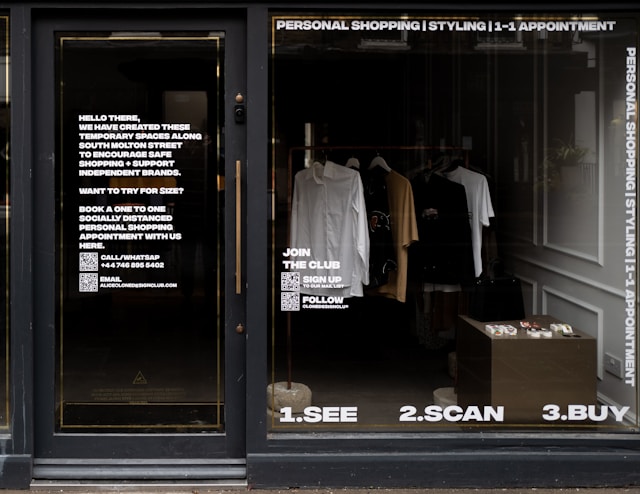
Traditional retail depends on physical locations with set hours. Customers visit in person, browse aisles, and interact with sales staff. Shopping is limited by geography and time.
eCommerce removes those limits. Online stores are open 24/7, accessible from anywhere with an internet connection. A shopper in one country can buy from a seller across the globe without ever leaving home.
Cost to Run the Business
Running a brick-and-mortar store means paying for rent, utilities, displays, and in-store staff. These fixed costs can be high, especially in busy locations.
Online businesses avoid most of these expenses. While they still pay for hosting, software, and possibly warehousing or shipping, the overall overhead is typically lower.
Customer Experience
In-store shopping offers face-to-face service, immediate product access, and the ability to touch or try before buying. For some, that’s a deal-breaker.
Online shopping relies on product photos, reviews, and clear descriptions to guide decisions. There’s no in-person interaction, but convenience and speed often outweigh that for many buyers.
Inventory and Fulfillment
Traditional stores hold physical stock on-site. Restocking takes time and space. If something is out of stock, the customer often walks away empty-handed.
Online sellers can use warehouses, dropshipping, or print-on-demand systems to manage inventory. This allows for broader product ranges and greater flexibility in how orders are fulfilled.
Sales Reach
A physical shop mostly serves its surrounding area unless it becomes a tourist destination or a well-known brand.
An online store can reach anyone, anywhere. With the right marketing, a new brand can build global visibility faster than any physical store could manage. The biggest difference lies in scale, access, and cost. eCommerce is digital, open around the clock, and not limited by location. Traditional retail offers physical presence, personal service, and instant pickup but at higher costs and limited reach. Each has advantages, and many businesses now combine both.
Why eCommerce Is a Popular Business Model Today
Selling online isn’t just a trend it’s become the first choice for many new businesses. This section explores why eCommerce has grown so quickly and why so many entrepreneurs are choosing it over traditional options.
Low Barrier to Entry
Starting an eCommerce business takes fewer resources than opening a physical store. There’s no need to rent a storefront or hire staff right away. With a basic website and a product to sell, anyone can begin testing a business idea with minimal risk.
Example: A creator selling digital downloads can launch a store in a weekend using only a laptop and a payment provider.
Access to a Global Market
Physical stores are limited by location. eCommerce stores aren’t. Sellers can reach buyers in different cities or different countries without opening new branches or signing local leases. This reach helps small brands grow quickly.
Example: A local coffee brand in one country can accept orders from another through its online shop.
Always Open for Business
Online stores don’t close. Customers can browse and buy at any time, whether it’s early morning or midnight. This extends the window for sales and captures more opportunities without extra staff.
Note: Automated systems handle most of the work product displays, order confirmations, and payment processing around the clock.
Data-Driven Decisions
Every action in an online store can be tracked. Business owners can see what customers are viewing, which pages lead to sales, and where people drop off. These insights help improve product listings, test pricing, and refine marketing without guessing.
Example: If a product gets clicks but no sales, the seller might test a new photo or change the description.
Flexibility in Business Models
eCommerce supports a wide range of setups dropshipping, subscription boxes, digital goods, custom-made items, and more. Business owners can choose a structure that fits their goals, time, and resources.
Example: A single-person team can run a profitable store using print-on-demand services without holding inventory. eCommerce has become a popular choice because it’s accessible, scalable, and supported by tools that make running a business easier. Whether selling physical goods or digital services, the model gives individuals and companies room to grow without large upfront costs or geographic limits.
Common Challenges Faced by New eCommerce Businesses
Starting an eCommerce business may seem straightforward build a website, list your products, and wait for orders. But many first-time sellers run into challenges that slow growth or stall progress. This section outlines the most common issues and offers practical ways to handle them early.
Attracting the First Customers
Many new store owners assume that simply launching a website will bring traffic. It doesn’t. Without a marketing plan, a store often sits empty.
What to do:
-
Start with low-cost channels like social media, email lists, or marketplace integrations.
-
Consider running small ad campaigns to test messaging and attract your first buyers.
-
Offer discounts or referral perks to early customers to create momentum.
Standing Out in a Crowded Market
It’s rare to be the only business selling a product online. Without a clear reason for customers to choose you, it’s easy to get overlooked.
What to do:
-
Focus on a specific audience or product niche instead of trying to serve everyone.
-
Use better product images, clearer descriptions, or stronger customer guarantees to differentiate.
-
Share your story or values if they support trust and loyalty.
Managing Inventory and Fulfillment
Poor stock management leads to either running out of products or over-ordering and losing money. Fulfillment errors hurt customer trust.
What to do:
-
Start with fewer products and track what sells before scaling up.
-
Use inventory tools, even basic spreadsheets, to avoid mistakes.
-
Choose a shipping method you can manage consistently whether it’s self-fulfillment, third-party logistics, or dropshipping.
Handling Customer Expectations
Online shoppers expect clear communication and fast, reliable service. Delays, vague return policies, or missing updates can damage your brand quickly.
What to do:
-
Set realistic shipping timelines and display them before checkout.
-
Write a simple, fair return policy that’s easy to understand.
-
Respond to customer questions within 24 hours, even if it’s just to say you’re working on it.
Building Trust Without a Reputation
New stores face a credibility gap. Customers don’t know who you are, and many hesitate to buy from an unfamiliar site.
What to do:
-
Add real customer reviews and testimonials as soon as possible.
-
Display clear contact information and secure payment options.
-
Use professional branding and design first impressions matter.
Every eCommerce business starts with unknowns. Common issues include low traffic, unclear positioning, inventory missteps, and a lack of trust. Addressing these problems early before they pile up sets the stage for steady, manageable growth.
What You Need to Start an eCommerce Business
Starting an eCommerce store doesn’t require a warehouse or a large budget but it does require a few key pieces to get off the ground. This section outlines what every new seller should have in place before launching.
A Product or Service to Sell
First, you need something people want to buy. This could be a physical product, a digital file, a subscription, or a service.
Tips for choosing what to sell:
-
Focus on a specific niche instead of trying to offer too much at once.
-
Test ideas with a small batch or limited launch before committing to large inventory.
-
Solve a problem or offer something hard to find locally.
A Storefront Platform
You’ll need a place to list your products and accept orders. Most sellers choose from hosted platforms or open-source systems.
Common options include:
-
Hosted platforms like Shopify or BigCommerce (no coding required)
-
Open-source options like OpenCart or WooCommerce (more flexibility, but some technical setup)
-
Marketplaces like Amazon or Etsy (no separate site needed, but limited control)
Choose based on your budget, skill level, and how much customization you want.
A Payment Method
To get paid, you’ll need a way to accept payments securely. Most platforms support multiple options.
Popular choices:
-
Credit and debit cards
-
PayPal or Stripe
-
Digital wallets like Apple Pay or Google Pay
Make sure the checkout process is quick and works on both desktop and mobile.
Product Content and Photos
Customers can’t touch or try your products, so your content has to do the heavy lifting.
Create:
-
Clear, honest product descriptions
-
High-quality images from multiple angles
-
Key details like size, material, and delivery time
If you’re selling services, explain exactly what the buyer gets and how it works.
A Shipping or Delivery Plan
If you’re selling physical goods, you need a plan to ship them out or partner with someone who can.
Your options:
-
Pack and ship orders yourself
-
Use a third-party warehouse or fulfillment service
-
Offer digital delivery for downloadable items
Be clear about delivery times and return policies before buyers reach the checkout.
A Way to Reach Customers
Even the best products need marketing. Build a simple plan to let people know your store exists.
Start with:
-
A basic email list
-
Social media profiles on platforms your audience uses
-
SEO-friendly content that helps your products appear in search results
You don’t need a big campaign to begin just a consistent way to communicate.To start an eCommerce business, you need a sellable product, a working store, a way to accept payments, and a plan to fulfill orders. Clear product content and simple marketing will help you build trust and get your first sales.
Real-World Examples of eCommerce in Action
Understanding how eCommerce works is one thing seeing it applied in real businesses brings the concept to life. This section highlights practical examples of eCommerce in different forms, showing how real companies use online platforms to serve customers and grow.
A Direct-to-Consumer Brand Selling Physical Products
Example: Allbirds
Allbirds sells eco-friendly shoes directly from its website. The brand uses a simple storefront, detailed product pages, and strong visual branding. Customers choose a product, pick a size, and check out within minutes no third-party retailer involved.
What it shows:
Direct-to-consumer models allow brands to control pricing, customer experience, and messaging.
A Digital Product Seller Offering Instant Access
Example: Canva
Canva offers digital tools and templates. Customers can subscribe or pay for individual assets like graphic elements or documents. Delivery is instant once purchased, the product is ready to use.
What it shows:
eCommerce isn’t limited to physical goods. Selling digital items means no shipping and faster delivery.
A Marketplace for Independent Sellers
Example: Etsy
Etsy connects individual creators to a global audience. Sellers manage their own shops under the Etsy umbrella. Buyers browse through categories like handmade goods, art, or vintage items, and pay through Etsy’s system.
What it shows:
C2C and small-business sellers can succeed without building a site from scratch, using established platforms instead.
A B2B Store Serving Business Clients
Example: Uline
Uline sells packaging and shipping supplies to other businesses. Its eCommerce site offers bulk pricing, live inventory tracking, and account-based features for repeat buyers.
What it shows:
B2B eCommerce focuses on functionality reordering, bulk management, and tailored pricing more than design or storytelling.
A Niche Subscription Business
Example: Dollar Shave Club
Customers subscribe to receive shaving products regularly. The entire process from selection to billing and fulfillment is automated.
What it shows:
Subscription-based eCommerce provides recurring revenue and predictable logistics when paired with the right offer. eCommerce shows up in many forms from physical products to digital downloads, from one-time purchases to subscriptions. Whether through independent stores or shared platforms, each model shows how businesses tailor online shopping to their audience’s needs.
Choosing an eCommerce Platform: What to Look For
Choosing the right eCommerce platform can make or break your online business. It affects everything from how your store looks to how you manage orders, payments, and inventory. This section walks you through what to consider before picking a platform, so you can build with confidence instead of guessing.
Consider Your Technical Comfort Level
Some platforms handle everything for you. Others give you more control but require some technical know-how.
-
If you want a plug-and-play option, consider hosted platforms like Shopify or BigCommerce. They handle hosting, security, and updates.
-
If you prefer more flexibility or already work with developers, open-source platforms like OpenCart or WooCommerce give you full control.
Tip: Don’t pay for complexity you don’t need. Choose a setup you can manage day to day.
Match the Platform to Your Business Size
Your platform should fit your current stage and have room to grow.
-
New or small stores benefit from easy setup, affordable pricing, and built-in support.
-
Growing stores need better inventory tools, order tracking, and marketing integrations.
-
High-volume sellers may require performance tuning, multi-channel features, or custom apps.
Check if the platform supports product limits, fast checkout, and multi-user access.
Look at Payment and Checkout Options
Customers expect fast and safe payments. A clunky or confusing checkout can lead to lost sales.
Look for:
-
Multiple payment gateways (credit cards, PayPal, digital wallets)
-
Guest checkout and account creation options
-
Mobile-friendly design
Some platforms charge extra fees on top of standard payment processing, so compare closely.
Review Design and Customization Tools
The design of your store affects trust. Look for themes or templates that:
-
Work well on mobile and desktop
-
Can be adjusted without coding (unless you prefer full control)
-
Support your brand’s tone clean, bold, minimal, etc.
Some platforms limit how much you can change. Others allow complete customization with developer help.
Check Available Integrations and Add-Ons
Your platform should work with the tools you already use or plan to use later.
Look for:
-
Shipping carriers and label printing tools
-
Email marketing and analytics plugins
-
Marketplace syncs (like Amazon, eBay, or social selling tools)
If you plan to scale, choose a system with a strong extension marketplace or API access.
Don’t Forget Customer Support
Something will go wrong eventually whether it’s a checkout error or a plugin conflict.
Hosted platforms usually include 24/7 support. Open-source options may rely on community forums or third-party developers. Read real reviews to gauge how helpful support actually is. Your eCommerce platform affects every part of your business from setup to sale. Choose one that fits your technical ability, business size, and long-term goals. Make sure it supports smooth payments, flexible design, and future integrations, so you can grow without needing to start over.
Is eCommerce Right for You?
Selling online sounds appealing but it isn’t for everyone. Before jumping in, it’s worth asking: does the eCommerce model fit your goals, resources, and working style? This section helps you decide whether to move forward and what to consider before committing.
Signs That eCommerce Might Be a Good Fit
eCommerce may be a smart choice if:
-
You have a product or service that people are willing to buy online.
-
You’re comfortable learning new tools or working with a simple website platform.
-
You prefer low startup costs compared to opening a physical store.
-
You like the idea of working independently or scaling at your own pace.
Even without a team or a large budget, it’s possible to launch a basic store and test your idea within days.
When to Pause or Rethink
eCommerce might not be the right model if:
-
Your product relies heavily on in-person interaction (like custom fittings or on-site demos).
-
You aren’t prepared to handle logistics such as shipping, returns, or customer support.
-
You want instant results. Online selling often takes time to build traffic and trust.
In these cases, it may be better to start with local sales, explore marketplaces, or build an audience before launching a store.
What to Ask Yourself First
Before moving forward, ask:
-
Do I know who I’m selling to?
-
Can I clearly describe what makes my offer different?
-
Am I ready to handle the basics product listings, orders, and payments?
If you can answer yes to those, you’re likely ready to get started or at least run a small test launch.
Final Takeaway:
eCommerce is accessible, flexible, and often cost-effective but success depends on preparation. If you have a sellable offer, a clear target audience, and the willingness to learn, eCommerce can be a smart way to build and grow your business on your terms.