









Magento vs OpenCart: Complete Comparison Guide
Overview of Magento and OpenCart
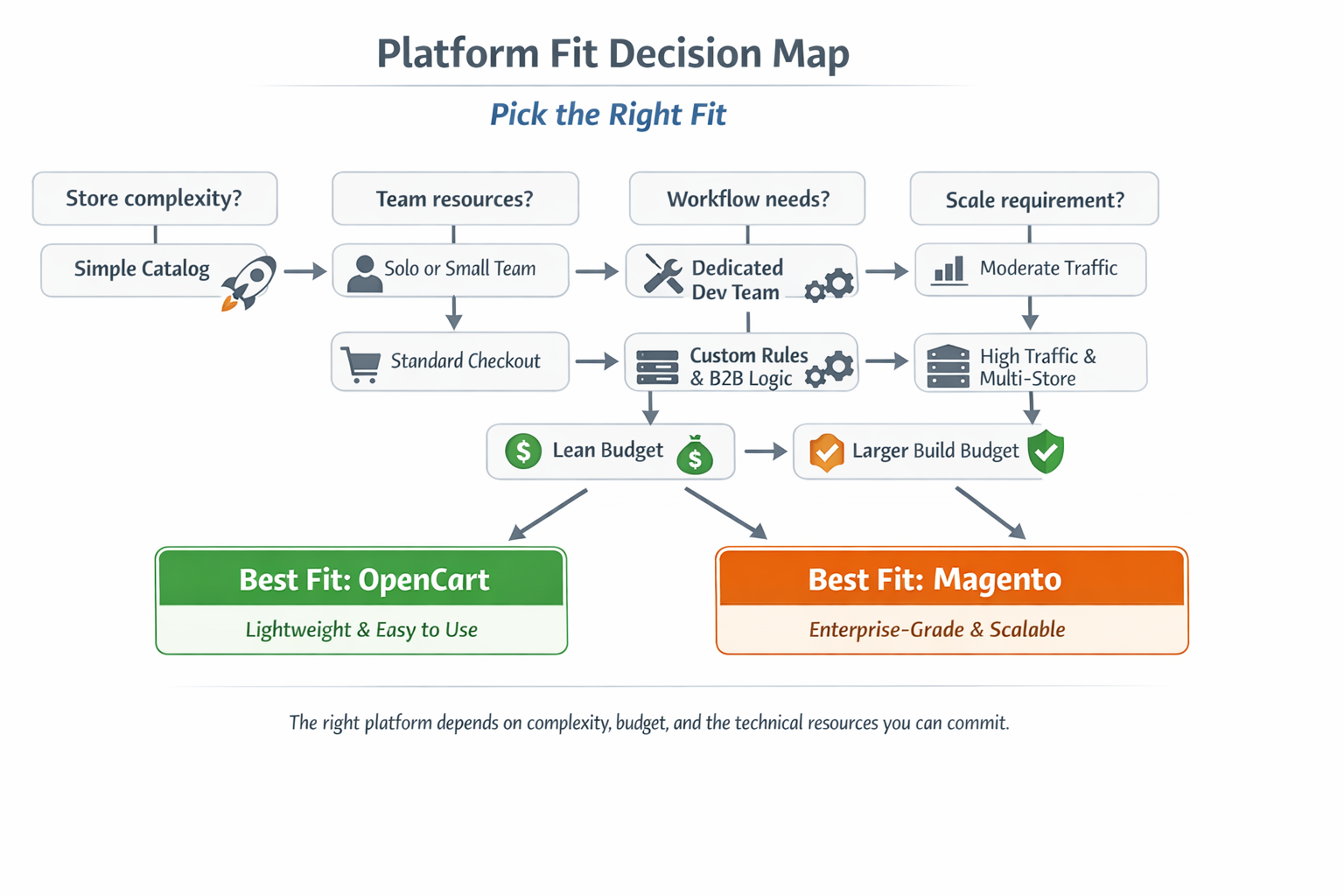
Magento and OpenCart are both open-source eCommerce platforms that let businesses sell products online, but they serve different needs and user types.
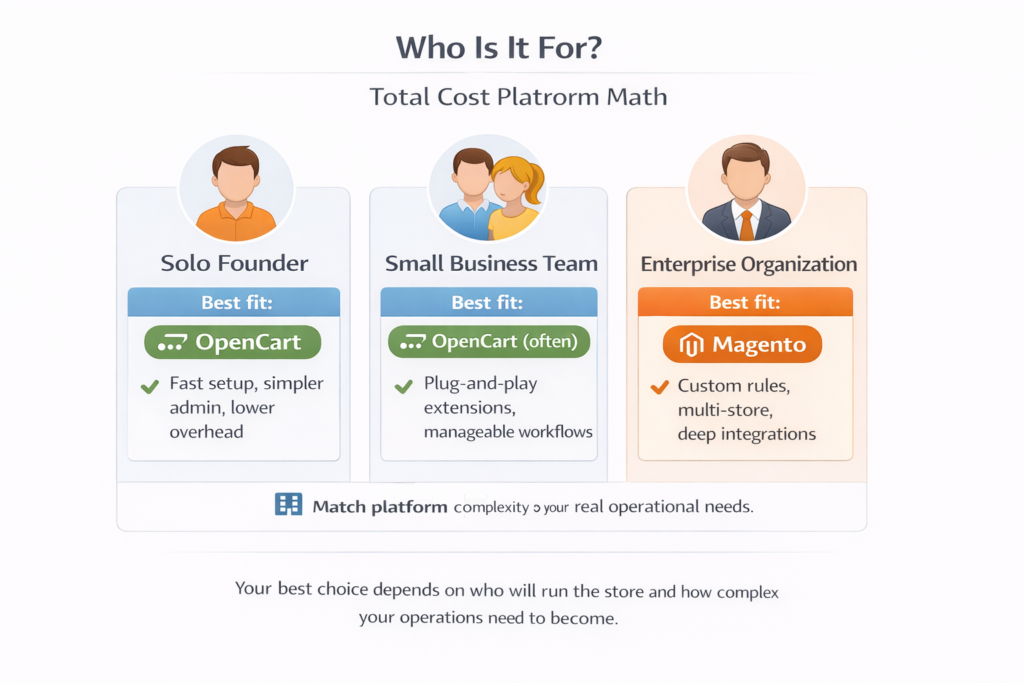
Magento, developed by Adobe, is built for customization and scale. It’s used by enterprise-level companies that need deep control over their store’s design, integrations, and backend logic. Magento supports large product catalogs, complex workflows, and multi-store setups. However, it comes with a steeper learning curve and often requires a developer or dedicated technical team to manage it effectively.
OpenCart is more accessible to small and medium-sized businesses. It’s lightweight, simple to install, and easy to manage without technical knowledge. OpenCart offers a modular system, built-in payment and shipping options, and a user-friendly admin interface. For businesses looking for a faster launch and lower development costs, OpenCart is often a practical choice.
Magento offers more power, but OpenCart offers more simplicity. Choosing between them depends on your business size, budget, and available technical support.
Features Comparison
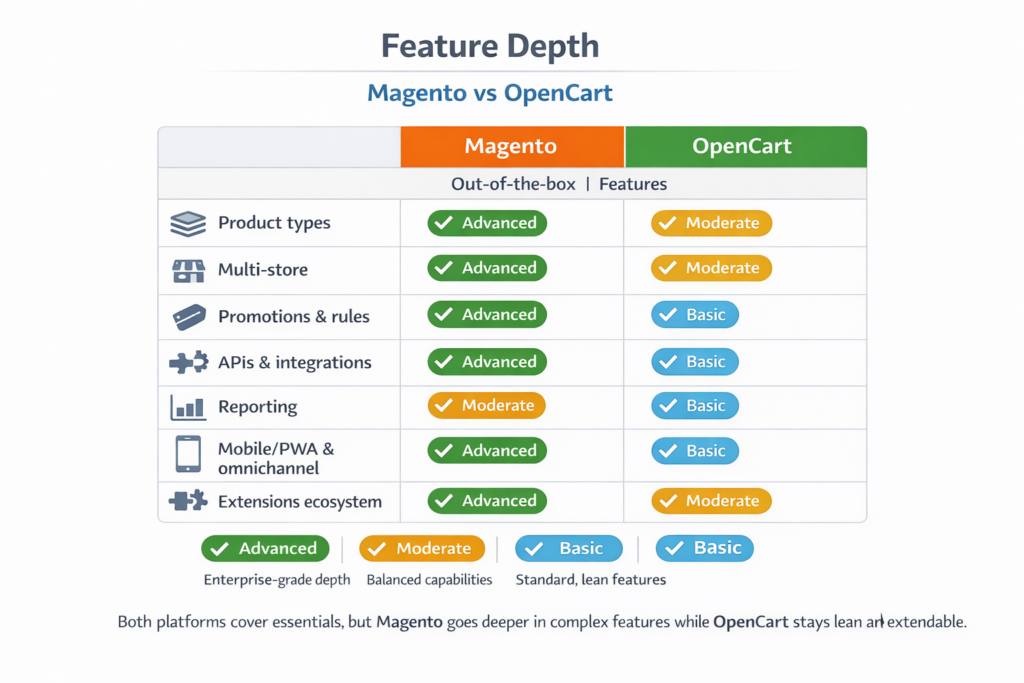
When choosing between Magento and OpenCart, one of the first things users consider is what features each platform offers out of the box and what requires additional extensions or custom development. Both platforms support basic eCommerce functions, but they differ in depth, flexibility, and scalability.
Core Features
Magento:
- Product Management: Advanced options including grouped products, configurable products, downloadable products, and virtual items
- Multi-store Capabilities: Run multiple stores from a single admin panel, each with its own domain, language, and catalog
- Customer Segmentation: Supports targeted marketing and pricing based on customer groups or behavior
- Advanced Rule-Based Promotions: Set up dynamic discounts and cart rules based on purchase behavior, cart value, or customer type
- Built-in APIs: REST and GraphQL APIs for integration with third-party systems and custom apps
OpenCart:
- Product Management: Supports standard product types with attributes, options, and filters
- Multi-store Capabilities: Available, though less flexible than Magento’s
- Extensions Marketplace: Offers 13,000+ modules to add marketing tools, analytics, and UI enhancements
- Built-in Reports: Sales, customer activity, and product views are available in a straightforward dashboard
- Shipping & Payment Options: Includes support for PayPal, Stripe, and various shipping carriers out of the box
Extension Ecosystem
Magento has a robust developer community and an extensive marketplace, but most powerful extensions come at a premium and often require technical configuration. OpenCart’s marketplace offers many free or low-cost extensions, and installation is typically more user-friendly.
Mobile and Omnichannel Features
Magento supports Progressive Web Apps (PWA), enabling advanced mobile shopping experiences. It also offers native integrations for omnichannel commerce, including in-store pickup and inventory sync. OpenCart offers responsive themes and some mobile app integrations, but PWA support is limited and typically added via extensions.
Magento is ideal for businesses that want to build a feature-rich store tailored to unique workflows. OpenCart provides essential eCommerce features in a lighter, more manageable package.
Ease of Use
The ease of setting up, managing, and maintaining an eCommerce platform can significantly impact business owners especially those without a technical background.
Installation and Setup
OpenCart is known for its simple installation process. Most hosting providers offer one-click installation through platforms like Softaculous. The default setup includes a clean admin panel, sample data, and essential store features, allowing users to launch quickly with minimal effort.
Magento, by contrast, is more complex. Installing Magento often requires command-line access, server configuration, and familiarity with Composer, a PHP dependency manager. While some hosting providers offer Magento-specific setups, it generally demands technical knowledge or a developer to get started.
Admin Dashboard and Navigation
OpenCart offers a straightforward admin interface with clear menus and intuitive settings. Store owners can easily manage products, track orders, and configure settings without steep learning curves.
Magento’s admin panel is powerful but more intricate. It includes deep configuration options and a wide range of settings, which can overwhelm beginners. It’s built for users who need granular control and are comfortable navigating complex structures.
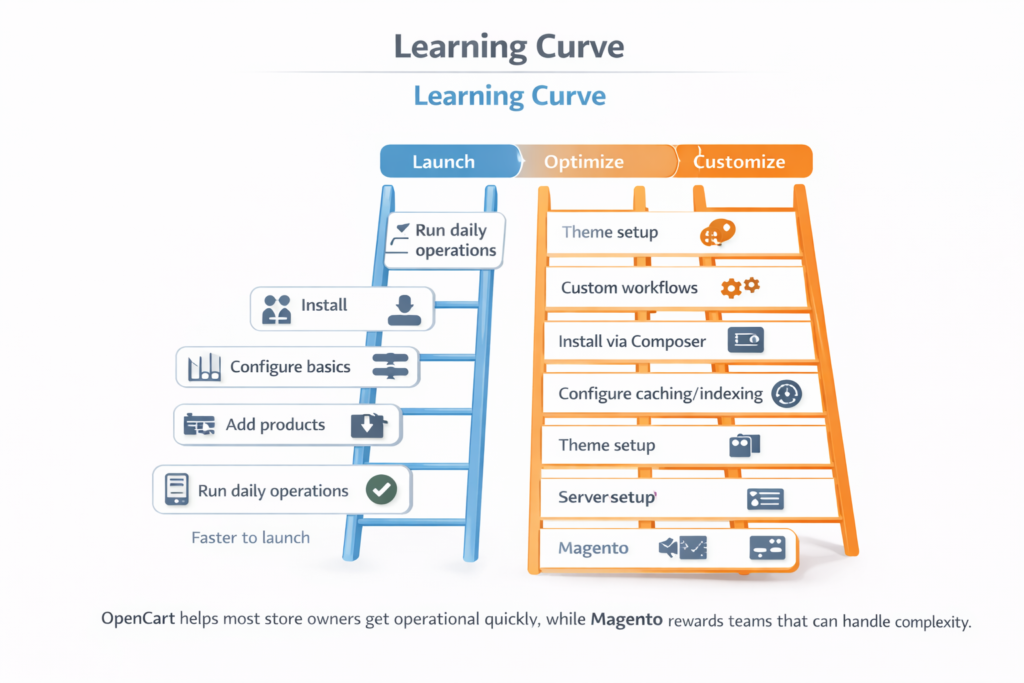
Learning Curve
Magento’s steep learning curve means even seasoned users may need documentation or developer support to handle everyday tasks like creating custom product types, configuring taxes, or managing promotions.
OpenCart, on the other hand, is beginner-friendly. Even users with limited eCommerce experience can feel comfortable managing a store within a day or two.
Day-to-Day Management
For day-to-day operations adding products, processing orders, running reports OpenCart is faster and more efficient for most users. Magento’s advanced capabilities can slow down routine tasks if not optimized properly.
Magento offers depth but demands expertise. OpenCart offers ease without sacrificing essential functionality making it a practical choice for solo entrepreneurs or small teams.
Performance and Speed
Site performance directly affects customer experience, search rankings, and conversion rates. When comparing Magento and OpenCart, both platforms can deliver fast storefronts but the performance depends heavily on how they’re hosted, configured, and maintained.
Page Load Times
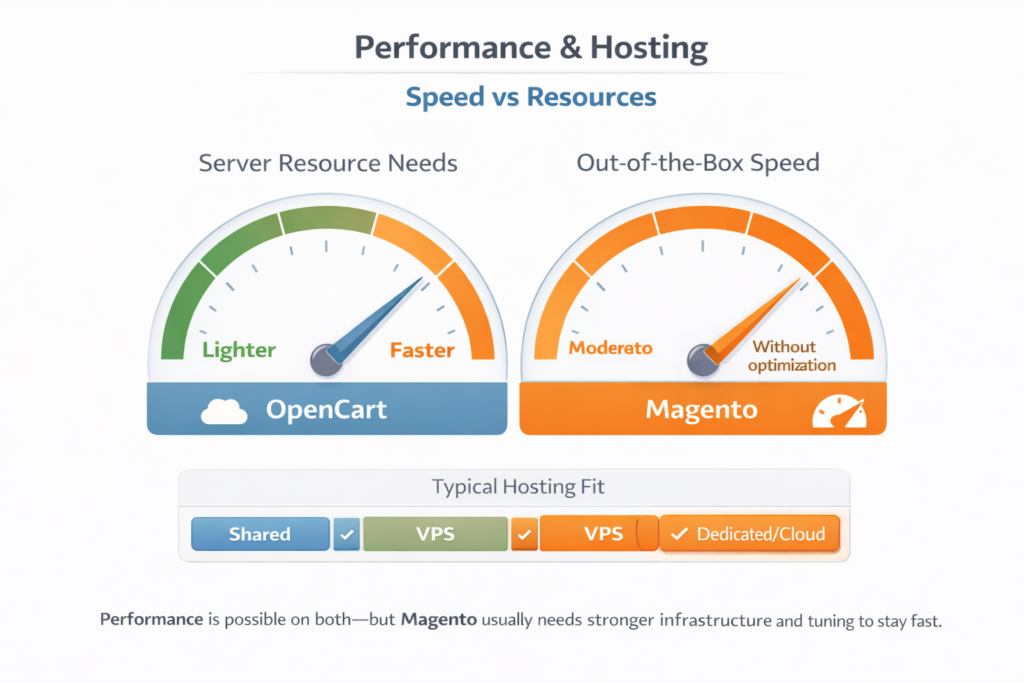
OpenCart is lightweight by design. It requires fewer server resources and delivers faster out-of-the-box page load times. For smaller catalogs and standard traffic volumes, OpenCart performs reliably with minimal tuning.
Magento, in contrast, is resource-intensive. Its layered architecture and extensive feature set require more server power. Without proper optimization such as caching, indexing, and code minification Magento stores can experience slow load times, especially on shared or low-tier hosting.
Hosting Requirements
OpenCart runs efficiently on most shared hosting environments. It doesn’t demand advanced server specs, which keeps hosting costs lower.
Magento requires a more powerful hosting setup. VPS or dedicated servers are often recommended, particularly for stores with high traffic or large product catalogs. Adobe Commerce (Magento’s cloud-hosted version) addresses these needs, but at a significantly higher price point.
Built-In Performance Tools
Magento includes built-in tools to manage performance:
- Full-page caching (Magento Commerce)
- Varnish support
- Indexing controls
- Static file compilation
These tools offer strong performance potential but they require proper configuration, often by a developer. OpenCart relies more on third-party extensions for caching or image optimization. While not as robust as Magento’s native stack, it’s sufficient for stores with moderate performance demands.
Scalability
Magento is built to scale. It supports large catalogs, thousands of concurrent users, and complex infrastructure setups like load balancing and multi-database support.
OpenCart scales well for small to mid-sized operations, but once traffic and product data reach enterprise levels, limitations in its core structure may become noticeable.
If performance is a critical factor and you’re running a large operation, Magento with the right setup can meet demanding requirements. For smaller stores aiming for speed and simplicity, OpenCart is often the better-performing option out of the box.
Customization and Flexibility
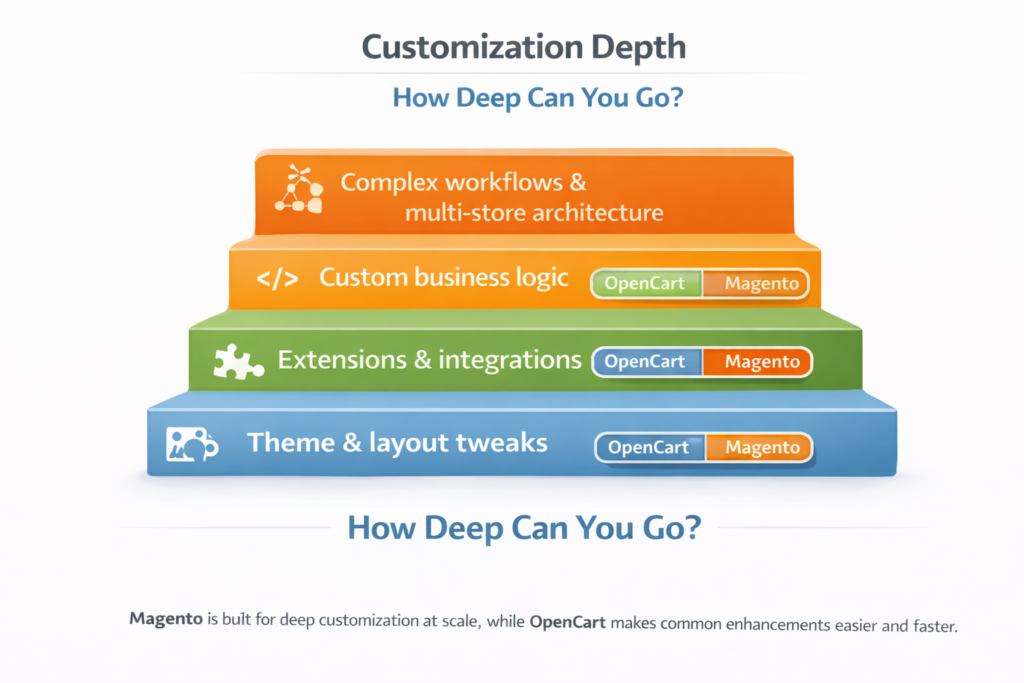
Customization defines how much control a business has over its store’s appearance, features, and behavior. Magento and OpenCart both support modifications, but the level of flexibility and the skill required differs greatly.
Code Access and Development Environment
Both platforms are open-source, which means you have full access to the code. However, Magento is built using a more complex framework (Zend and Symfony). Customizing it usually involves PHP, XML, and sometimes JavaScript for frontend behavior. Most changes require developer knowledge or an agency.
OpenCart is simpler. The codebase is easier to understand for non-developers or beginners with some PHP knowledge. Small design tweaks and functional adjustments can be made with minimal technical skills or by installing modules.
Themes and Design Flexibility
OpenCart offers a wide selection of pre-built themes that are easy to install and modify. Most themes come with layout editors or simple control panels that allow non-technical users to adjust color schemes, fonts, and banners.
Magento themes are also customizable but more developer-centric. Custom design changes often require creating a child theme or editing layout XML files. Magento’s frontend development process can be powerful but also time-consuming.
Extension Ecosystem
Magento has a mature extension marketplace, with both free and paid modules. Many extensions are aimed at high-end use cases multi-warehouse inventory, custom checkout flows, ERP integration but setup is often complex.
OpenCart also features a robust extension store with over 13,000 modules. These add features like SEO optimization, payment gateways, and shipping methods. Most are plug-and-play, and installation rarely requires technical changes.
Custom Business Logic
Magento shines in this area. If your store requires unique workflows like tiered pricing by customer group, B2B quotes, or rule-based catalog management Magento is built for it. Its modular architecture allows for deep customization, provided you have the technical support.
OpenCart can support light customizations via VQMod or OCMOD (its two override systems). However, complex business rules may require more effort or external help due to the platform’s simpler structure.
Magento offers deeper flexibility but at a higher development cost. OpenCart delivers quick wins for businesses that want to enhance their store without touching code.
SEO Capabilities
Search engine optimization (SEO) is essential for driving organic traffic to your online store. Both Magento and OpenCart offer SEO features, but they differ in terms of control, flexibility, and ease of use.
Out-of-the-Box SEO Features
Magento includes:
- Customizable URLs for products, categories, and CMS pages
- Canonical tags to prevent duplicate content issues
- Meta title, description, and keyword fields for every page
- Automatic sitemap generation
- Structured data markup for rich results (with some setup)
Magento’s SEO tools are powerful, but using them effectively often requires manual setup and technical knowledge.
OpenCart includes:
- URL rewriting (requires enabling mod_rewrite on your server)
- Custom meta tags for products and categories
- Simple sitemap generation via extension
- SEO-friendly URLs
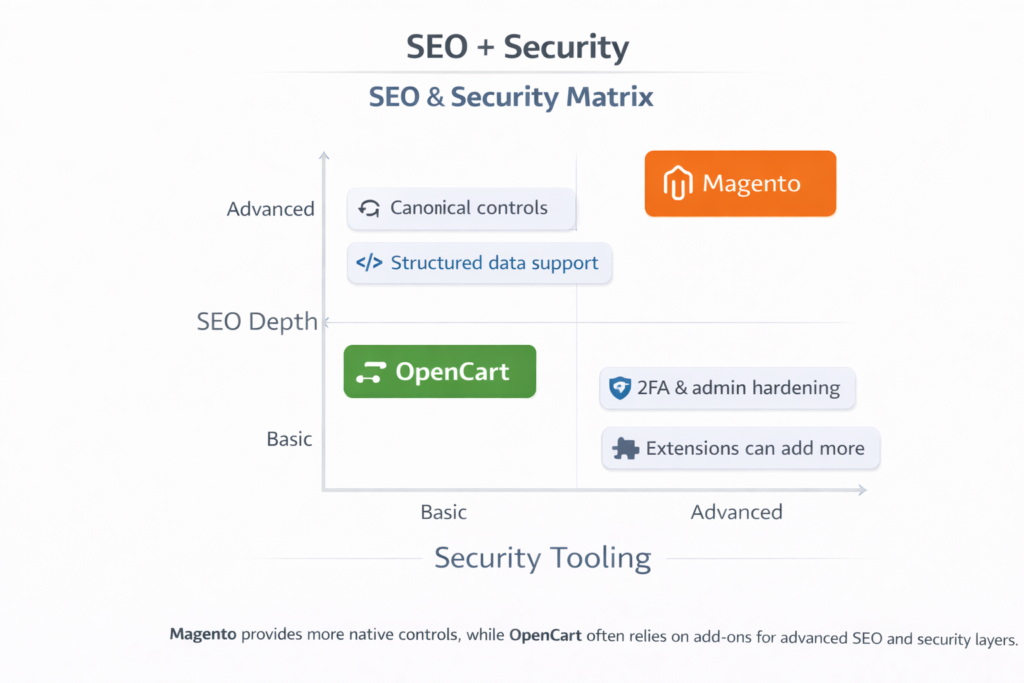
However, OpenCart doesn’t support structured data or advanced SEO features out of the box. Most SEO enhancements require third-party extensions.
URL Structure and Control
Both platforms allow you to create custom URLs, but Magento provides more granular control and includes URL rewrites as part of the core system. OpenCart supports SEO URLs too, but enabling them may require manual server configuration and isn’t always consistent across themes or modules.
Mobile and Performance SEO
Magento supports Progressive Web Apps (PWAs) with mobile-first design in mind, which can enhance Core Web Vitals and mobile SEO rankings. OpenCart offers responsive themes, but you’ll need to ensure the theme is well-optimized for mobile performance.
SEO Extension Ecosystem
Magento has premium SEO extensions like Amasty SEO Toolkit and Mageworx SEO Suite that offer end-to-end optimization. OpenCart’s marketplace includes affordable SEO modules that are simpler to install but may not cover all technical aspects.
Magento gives SEO professionals the tools to fully optimize a store for long-term growth, while OpenCart provides the essentials for businesses looking to rank without deep technical investment.
Security Features
Security is a top priority for any eCommerce platform. Both Magento and OpenCart offer baseline protection, but the level of control and security hardening available differs.
Core Security Capabilities
Magento includes:
- Two-factor authentication (2FA)
- Custom admin path configuration
- CAPTCHA for login and forms
- Role-based access controls
- Regular security patches and updates from Adobe
- Data encryption for customer and order information
Magento also follows strict coding standards and has a dedicated Magento Security Center. However, installing patches usually requires a developer.
OpenCart provides:
- Basic user permissions system
- SSL support for encrypted data transfer
- CAPTCHA integration for forms
- Default admin folder renaming for added protection
OpenCart doesn’t come with 2FA, firewall tools, or built-in activity logging. These can be added via extensions, but the core security stack is more limited.
Security Maintenance and Updates
Magento requires ongoing maintenance. Adobe releases regular patches for security vulnerabilities, but applying them is not automatic. Store owners must monitor updates and apply them manually.
OpenCart updates are less frequent, and while patching is easier, security best practices rely heavily on the store owner or hosting provider.
PCI Compliance
Magento (especially Adobe Commerce) is designed with PCI DSS compliance in mind. OpenCart stores can be PCI compliant if proper hosting, SSL, and payment processors are used, but OpenCart itself doesn’t enforce PCI standards.
Magento is built with enterprise security in mind and requires a more proactive approach. OpenCart covers the basics but depends heavily on external tools and careful server setup for full protection.
Pricing and Cost of Ownership
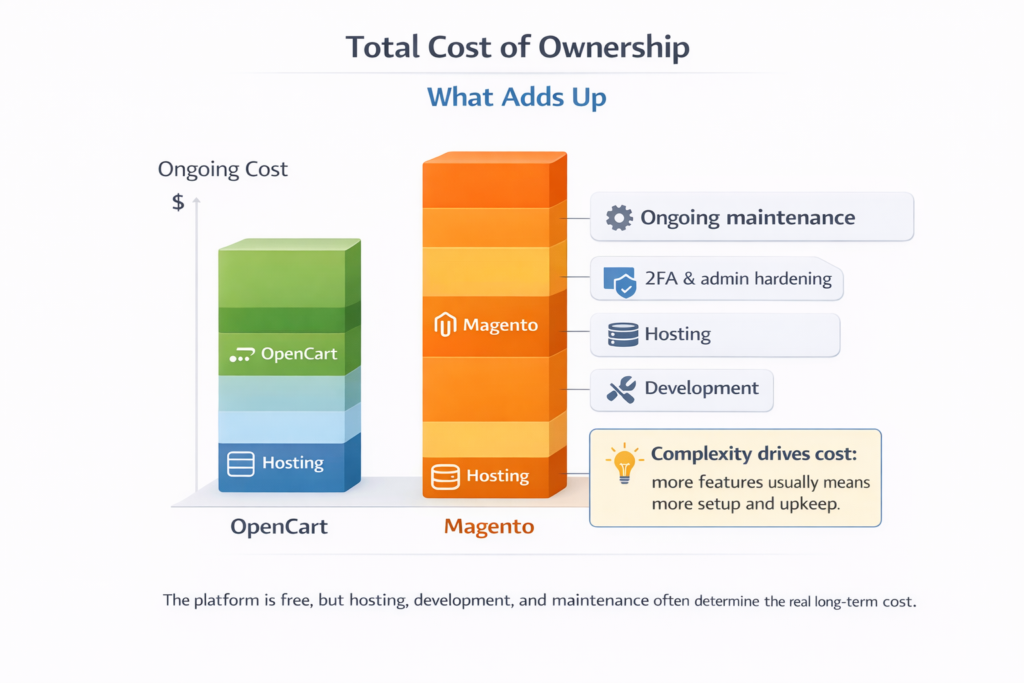
Neither Magento nor OpenCart charge licensing fees for their open-source versions, but the total cost of ownership goes far beyond the software itself.
Software Cost
Both Magento Open Source and OpenCart are free to download and use. However, Adobe also offers Magento Commerce (Adobe Commerce) starting at approximately $22,000 per year. OpenCart has no premium edition.
Hosting and Infrastructure
Magento requires high-performance hosting ($40–500+/month). OpenCart can operate smoothly on shared hosting ($5–30/month).
Development and Maintenance
Magento is developer-heavy with rates of $50–150/hour. OpenCart developers are more affordable at $15–60/hour.
Extension and Theme Costs
Magento extensions: $100–500+ OpenCart extensions: $20–100
Magento provides extensive capabilities at a higher cost. OpenCart offers a leaner model with lower ongoing costs.
Support and Community
Official Support Options
Magento Open Source does not include official support. Adobe Commerce includes 24/7 support with SLAs. OpenCart offers pay-as-you-go dedicated support.
Community and Forums
Magento has a large global community through forums, Stack Exchange, and GitHub. OpenCart’s community is smaller but active and user-friendly.
Documentation and Learning Resources
Magento’s documentation is thorough but technical. OpenCart’s documentation is simpler and better suited for beginners.
Developer Availability
Magento developers are in high demand and expensive. OpenCart developers are more accessible and cost-effective.
Magento’s ecosystem favors experienced developers and enterprise-level collaboration. OpenCart offers more direct paths to assistance for non-technical users.