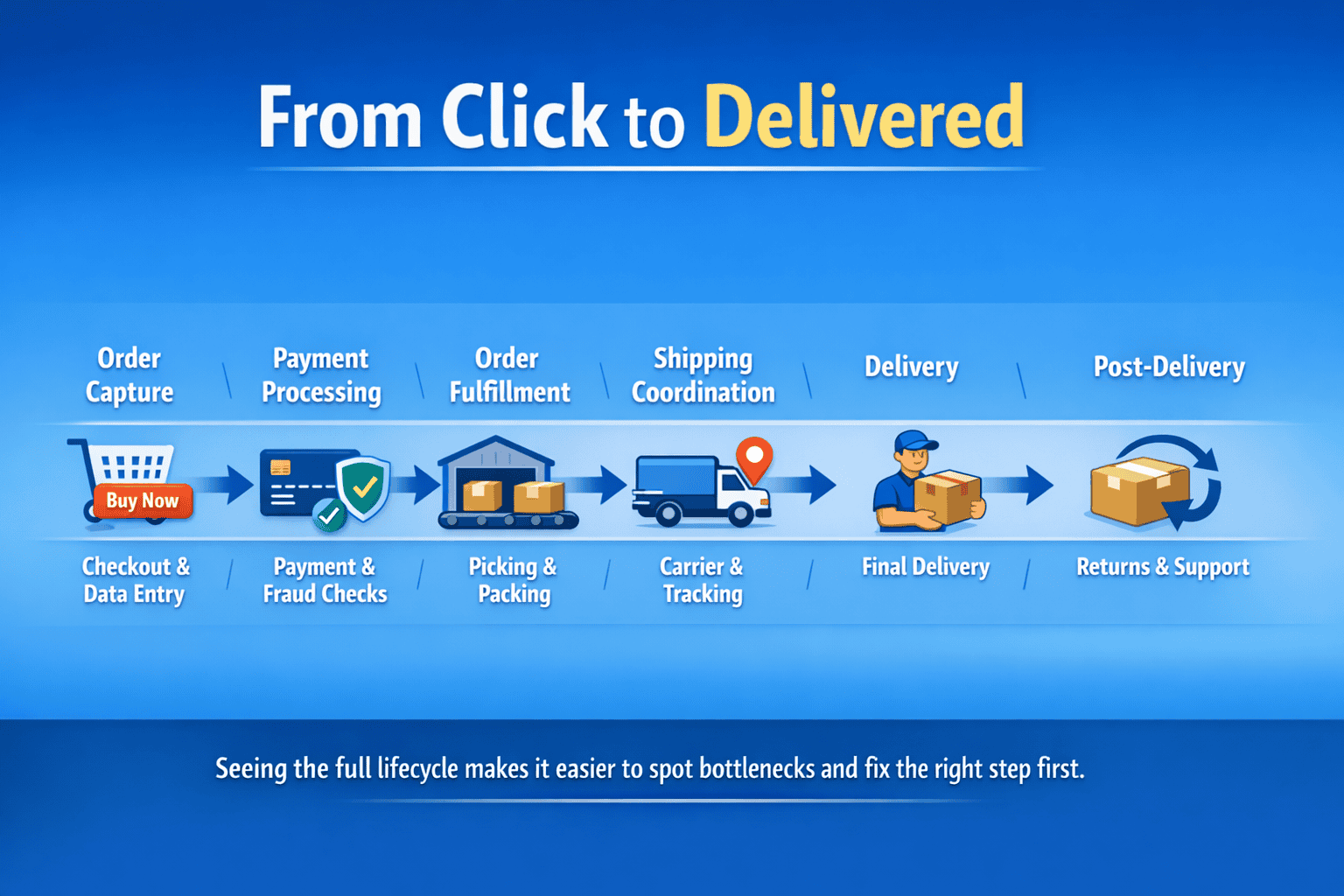
Every online order follows a path from checkout to delivery. That path involves inventory checks, payment processing, warehouse picking, shipping coordination, and customer communication. When any step fails, customers receive wrong items, late shipments, or no order at all.
Effective order management prevents these failures. It connects your website, warehouse, and shipping carriers so information flows accurately between systems. Modern approaches include AI-powered tools that predict delays, automate routine decisions, and handle customer questions without human intervention.
This guide explains how order processing actually works, where problems typically occur, and which technologies solve specific challenges. You’ll learn when automation helps and when it creates new issues.
The Order Processing Lifecycle
Order processing moves through distinct stages. Understanding each stage helps identify where delays happen and what improvements matter most.
Order Capture
The process starts when a customer clicks “Buy Now.” Your ecommerce platform records product details, quantities, shipping address, and payment method. This data must be accurate a single digit wrong in a ZIP code sends packages to the wrong state.
Address validation tools check customer entries against postal databases. They catch typos like “Mian Street” instead of “Main Street” and suggest corrections. This small check prevents 3-5% of shipments from failing delivery on the first attempt.
Real-time inventory checks confirm items are in stock before charging cards. Nothing frustrates customers more than paying for products you cannot ship. Systems should reserve inventory the moment an order is placed, not after payment processes.
Payment Processing
Payment gateways connect your store to banks and card networks. They encrypt sensitive information, verify funds, and transfer money to your account. The entire transaction takes 2-3 seconds when systems work properly.
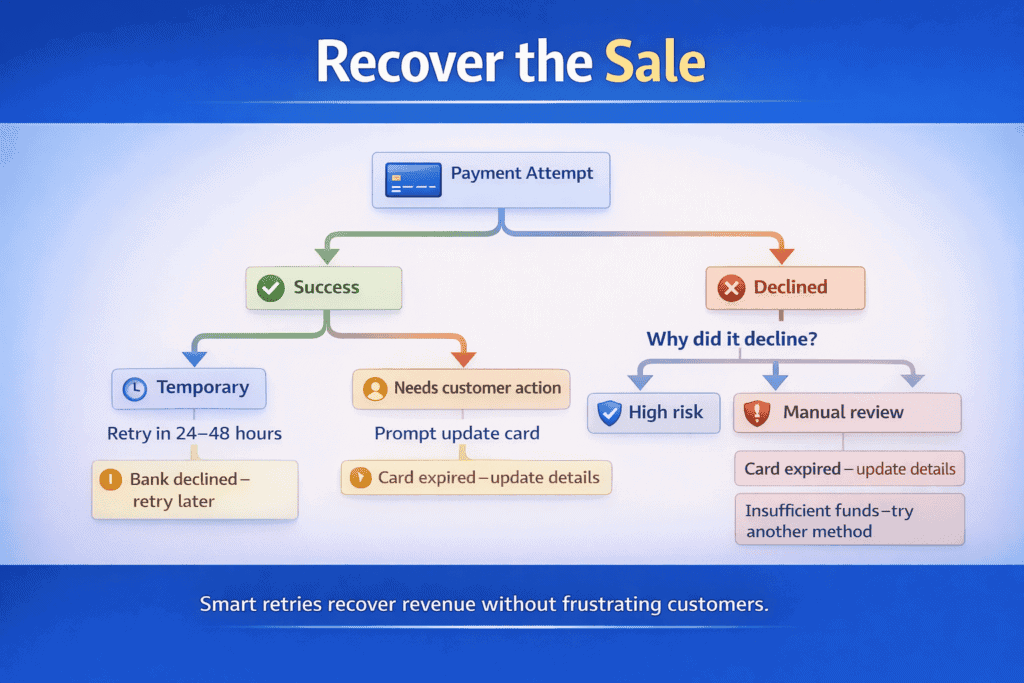
Failed payments happen for many reasons: insufficient funds, expired cards, fraud detection, or technical glitches. Your system should retry legitimate failed transactions automatically and notify customers clearly about what went wrong. Vague error messages like “Payment failed” leave customers confused and less likely to complete their purchase.
Fraud screening adds another layer. Machine learning models analyze hundreds of data points billing address, shipping location, purchase patterns, device fingerprints to flag suspicious orders. These systems learn from past fraud attempts, becoming more accurate over time while reducing false positives that block legitimate customers.
Order Fulfillment
Approved orders move to your warehouse or fulfillment center. Staff receive picking lists showing exactly which products to gather and where to find them. Barcode scanners verify each item matches the order, preventing wrong products from shipping.
Picking efficiency determines how many orders you can process daily. Workers walking across large warehouses waste time. Better systems bring products to workers using conveyor belts or mobile robots. Some operations cut picking time from 8 minutes per order to under 2 minutes with this change.
Packing stations need the right materials ready: boxes in multiple sizes, bubble wrap, tape, and printed shipping labels. Running out of medium boxes at 3 PM means you cannot pack half your orders until tomorrow. Inventory management applies to packaging supplies just like products.
Shipping Coordination
Carriers pick up packages and provide tracking numbers. Your system should automatically select the cheapest carrier that meets promised delivery dates. A package going 50 miles might cost $6 via ground shipping versus $22 for next-day air. Choosing correctly saves thousands monthly.
Multi-carrier software compares rates in real time. It considers package weight, dimensions, destination, and service level. The best platforms also factor in carrier performance if FedEx consistently delivers late to certain ZIP codes, the system routes those shipments through UPS instead.
Tracking information should update your order management system automatically. Customers want to know where their package is without calling support. Email notifications at key milestones shipped, out for delivery, delivered reduce “Where is my order?” inquiries by 60-70%.
Post-Delivery Management
Orders do not end at delivery. Customers request returns, report damaged items, or need help with products. How you handle these situations affects whether shoppers buy again.
Return management systems generate prepaid labels and track returned inventory. They note why customers sent items back wrong size, defective, not as described so you can address root causes. If 40% of blue shirts come back because they run small, you need better sizing information on product pages.
Refund processing should happen within 24 hours of receiving returns. Slow refunds damage trust and generate negative reviews. Automated systems can approve standard returns immediately while flagging unusual patterns for human review.
Common Order Processing Problems
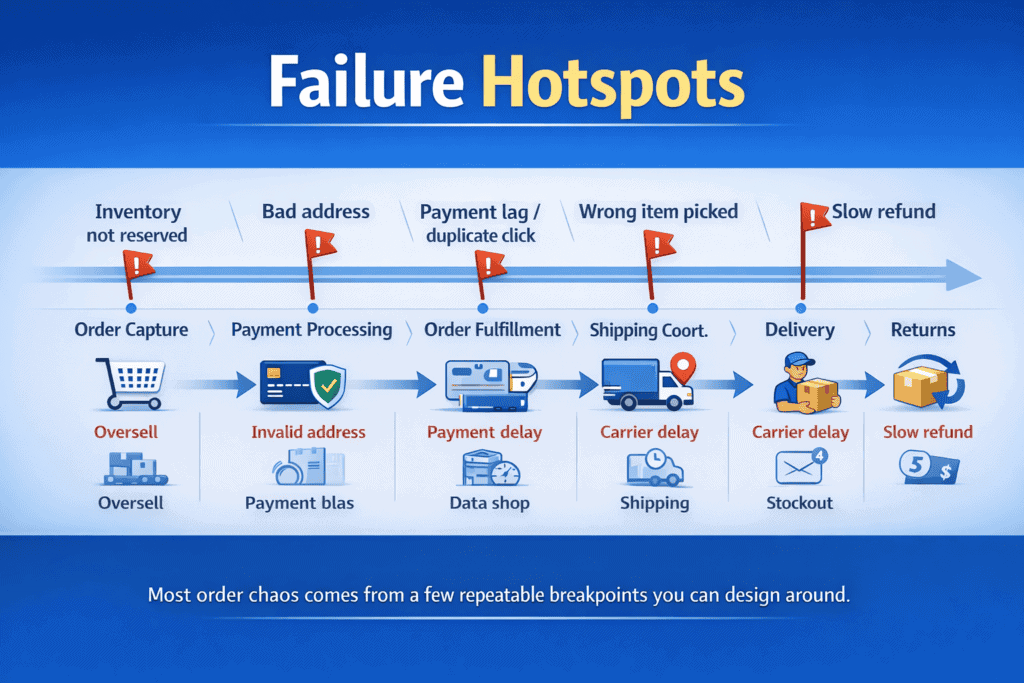
Even well-designed systems encounter issues. Recognizing these problems early prevents minor hiccups from becoming major failures.
Inventory Sync Failures
Your website shows a product in stock. A customer orders it. Then your warehouse discovers you actually sold the last unit an hour ago. This happens when inventory counts do not update across all sales channels simultaneously.
Selling on multiple platforms your website, Amazon, eBay multiplies this risk. Each channel needs real-time inventory data. When someone buys from Amazon, your website should immediately reflect one fewer unit available. Delays of even 5-10 minutes cause overselling during busy periods.
Safety stock thresholds provide a buffer. If you have 10 units but set the online display to show “In Stock” only when you have 12+, you protect against sync delays. You might miss a few sales, but you avoid the customer service nightmare of canceling paid orders.
Address Data Quality Issues
Customers type addresses quickly and make mistakes. They abbreviate incorrectly, misspell street names, or enter old addresses saved in their browser. These errors cost money UPS charges $15-20 to correct and redeliver a package sent to an invalid address.
Address verification APIs check entries against official postal databases as customers type. They autocomplete addresses, flag apartment numbers that might be missing, and detect when ZIP codes do not match cities. Implementing this reduces delivery failures from bad addresses by 80-90%.
International shipping magnifies address problems. Different countries format addresses differently. What looks wrong to an American system might be correct in Germany or Japan. Use verification services that understand regional address formats.
Payment Processing Delays
Card authorizations can take 10-30 seconds during peak traffic. Customers see a spinning wheel and click “Buy” again, creating duplicate orders. Your system needs to prevent duplicate submissions while the first transaction processes.
Some payment methods settle slowly. Bank transfers might take 2-3 business days to confirm. Do you wait to ship, or do you ship immediately and risk fraud? Different merchants handle this differently based on their fraud rates and margins.
Failed payment recovery systems automatically retry declined transactions 24-48 hours later. Cards decline for temporary reasons daily spending limits, suspected fraud flags that get cleared, insufficient funds that get resolved. Gentle retries recover 15-25% of initially failed transactions without bothering customers.
Communication Gaps
Customers want updates. Order confirmed, payment received, item shipped, out for delivery, delivered. Each notification reduces anxiety and support contacts. Missing any of these triggers “Where is my order?” emails.
Proactive delay notifications matter even more. If a snowstorm will delay shipments three days, tell customers immediately. They appreciate honesty. They hate discovering delays only when packages arrive late.
Email deliverability affects whether customers see notifications. If your order confirmations land in spam folders, customers think you never received their purchase. Monitor email open rates and spam complaints. Switch to transactional email services designed for high deliverability.

Technology Solutions That Improve Order Management
Modern order management relies on software that automates decisions, integrates multiple systems, and adapts to changing conditions. The right tools eliminate manual work and catch problems before they reach customers.
Order Management Systems
An OMS connects your ecommerce platform, warehouse, and shipping carriers. It serves as the central hub where all order information lives. When systems connect properly, data flows automatically no manual entry, no copy-paste between programs.
Good OMS platforms handle complex scenarios. You sell the same product on three marketplaces, stock it in two warehouses, and offer six shipping options. The system routes each order to the optimal warehouse based on proximity, inventory availability, and shipping costs. It calculates these decisions in milliseconds.
Reporting capabilities show which products sell best, which warehouses perform fastest, and where fulfillment costs run high. You cannot improve what you do not measure. Daily dashboards highlight unusual patterns sudden inventory drops, shipping delays, or return spikes that need investigation.
AI-Powered Customer Service
Large language models now handle routine customer questions about orders. When someone asks “Where is my package?”, the AI pulls tracking information and responds instantly. No wait times, no ticket queues.
These systems understand natural language. Customers type “My shoes never arrived” or “Need to change delivery address” and get appropriate help. The AI accesses order data, shipping status, and return policies to provide accurate answers.
Implementation requires careful setup. Train the AI on your specific policies, products, and common issues. Generic responses frustrate customers more than helping them. One furniture retailer reduced support tickets by 40% after fine-tuning their AI with three months of actual customer conversations.
Know when to escalate to humans. AI handles straightforward questions well but struggles with nuanced complaints or emotional situations. Set clear escalation rules if a customer mentions “broken,” “defective,” or “manager,” route them to a person immediately.
Predictive Analytics for Demand Forecasting
AI models analyze past sales, seasonal trends, and external factors to predict future demand. They notice patterns humans miss sales of rain boots spike three days after weather forecasts predict storms, or certain products sell together consistently.
Accurate forecasts prevent stockouts and overstocking. If you know demand for winter coats will jump 300% in late October, you order more inventory in September. If predictions show declining interest in a product line, you reduce purchasing and clear existing stock through promotions.
These systems improve over time. Each sales cycle provides more training data. Models learn which factors matter most for different product categories. Fashion items respond to social media trends, while household staples follow predictable seasonal patterns.
Automated Fraud Detection
Fraudsters constantly evolve tactics. Static rules block all orders from certain countries, flag purchases over $500 catch obvious fraud but miss sophisticated schemes and annoy legitimate customers.
Machine learning fraud detection analyzes hundreds of signals: device fingerprints, mouse movement patterns, typing speed, IP address history, and purchase behavior. Someone ordering 50 phones to a residential address raises flags. So does a new customer buying gift cards late at night from a proxy server.
These systems assign risk scores rather than binary block/approve decisions. Orders scoring 0-30 might auto-approve, 31-70 require manual review, and 71-100 automatically decline. You adjust thresholds based on your fraud rates and tolerance for false positives.
Continuous learning means the model adapts to new fraud patterns. When scammers switch tactics, the AI detects unusual patterns in declined orders and chargeback reports. It updates its risk assessment automatically, no manual rule writing needed.
Smart Inventory Allocation
Companies with multiple warehouses face allocation questions daily. Which facility should fulfill each order? The closest warehouse minimizes shipping costs and delivery time. But what if that location only has two units left and typically sells five daily?
AI allocation systems balance multiple factors: shipping costs, inventory levels, local demand predictions, and warehouse capacity. They reserve inventory at each location for expected local orders while routing distant orders to facilities with surplus stock.
This optimization happens in real time for every order. A customer in Florida might receive products from a Texas warehouse because the Georgia facility is low on stock. The system makes this decision in under one second, completely transparent to the buyer.
Return Prediction and Prevention
Some products get returned more than others. Clothing returns run 20-30% across the industry. Electronics hover around 10-15%. AI can predict which specific orders are likely to come back based on customer behavior, product attributes, and order details.
Customers who order multiple sizes of the same item plan to return most of them. Someone buying three dresses in different colors might keep one. Shipping seven shirts in one order, all the same style but different sizes, signals a fitting room approach to online shopping.
Knowing this helps in several ways. You can provide better size guidance to reduce fit-related returns. You might encourage customers to check reviews mentioning sizing before ordering. Some retailers charge restocking fees for serial returners while maintaining free returns for typical customers.
Product page improvements reduce returns more effectively than return policies. If customers return size medium shirts because they run small, add “Runs small, consider ordering one size up” to the product description. One apparel brand cut returns 22% by adding detailed sizing charts generated from customer feedback data.
Building an Efficient Order Processing System
Creating a reliable order management system requires planning, testing, and ongoing refinement. Start with your biggest pain points rather than trying to fix everything at once.
Map Your Current Process
Document every step from checkout to delivery. Include timing how long does each stage take? Note handoffs between systems or departments. Identify manual tasks that slow things down.
Talk to everyone involved: customer service reps, warehouse staff, shipping coordinators. They know where problems occur daily. A warehouse worker might mention they constantly fix addresses that customers entered incorrectly. Customer service might report spending hours answering “Where is my order?” questions.
Measure key metrics: order processing time, picking accuracy, shipping cost per order, customer inquiry rate, and return percentage. These numbers establish baselines for improvement. You cannot determine if changes help without knowing where you started.
Choose Integrated Tools
Select software that connects to your existing platforms. An OMS that does not integrate with your ecommerce platform creates more work, not less. Check whether tools offer APIs or pre-built connections to systems you already use.
Start with core functionality before adding advanced features. Get basic order routing and inventory sync working perfectly before implementing AI fraud detection or predictive analytics. Each additional layer adds complexity and potential failure points.
Cloud-based systems often work better than on-premise software for growing businesses. They scale automatically during peak seasons, receive regular updates, and typically cost less upfront. You pay monthly based on order volume rather than buying expensive licenses and servers.
Test Before Full Rollout
Run new systems parallel to existing processes initially. Process real orders through both the old and new systems simultaneously. Compare results do they match? Where do discrepancies occur?
Start with a subset of orders during testing. Route orders for one product category or geographic region through the new system. If something breaks, only a portion of customers are affected. You can fix problems before they impact everyone.
Prepare rollback plans. Know how to quickly revert to your old system if the new one fails. This might mean keeping old software licenses active for a month or having manual backup processes documented. The ability to retreat reduces risk.
Monitor and Optimize Continuously
Track the same metrics you established during process mapping. Are order processing times decreasing? Is picking accuracy improving? How have shipping costs changed?
Set up alerts for unusual patterns. If shipping costs suddenly jump 20% one week, investigate immediately. Maybe carrier rates increased, or your system is routing packages inefficiently. Catching issues quickly prevents them from becoming expensive.
Review customer feedback regularly. Are complaints about delivery times increasing? Do customers mention confusing order confirmations? Direct feedback reveals problems that metrics might not show.
Schedule quarterly reviews of your entire order management workflow. Technology improves rapidly. Features that seemed expensive or complicated last year might now be affordable and easy to implement. Stay current with new capabilities that could help your operation.
When to Add AI and Machine Learning
AI tools work best when you have sufficient data and clear problems to solve. Implementing machine learning before your basic systems function properly wastes time and money.
Data Volume Requirements
Machine learning needs training data. Fraud detection requires thousands of transactions, including examples of confirmed fraud. Demand forecasting needs at least 12-24 months of sales history to identify seasonal patterns accurately.
Small businesses processing 50 orders daily probably cannot justify AI implementation. You do not have enough data for models to learn meaningful patterns. Focus on getting basic automation right inventory sync, address validation, automated notifications.
Companies processing 500+ orders daily start seeing AI benefits. You generate enough data weekly for models to detect trends. Customer service chatbots become worthwhile when you receive 100+ support inquiries daily the volume where humans cannot keep up with response time expectations.
Clear Use Cases
Implement AI to solve specific, measurable problems. “We want to use AI” is not a strategy. “We want to reduce fraud chargebacks from 2.1% to under 1%” gives you a target and a way to measure success.
High-value applications include fraud detection for businesses with chargeback problems, customer service automation for companies drowning in support tickets, and demand forecasting for businesses with complex inventory across multiple locations.
Low-value applications might be using AI to write product descriptions when you only have 20 products, or implementing chatbots when you receive five support emails daily. Simple solutions good FAQ pages, clear product information work better for low-volume operations.
Implementation Costs vs Benefits
AI tools range from affordable SaaS products to expensive custom implementations. Customer service chatbots might cost $200-500 monthly for platforms with pre-trained models. Custom fraud detection systems can require $50,000+ in development plus ongoing maintenance.
Calculate expected savings or revenue gains. If fraud currently costs you $30,000 annually in chargebacks and a detection system costs $6,000 yearly, the ROI is clear. If customer service handles 10,000 inquiries monthly at $3 per ticket and AI can handle 40% of them, you save $14,400 monthly.
Factor in setup time and learning curves. Your team needs training. Expect 2-3 months of lower productivity while everyone learns new tools. This temporary dip is normal and should not discourage implementation it just needs to be part of your planning.
Measuring Success
Track metrics that directly affect your business goals. Different companies care about different numbers based on their priorities and challenges.
Order Accuracy
Measure what percentage of orders ship with correct items to correct addresses. Industry average is 98-99% accuracy. Anything below 97% indicates serious problems. Each error costs you shipping charges for returns plus replacement shipments.
Track error sources separately. Are workers picking wrong items? Are addresses incorrect? Do packers put labels on wrong boxes? Knowing where mistakes happen guides improvements. If 80% of errors come from picking, invest in better warehouse technology or training.
Fulfillment Speed
Time from order placement to shipment matters to customers. Most expect same-day or next-day shipping for in-stock items. Track average fulfillment time and percentage of orders shipped within 24 hours.
Break this down by time of day. Orders placed at 2 AM might not ship until the next business day, but orders placed at 10 AM should ship the same day. Separate weekday from weekend performance—different staffing levels create different capabilities.
Customer Satisfaction Indicators
Support ticket volume relative to orders shows how often customers need help. If you process 1,000 orders and receive 100 support contacts, 10% of customers needed assistance. Industry benchmarks vary, but most successful retailers keep this under 5%.
Repeat purchase rates indicate overall satisfaction. Customers who had good experiences buy again. Track the percentage of customers who make second purchases within 90 days. Significant drops suggest problems somewhere in the order experience.
Review ratings and feedback directly mention order management when customers complain about late shipments, wrong items, or poor communication. Monitor these mentions in reviews, social media, and support tickets to catch systemic issues.
Cost Efficiency
Calculate cost per order including all expenses: labor, packaging materials, shipping, payment processing fees, and software subscriptions. This number should decrease as you scale and optimize processes.
Shipping costs deserve special attention. They typically represent 8-12% of order value. Small improvements better carrier selection, optimized packaging sizes, negotiated rates add up quickly. Reducing shipping costs from 10% to 8.5% of revenue means significant savings on thousands of orders.
Labor efficiency shows how many orders each warehouse worker can process per hour. This number helps determine when you need more staff or better automation. If productivity is declining despite stable order volume, investigate whether new products, seasonal items, or process changes are slowing things down.
Making Order Management Work for Your Business
Order processing connects every part of your ecommerce operation. When it works well, customers receive accurate orders quickly, support teams handle fewer complaints, and costs stay manageable. When it breaks down, you face frustrated customers, increased expenses, and operational chaos.
Start by fixing basic issues before adding complex solutions. Address sync problems, implement address validation, and automate customer notifications. These foundational improvements deliver immediate results and cost less than advanced AI tools.
Add AI and machine learning when you have sufficient data and clear problems to solve. Customer service chatbots make sense at high inquiry volumes. Fraud detection becomes worthwhile when chargebacks cost thousands monthly. Demand forecasting helps businesses managing complex inventory across multiple locations.
Measure what matters to your specific business. Track the metrics that align with your goals whether that is faster fulfillment, lower costs, or higher accuracy. Review performance regularly and adjust based on results, not assumptions.
Order management improves through continuous refinement. Technology evolves, customer expectations change, and your business grows. Systems that work today might need adjustment tomorrow. Stay flexible, keep learning, and focus on solving real problems rather than implementing technology for its own sake.