Build Your eCommerce Store: Start Building an e-commerce Website Now
Starting an online store sounds simple until you hit the real questions. What should you sell first? How do you price it? What pages do you need so shoppers don’t get lost? This blueprint walks you through the build in a clear order, so you don’t waste weeks fixing decisions you could have made once.
Questions we must ask before we decide on Building our ecommerce store
How much does it cost to build an ecommerce store?
The cost of an ecommerce site depends on one main thing: how much work you do yourself versus how much you pay others to do. Your online store can be a low-cost setup you assemble with a template, or a custom build with deeper design, features, and integrations.
Typical cost ranges (UK-friendly numbers)
-
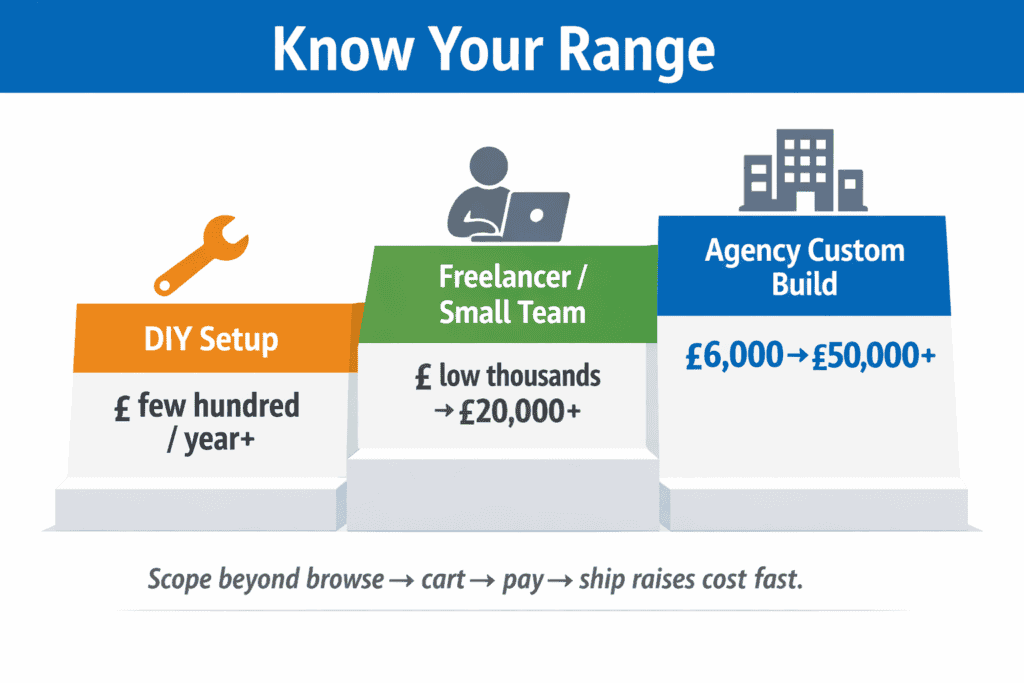
DIY setup (template + your time): roughly a few hundred pounds per year at the low end, and can climb as you add paid apps, premium themes, and services.
-
Freelancer or small-team build (template, light custom work): often lands in the low thousands. Some UK guides place ecommerce builds in the £5,000–£20,000+ band for more involved work.
-
Agency custom build (bespoke UX, more features): commonly £6,000–£20,000, and advanced builds can reach £20,000–£50,000+ when requirements grow.
A simple way to think about it: the more your store needs to do beyond “browse, add to cart, pay, ship,” the faster costs rise.
What you pay for when building an ecommerce website
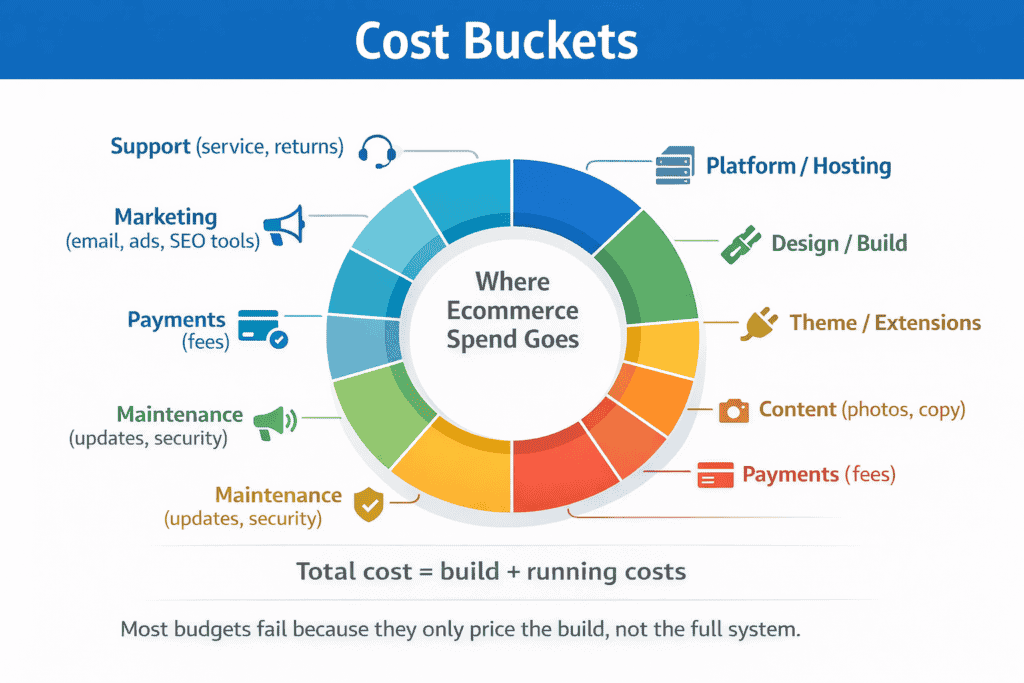
These are the cost buckets that move your total up or down:
-
Platform or software
-
Hosted platforms charge a monthly fee (for example, Shopify’s UK pricing starts around £19/month on annual billing for its Basic plan).
-
Self-hosted (Opencart ecommerce platform) options can be “free” to install, customize, but you pay for hosting, themes, and extensions.
-
-
Design and build work
-
Template setup: cheaper, faster, fewer choices.
-
Custom design: higher cost, more control over layout and conversion flow.
-
Custom features (filters, bundles, subscriptions, ERP links): this is where budgets jump.
-
-
Theme and extensions (the “hidden” spend)
-
Premium themes and paid plugins add up over time. WooCommerce notes premium themes around $100/year, while custom themes can start much higher depending on complexity.
-
-
Content that sells
-
Product photos, videos, copywriting, and size guides.
-
Category copy that answers questions and supports SEO.
-
-
Payments
-
Card processing fees and (sometimes) extra fees if you use a third-party payment provider.
-
Ongoing costs most store owners forget to plan for
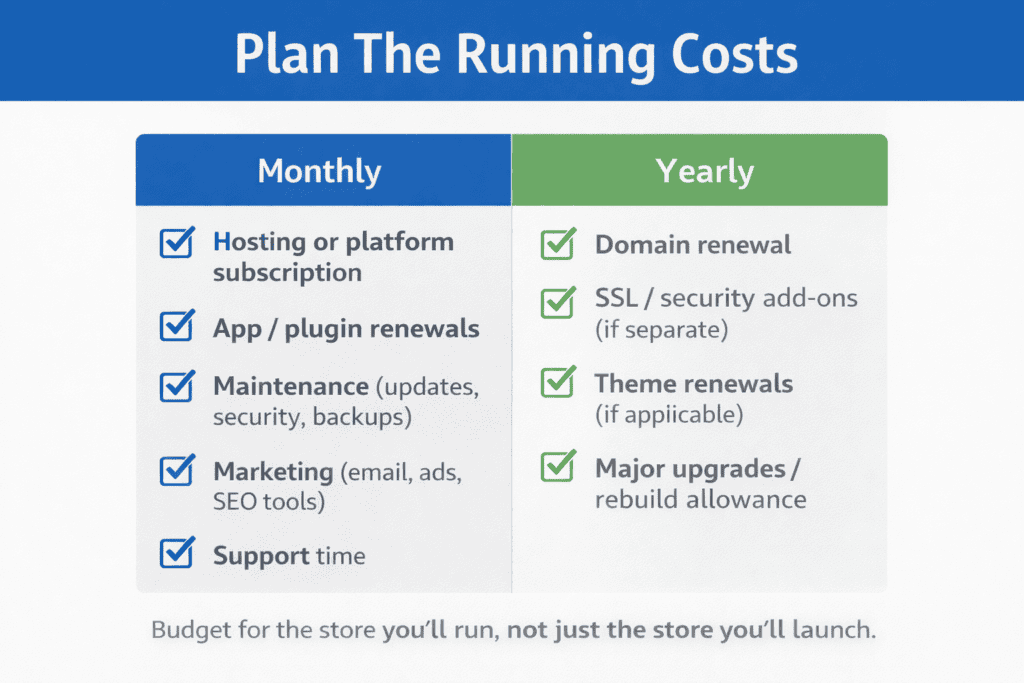
Even after the ecommerce website goes live and tou start selling, the online store still has monthly and yearly costs:
-
Domain and renewals (yearly)
-
Hosting or platform subscription (monthly)
-
App/plugin renewals (monthly or yearly)
-
Maintenance (updates, security, backups)
-
Marketing (email, ads, SEO tools)
-
Support time (customer service, returns, chargebacks)
If you only budget for the build optimize, you’ll feel squeezed later.
Three real-world budget examples (so you can place yourself)
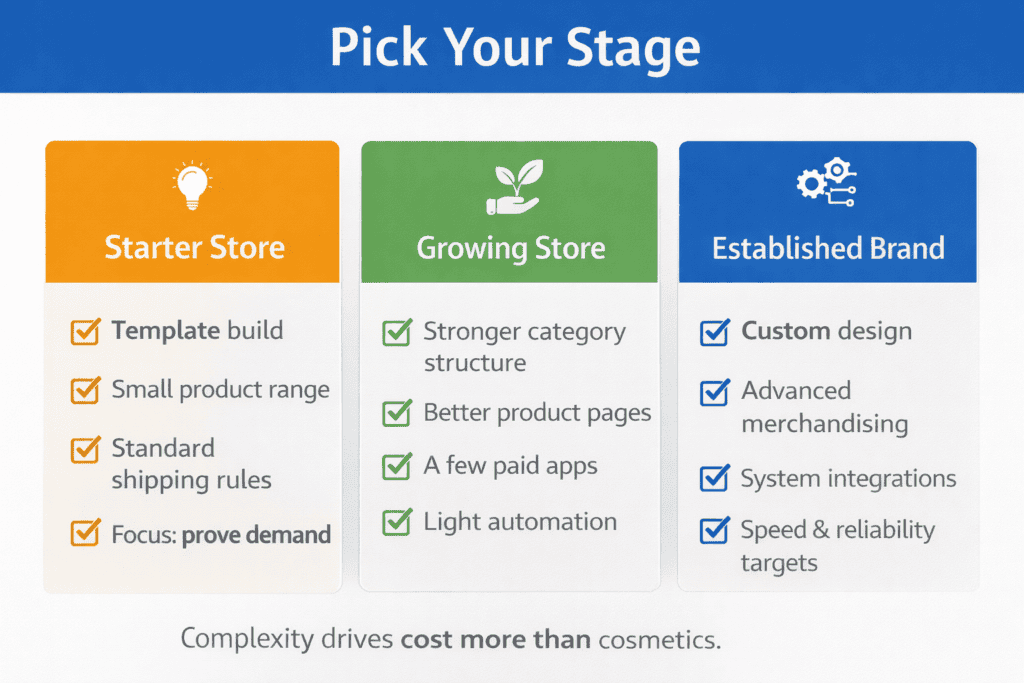
Starter store (prove demand first)
-
Template build, basic pages, a small product range, standard shipping rules.
-
Lowest spend, but you invest time and accept limits.
Growing store (needs better UX and stronger operations)
-
Better built-in themes, improved category structure, stronger product pages, product descriptions and a few paid apps, light automation.
-
Often falls into the “several thousand pounds” zone.
Established brand (complex catalog, integrations, performance targets)
-
Custom design, advanced merchandising, multiple systems, stricter speed and reliability needs.
-
Can reach £20,000–£50,000+ depending on scope.
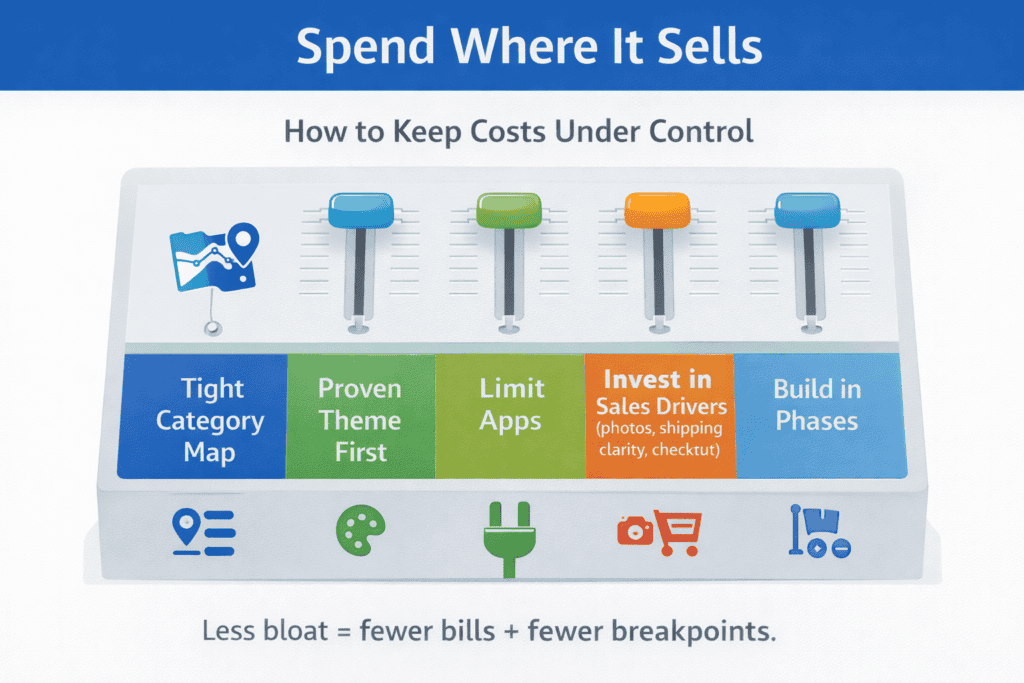
How to keep costs under control without building a weak store
-
Start with one clear product range and a tight category map. Fewer pages. Better pages.
-
Use a proven theme, then pay for small improvements that remove buying friction.
-
Limit apps. Every add-on is another monthly bill and another thing to maintain.
-
Spend first on what affects sales: product photos, shipping clarity, and checkout flow.
If you tell me your product type, number of SKUs, and where you ship, I’ll outline a realistic cost range and the exact line items to include in your budget (build + year-one running costs).
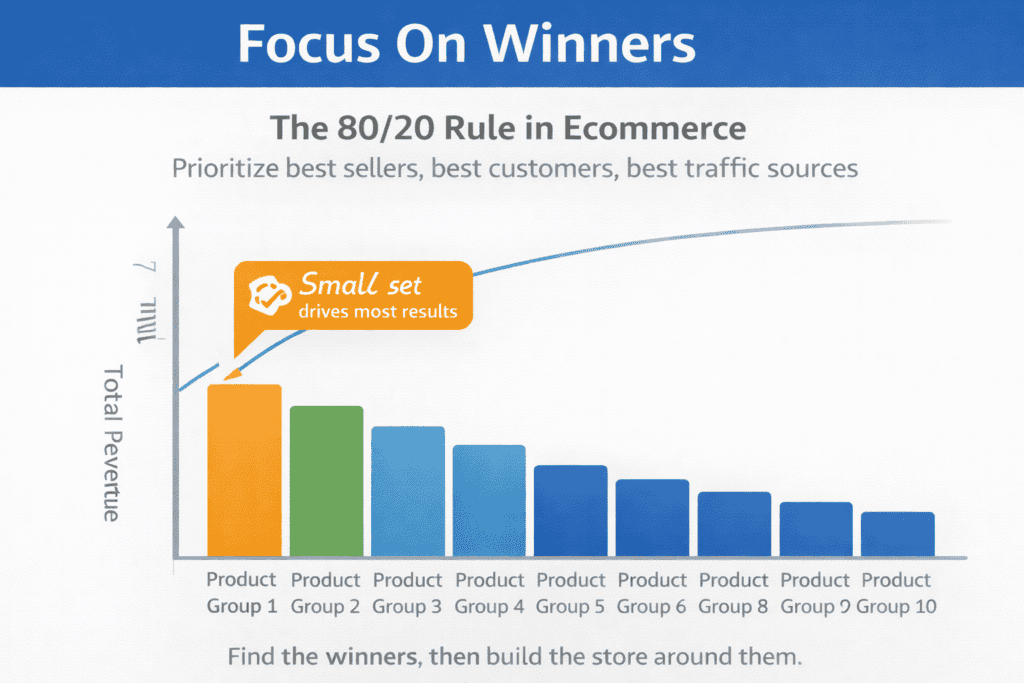
What is the 80 20 rule in ecommerce?
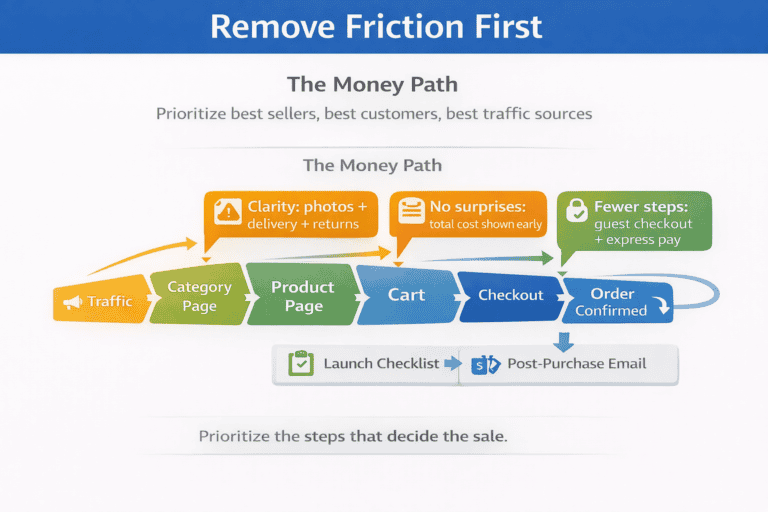
The 80/20 rule in ecommerce (also called the Pareto Principle) means a small portion of what you do often drives most of your results for many online store owners, around 20% of products, customers, or marketing efforts can produce roughly 80% of revenue. In practice, it’s a way to focus your ecommerce website on what actually moves the numbers: identify your best-selling items, highest-value customer segments, and top-performing traffic sources, then prioritize stock, merchandising, content, and ads around those winners instead of spreading time and budget across everything.
When you apply it while building an ecommerce website, you design the online store to make the “money paths” easy promote the top products, simplify navigation to key categories, tighten landing pages for proven keywords, and fix checkout friction first because small improvements in the few areas that matter most usually outperform big effort on low-impact pages and slow-moving inventory.
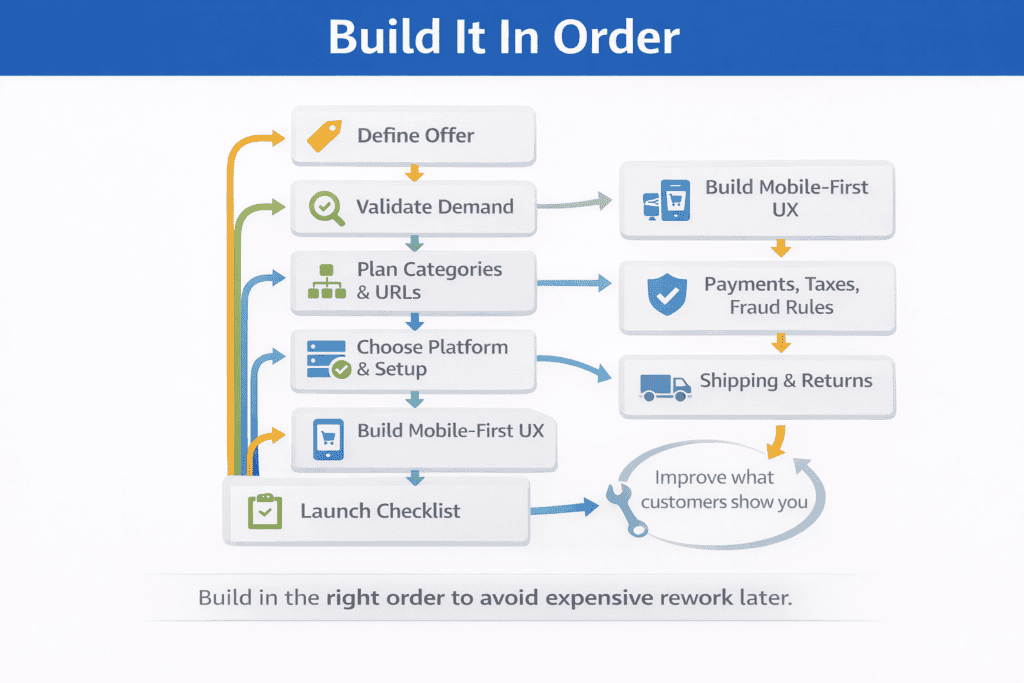
How do I create my own ecommerce store?
To create your own ecommerce store, start by choosing what you will sell and who you are selling to, then validate demand before you build anything. Pick a small starting range, set your pricing with a clear margin after product cost and shipping, and map a simple structure for your ecommerce website: 5–8 main categories, clean product pages, and the basic trust pages (shipping, returns, contact, privacy).
Next, choose the platform that fits your skills and control needs, buy a domain, and set up hosting if you are self-hosting. Keep the first version of your online store tight and easy to shop: a fast mobile design, clear menus, strong product photos, honest delivery times, and a checkout that does not force account creation.
When you begin building an ecommerce website, focus on the setup that prevents problems later: payments, taxes, shipping rules, and order emails. Add two payment options (cards plus one alternative), set shipping rates that make sense for your average basket, and write a returns policy that is short and clear.
Before launch, place a real test order end-to-end (including a refund), check your store on mobile, and set up tracking so you can see what customers do. After you go live, improve the online store weekly: fix the pages where people drop off, expand only the products that sell, and build repeat sales with simple email follow-ups, reviews, and bundles.
Do I need an LLC to start an ecommerce store?
You can start selling online without an LLC. In the U.S., if you begin trading and don’t register another structure, you’re generally treated as a sole proprietorship by default. That means you can use an ecommerce website builder, launch fast, and create an online store without forming a new legal entity on day one sometimes even using a free online store or ecommerce plan to test demand.
An LLC becomes worth considering when you want a clearer legal wall between you and the business. The IRS notes an LLC is a business structure created under state law, and your structure affects taxes and legal exposure. In plain terms: an LLC can help limit personal liability, but it’s not automatic protection if you mix personal and business money, ignore basic paperwork, or run the business carelessly.
Use this rule of thumb for an online store or ecommerce website:
-
start without an LLC if you’re testing a small product range, low risk, and low volume
-
form an LLC sooner if you sell higher-risk products (health, kids, electrical), keep inventory, sign supplier contracts, hire help, or plan to scale paid ads and returns
-
either way, separate finances early: a dedicated bank account, clear records, and clean invoices (this matters even before you spend money building an ecommerce website)
One extra note: “LLC” is a U.S. term. If you’re operating in the UK, your usual paths are sole trader or a limited company, not an LLC.
How to create an ecommerce store for beginners
To create an ecommerce website as a beginner, start small and build around one clear idea. Choose a simple product range you can explain in one sentence, decide who it’s for, and set a price that leaves room for product cost, shipping, and returns. Pick a platform that lets you launch fast even a free ecommerce option if you are still testing then secure a domain and set up the basic pages your ecommerce business needs: home, category pages, product pages, cart, checkout, shipping, returns, and contact.
Next, map your store navigation so shoppers can find items in two or three clicks. A clean structure is the foundation of a good online shopping experience, especially on mobile.
Once the structure is in place, add your products with care. Don’t rush the listings. Add products with clear titles, strong photos, simple benefit-focused descriptions, and honest delivery details. Use consistent options (size, color, bundles) and keep product data tidy so the online ecommerce store stays easy to manage.
Before you publish, test the full purchase flow on your phone: browsing, search, add products to cart, payment, and confirmation emails. After launch, focus on two growth basics: make the online shopping experience smoother every week, and start email marketing early by collecting sign-ups with a clear offer (like first-order savings or restock alerts). This gives your ecommerce business a direct way to bring people back without relying only on ads or social posts.
Define your ecommerce offer and business model (what your online store sells, who it’s for, and why you win)
Before you touch a theme or logo, get the offer right. A store is only as strong as the product promise behind it.
Write down three things:
-
Who the buyer is: not “everyone,” but a clear group with a shared need
-
What problem you solve: the job your product does in real life
-
Why your option makes sense: price, quality, speed, selection, or trust
Then decide your model:
-
Your own products: best control, more work upfront
-
Dropship: faster start, less control over stock and packing
-
Wholesale/resell: easier supply, margin depends on buying power
-
Digital goods: no shipping, but refunds and access control matter
Quick test: if you can’t explain why someone buys from you in one sentence, the store will feel fuzzy.
Validate ecommerce website demand fast (keywords, competitors, pricing, and a simple proof test)
You don’t need perfect research. You need enough proof to avoid building for a product nobody wants.
Check four signals:
-
Search intent: people look for this product using clear terms
-
Competition: other stores sell it, which shows demand, but you can still stand out
-
Price range: you can land in the market without losing money
-
Delivery reality: you can ship it at a cost that doesn’t scare buyers
Do a “small proof” before a full build:
-
Create one simple product page (even on a temporary landing page)
-
Run a small ad test or share with a targeted community
-
Track actions that show real interest: email signups, add-to-cart clicks, replies asking about delivery
If nobody acts, change the offer. If people act but won’t pay, adjust pricing, bundle, or positioning.
Plan your store structure before you build (categories, URLs, navigation, and search)
Most stores fail quietly because shoppers can’t find things. Fix the structure first, then design around it.
Start with a category map:
-
5–8 top categories that match how people shop
-
3–8 subcategories under each, only when it helps decision-making
-
A “New” or “Best sellers” collection for quick browsing
-
A “Gifts” or “Bundles” area if it fits your products
Set simple URL rules early:
-
Keep category URLs short and readable
-
Use one main URL for each product, even if it has options
-
Avoid creating many near-duplicate pages for tiny differences
Navigation checklist:
-
Top menu: only the main categories
-
Footer: shipping, returns, contact, FAQs, privacy, terms
-
Search: visible on mobile, with helpful “no results” suggestions
-
Filters: use a few strong ones (size, color, price), not twenty
A good structure makes your store feel calm. That’s the goal.
Choose your platform and hosting setup (ssl, speed, costs, and ownership and customer data protection)
Pick the setup that matches your control needs, budget, and team skills.
Two common routes:
-
Hosted platforms: less setup work, monthly fees, limits on deep changes
-
Self-hosted platforms: more control, you handle hosting and updates
Questions that help you choose:
-
Do you need full control of checkout rules and data?
-
Will you sell in multiple languages or currencies soon?
-
Can you handle updates, backups, and security checks in-house?
-
Are you okay with platform fees that rise as you grow?
Hosting basics (even if you outsource):
-
Use a server plan sized for traffic spikes, not quiet days
-
Make sure backups are automatic and easy to restore
-
Add a CDN if you sell across regions
-
Set up uptime alerts so you learn about issues first, not your customers
If you’re unsure, pick a setup you can keep for two years. Constant rebuilds are expensive.
Build a store design that converts (mobile-first UX, trust signals, and checkout flow)
Design is not decoration. It’s a path from interest to purchase.
Focus on these pages first:
-
Homepage: what you sell, who it’s for, and one clear next step
-
Category pages: clean sorting, filters that matter, strong product cards
-
Product pages: clear photos, benefits, details, delivery info, returns summary
-
Cart and checkout: fewer steps, fewer surprises, fewer fields
Trust signals that actually help:
-
Delivery time and cost shown before checkout
-
Returns policy written in plain language
-
Real customer reviews (even if you start with a small number)
-
Clear contact options and business details
-
Secure payment badges only if they are accurate
Checkout rules that reduce drop-off:
-
Let shoppers check out as a guest
-
Offer express options (Apple Pay, Google Pay, PayPal) if available
-
Don’t force account creation before payment
-
Show full cost early: shipping, taxes, fees
Small detail, big win: write button text that matches intent, like “Add to cart” and “Place order,” not vague labels.
Set up payments, taxes, and fraud controls (gateways, rules, and risk checks)
Money setup is where new stores get stuck. Keep it simple, then expand.
Payments:
-
Offer at least two methods: card payments plus one alternative
-
Make sure settlement times work for your cash flow
-
Confirm refunds are easy to process inside your system
Taxes:
-
Decide if prices include tax or add tax at checkout
-
Set tax rules by region so you don’t guess later
-
Save receipts and reports in a monthly folder from day one
Fraud controls (lightweight, high value):
-
Use address checks and CVV where supported
-
Flag orders with mismatch signals (billing vs shipping, unusual volume)
-
Require signature on high-value deliveries
-
Set a manual review rule for first-time buyers over a set amount
Do not block good buyers with aggressive rules. Start with flags, not hard stops.
Configure shipping and returns that customers understand (rates, zones, tracking, policies)
Shipping is part of the product. If it’s confusing, it hurts sales.
Build your shipping plan in this order:
-
Where you ship: local, national, or international
-
How you price it: flat rate, weight-based, or free above a threshold
-
How you fulfill: in-house, supplier, or a 3PL
-
How you track: basic tracking links and delivery updates
Shipping options most stores need:
-
Standard delivery (clear time range)
-
Faster option for urgent buyers
-
Local pickup if it fits your business
Returns policy that reduces conflict:
-
State the return window in days
-
Explain product condition rules with examples
-
Share who pays return shipping
-
List items that can’t be returned (hygiene, custom, perishables)
-
Tell people how refunds happen and how long it takes
Put a short version on product pages, then link to the full policy.
Security and mobile checklist before launch
- Install an SSL certificate and confirm every page loads over HTTPS.
- Use strong passwords and two-factor authentication for every admin account.
- Keep the platform, theme and plugins or extensions updated, and remove any you do not use.
- Set up automatic backups and test that you can restore one.
- Test the full journey on a phone, from browsing to payment, including menus and forms.
- Check page speed on mobile; slow pages lose sales.
Launch with a clean go-live checklist and a 90-day growth plan (analytics dashboard, SEO, ads, email, retention)
A launch is not one day. It’s a controlled start, then weekly improvements.
Go-live checklist:
-
Test checkout on mobile and desktop
-
Place a real order end-to-end (including refund test)
-
Confirm emails work: order confirmation, shipping update, password reset
-
Check page speed on key pages (home, category, product, cart)
-
Set up tracking: analytics, conversion events, and basic dashboards
-
Review legal pages: privacy, terms, returns, shipping
-
Add a backup plan and confirm restore steps
90-day growth plan (simple, repeatable):
Weeks 1–2: Fix obvious friction
-
Watch where buyers drop off
-
Improve product photos and key page text
-
Add FAQs based on real questions
Weeks 3–6: Build traffic you can control
-
Launch 2–3 core landing pages for your main categories
-
Start an email list with one offer that fits your margin
-
Run small-budget ads to your best products, not everything
Weeks 7–12: Improve repeat buying
-
Add post-purchase emails: care tips, reorder reminders, related items
-
Create bundles that raise order value without forcing upsells
-
Ask for reviews the right way: after delivery, with one click
Weekly habit: pick one metric, one issue, one fix. Then ship the change.
Conclusion: your next steps
An ecommerce store works when the basics are clear. Start with an offer that makes sense. Prove demand with a small test. Map categories before design. Set payments, shipping, and policies with no surprises. Then launch with a checklist and improve every week.
Keep reading: see our full guide to ecommerce resources, or read about ecommerce website builder and how to set up an ecommerce business.