A/B testing tools
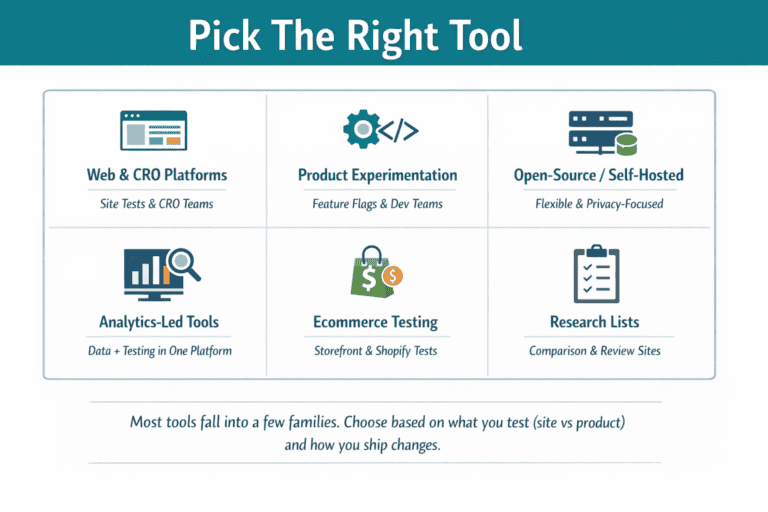
There are a lot of A/B testing tools, and they fall into a few clear “families.” Here’s a practical list of the main options people use today (grouped so you can actually choose).
1) Web & CRO platforms (visual editor + targeting + reporting)
These are the classic “marketing/CRO” A/B testing suites:
-
Optimizely Web Experimentation
-
VWO (Visual Website Optimizer)
-
Adobe Target
-
AB Tasty
-
Kameleoon
-
Convert Experiences
-
Dynamic Yield
-
Contentsquare (includes experimentation modules depending on plan
2) Product experimentation + feature flags (server-side + SDK-first)
These are more engineering-friendly and often used for product-led growth:
-
LaunchDarkly (feature management + experimentation)
-
Split (feature flags + experimentation)
-
Statsig
-
Eppo
3) Open-source / self-hosted experimentation
If you want flexibility, privacy control, or warehouse-first setups:
-
GrowthBook (open-source feature flags + A/B tests)
-
Wasabi (open-source framework; originally from Intuit)
-
PlanOut (framework approach; commonly referenced in experimentation stacks)
-
PostHog (open-source product analytics with experimentation)
4) Analytics-led tools that include experiments
For teams that want analytics + experimentation under one roof:
-
Amplitude (experimentation as part of the platform)
5) Ecommerce-native tools (Shopify-focused testing)
If you’re testing mostly storefront and merchandising changes:
-
Shoplift (Shopify testing platform)
-
Intelligems (often used for pricing/offer + store tests)
6) “Honourable mentions” and research lists (good for discovering more)
If you want big comparison lists to spot additional vendors quickly:
-
CXL’s roundup of A/B testing tools
-
Convert’s “top A/B testing tools” roundup
-
VWO’s “best A/B testing tools” list (updated Feb 2026)
-
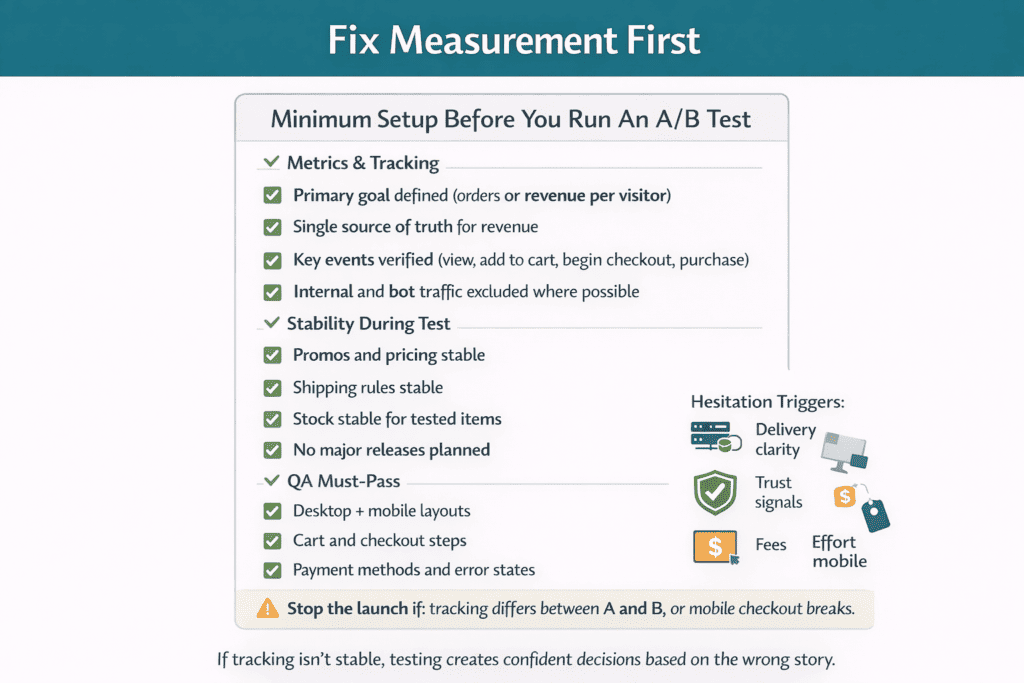
If tracking isn’t stable, testing creates confident decisions based on the wrong story.
A/B testing basics for ecommerce sites
A/B testing is a simple idea: show two versions of the same page to similar visitors, then measure which one leads to more completed orders. It sounds easy, but ecommerce sites often get misleading “wins” because the test was set up poorly, ran too short, or changed too many things at once. If you get the basics right, A/B testing becomes a reliable way to remove checkout friction, improve product pages, and increase revenue without guessing.
Start by knowing what A/B testing can and cannot tell you. A/B testing is good at answering, “Does version A perform better than version B for this goal?” It is not good at explaining why buyers behave a certain way without supporting evidence. Treat it like a decision tool, not a creativity contest. Your job is to make one clear change, measure one clear outcome, and make a clean call at the end.
What you should test on an ecommerce site
Most tests fall into a few buckets. These are the areas where small changes can have a real impact:
-
Product pages: image order, trust signals, shipping/returns clarity, size guides, sticky add-to-cart, review placement
-
Category pages: filter layout, sort defaults, tile density, quick add-to-cart, badges like “in stock”
-
Cart and checkout: guest checkout, form fields, address lookup, payment methods, error messages, delivery options
-
On-site messaging: how you explain delivery times, guarantees, and what happens after purchase
A helpful rule: test where shoppers hesitate. That is usually where they need to understand price, delivery, fit, trust, or next steps.
The minimum setup you need before you run a test
A/B testing only works if your measurement is stable. Before you touch variants, make sure you have:
-
A clean primary goal (usually completed orders, not clicks)
-
One analytics source you trust for orders and revenue
-
A way to exclude internal traffic and bot traffic if possible
-
A plan to keep pricing and promotions consistent during the test window
-
A QA checklist so you don’t break mobile layouts, payment options, or tracking
If you do not trust your numbers yet, fix tracking first. Testing on bad tracking creates confident decisions based on the wrong story.
How to write a basic ecommerce A/B test
A good beginner test has three parts: a problem, a change, and an expected outcome.
Example:
Problem: Too many people drop out on the shipping step because delivery costs and timing feel unclear.
Change: Add a short delivery summary above the “Continue” button and show the free-shipping threshold in plain language.
Expected outcome: Higher checkout completion rate, with no drop in average order value.
Notice what is missing: big redesigns, multiple layout changes, new copy everywhere. If you change ten things, you won’t know what caused the result. Start small and learn fast.
A simple testing process you can repeat
Use this loop for most ecommerce tests:
-
Pick one page with a clear business impact (checkout, top product page, top category page).
-
Find one specific friction point (confusing fee, missing trust, slow step, unclear sizing).
-
Write a one-sentence hypothesis (if we change X, then metric Y will improve because reason Z).
-
Build a variant with one main change.
-
QA on desktop and mobile, including payment flows.
-
Run the test long enough to capture normal buying behavior (weekdays and weekends).
-
Make the call: ship the winner, or learn and move on.
The goal is not to run “perfect” tests. The goal is to run clean tests that teach you something and lead to better pages over time.
What beginners often get wrong
If you are new to A/B testing, these mistakes are common and expensive:
-
Ending the test as soon as the result looks good on day one
-
Measuring clicks instead of completed orders
-
Running tests during unusual traffic spikes or one-off promotions
-
Changing the site again while the test is live
-
Letting mobile break while desktop looks fine
-
Calling a “win” that increases orders but reduces profit after discounts and shipping costs
Keep it simple. One change, one primary metric, a couple of guardrails, and a clear stop rule.
How A/B testing fits into daily ecommerce work
A/B testing works best when it is a habit, not an event. Create a small backlog of test ideas based on real customer behavior: support tickets, search terms, session recordings, heatmaps, and checkout error logs. Then pick one test per week or per sprint. Over a few months, these small wins stack up. The result is a site that feels easier to buy from, because you removed friction step by step instead of redesigning everything and hoping for the best.
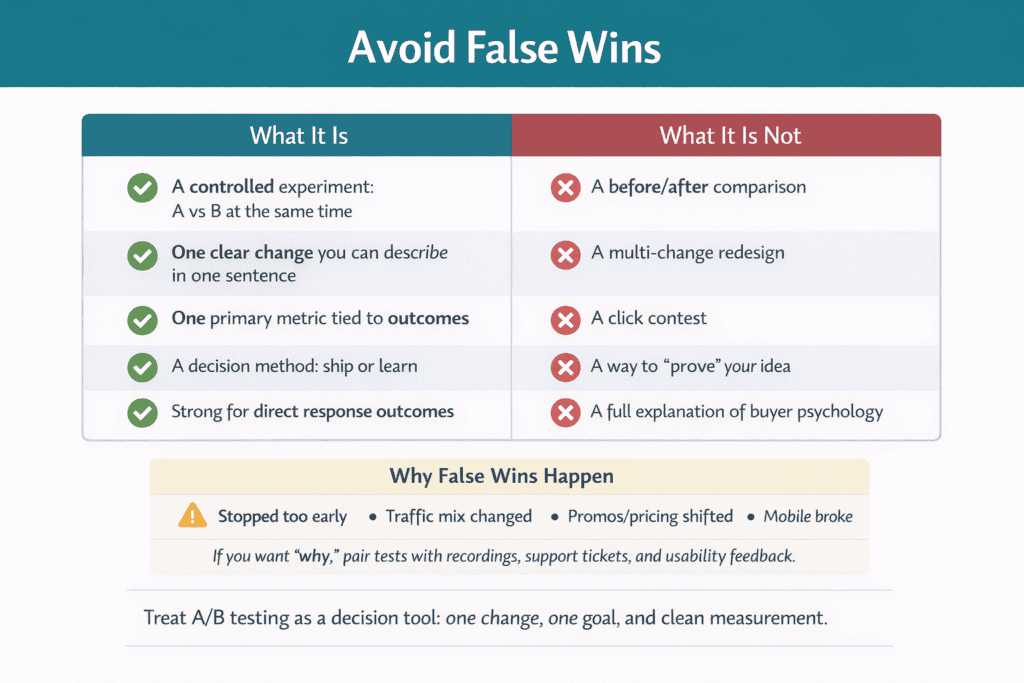
What A/B testing is and what it is not (so you avoid false wins)
A/B testing is a controlled experiment where you show two versions of the same page (A and B) to similar visitors at the same time, then compare performance using a single goal. In ecommerce, that goal is usually completed orders or revenue per visitor. Because both versions run in parallel, the test helps you isolate whether one specific change improves results, instead of guessing based on opinions or one-off spikes.
What A/B testing is
A/B testing is a decision method. It answers one practical question: “Does this change perform better than the current version for this metric?” It works best when you keep the change small and the measurement clean. Typical ecommerce A/B tests include:
-
Adding guest checkout vs forcing account creation
-
Showing delivery cost and ETA earlier vs later
-
Changing button copy or placement to reduce hesitation
-
Simplifying a form by removing fields
-
Moving reviews, guarantees, and returns info higher on the page
When it’s done properly, A/B testing is less about creativity and more about removing friction. You are testing whether a clearer, faster, more trustworthy experience leads to more paid orders.
What A/B testing is not
A/B testing is not a way to “prove” a redesign is good. It is not a replacement for customer research. And it is not a shortcut to understanding buyer psychology. It can tell you which version won, but it cannot automatically explain why it won. If you want the “why,” you use supporting evidence like session recordings, support tickets, on-site search terms, surveys, or usability testing.
It’s also not a good tool for everything. Some examples of what A/B testing struggles with:
-
Changes that affect a small group of users (too little data)
-
Very small traffic sites (tests take too long and become unreliable)
-
Big multi-change redesigns (you can’t tell what caused the result)
-
Brand or long-term trust effects that don’t show up in short windows
A/B testing is strongest for direct response outcomes: “Did more people buy?” It is weaker for long-term brand impact.
Why false wins happen
A “false win” is when the test result looks positive, but the improvement is not real or won’t repeat. Ecommerce sites get false wins for a few predictable reasons:
-
The test ran too short and caught random noise
-
The result was checked repeatedly and stopped when it looked good
-
The traffic sources changed mid-test (email blast, paid spike, influencer post)
-
Pricing, shipping fees, or stock levels changed during the test
-
Mobile broke, but desktop performance hid the damage
-
Tracking failed on one variant, undercounting orders or revenue
-
The team measured the wrong metric (clicks instead of orders/profit)
False wins are dangerous because they create confidence and momentum around the wrong decision. You “ship the winner,” then performance drops later and no one knows why.
How to avoid false wins on ecommerce sites
You don’t need complex statistics to avoid most problems. You need discipline and a few basic rules:
-
Test one main change at a time so the result is readable
-
Choose one primary metric tied to money (orders, revenue per visitor)
-
Add guardrails like average order value and refund rate so you don’t win the wrong way
-
Let the test run across normal buying cycles (include weekdays and weekends)
-
Keep promotions, shipping rules, and pricing consistent during the test
-
QA both variants on mobile, especially cart and payment steps
-
Do not stop early just because the chart looks exciting
If your business is seasonal or campaign-heavy, aim to run tests during stable periods. When traffic is unusually mixed, results become harder to trust.
A practical mindset that keeps you honest
Treat every test as a learning loop, not a trophy. A win is only valuable if you can repeat it and explain it to your team in plain language: what changed, what improved, what stayed safe, and what you will do next. When you run A/B testing this way, you stop chasing “lucky” uplifts and start building a site that steadily converts better because the experience keeps getting simpler and clearer.
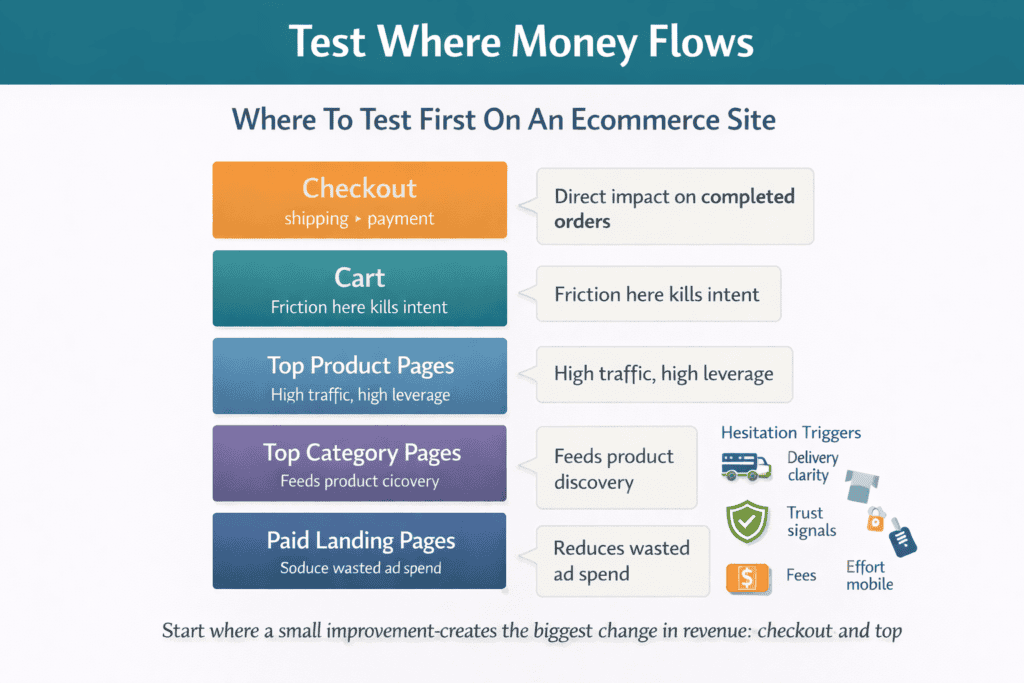
Pick the right page to test first using revenue impact, not opinions
If you pick test ideas based on opinions, the loudest voice wins and the results rarely move the business. If you pick based on revenue impact, you build a testing pipeline that pays for itself. The goal is simple: start where a small improvement creates the biggest change in orders, profit, or revenue per visitor.
Start with pages that sit closest to money
Not every page deserves your first test. Blog posts, about pages, and low-traffic categories can wait. For most ecommerce sites, your highest-impact testing targets are:
-
Checkout steps (cart, shipping, payment, review)
-
Top product pages (your best sellers and highest-margin items)
-
Top category pages (the pages that feed most product views)
-
Landing pages tied to paid campaigns (where you already spend money)
These pages either handle the most transactions or influence the most buying decisions. If they improve by even a small percentage, the revenue lift is noticeable.
Use a simple revenue-impact score to choose the first page
You can make a smart decision with three numbers. For each candidate page, write down:
-
Sessions (how many visitors hit the page)
-
Revenue influenced (how much revenue comes after that page)
-
Drop-off rate (how many people leave or fail to progress)
A page with high sessions, high downstream revenue, and high drop-off is your best first target. It means lots of people see it, it matters to sales, and something is causing friction.
If you want a quick shortcut: pick the page that has both high traffic and a clear business complaint. For example, “people abandon at shipping,” “mobile checkout errors,” or “customers keep asking about returns.”
Look for “friction signals,” not just low conversion
Low conversion alone doesn’t tell you what to fix. Instead, look for signals that the page is actively blocking purchases:
-
High exit rate on a checkout step
-
A sharp drop between “add to cart” and “begin checkout”
-
Low product page add-to-cart compared to similar products
-
High use of site search that suggests confusion (shipping, sizing, returns)
-
Support tickets and live chat questions repeating the same issue
-
Frequent discount code attempts or cart edits (price uncertainty)
-
Mobile performance significantly worse than desktop
These signals point to hesitation, confusion, or broken flows. Those are ideal for A/B testing because a clear change can remove the blocker.
Pick one page, then pick one problem on that page
A common mistake is testing a page without deciding what problem you’re solving. The result is a “pretty” variant with no clear measurement story. Instead, tie the test to a single friction point:
-
People don’t trust delivery timing → show delivery estimate earlier
-
Too many checkout fields → remove non-essential fields
-
Shoppers can’t tell if it fits → add sizing guidance near the selector
-
People don’t believe reviews → move reviews higher and add review filters
-
Payment drop-offs → add a preferred payment method or clarify fees
Your first test should be easy to build, easy to measure, and directly connected to why shoppers hesitate.
Make sure the page has enough traffic to learn quickly
Even the best idea is useless if it takes months to collect enough data. As a practical rule, start with a page that gets steady traffic and steady conversions each week. Checkout and your top product/category pages usually qualify. If your store is small, you can still test, but you should focus on bigger changes (like removing a checkout step) rather than tiny copy tweaks, because the signal will be stronger.
Avoid “ego tests” that feel important but do nothing
These are the tests that waste time early on:
-
Changing button colors without a specific problem behind it
-
Redesigning the homepage when most buyers arrive on products/categories
-
Testing slogans or brand messaging as your first experiment
-
Running tests on pages with low traffic because “it bothers me”
Your first wins should be practical. Fix clarity, trust, speed, and effort. Those changes tend to move revenue.
A fast way to choose your first A/B test page
If you want a quick, reliable starting point, follow this order:
-
Checkout step with the biggest drop-off (often shipping or payment)
-
Best-selling product page with high views but low add-to-cart
-
Top category page that feeds those products
-
A paid landing page where you can reduce wasted ad spend
This sequence keeps you close to money and reduces guesswork. Once you’ve shipped a few improvements, your testing program becomes less about “what should we try?” and more about “what will unlock the next revenue bottleneck?”
Write a strong test hypothesis using one change, one reason, one outcome
A strong A/B test hypothesis keeps your experiment clean and your decision simple. It forces you to choose one meaningful change, explain why it should work, and define what “better” looks like. Without this, teams end up testing random tweaks, arguing about results, and shipping changes that don’t hold up.
What a good hypothesis does
A good hypothesis is a short statement that connects three things:
-
One change you will make
-
One reason that change should reduce friction or increase trust
-
One outcome you will measure to decide if it worked
This structure keeps you from bundling multiple ideas into one test and calling it a win when you can’t explain why it happened.
Use this simple hypothesis formula
Write your hypothesis like this:
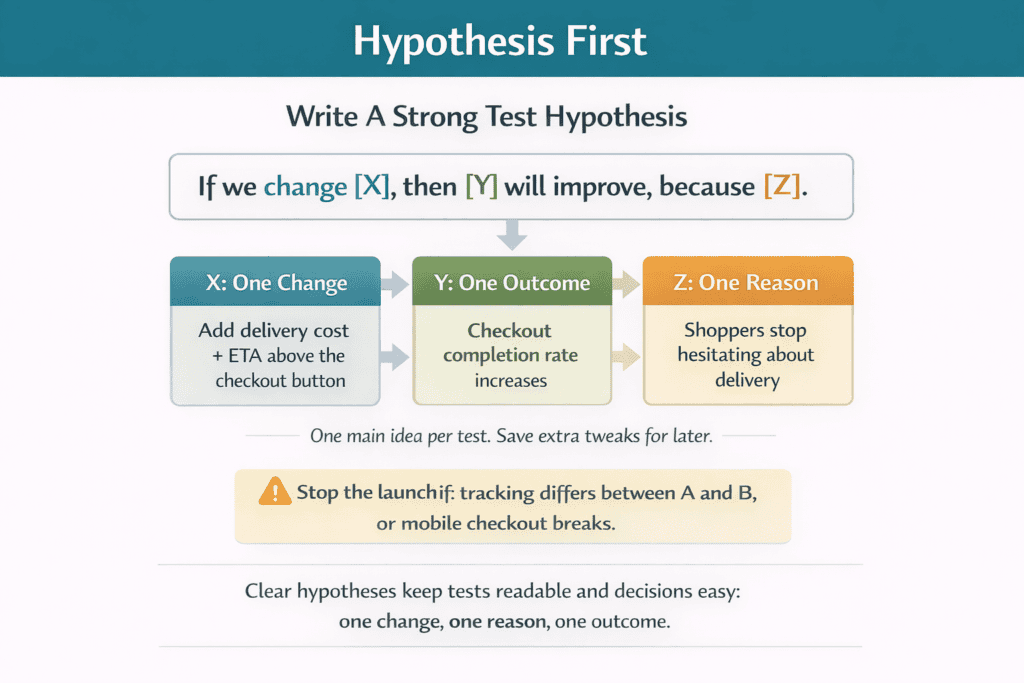
If we change X, then Y will improve, because Z.
-
X = the single change (what is different in version B)
-
Y = the primary metric (the business result you want)
-
Z = the reason (the customer problem you believe you’re fixing)
Example:
If we show delivery cost and estimated arrival date on the product page above the add-to-cart button, then add-to-cart rate will increase, because shoppers won’t need to click around to confirm delivery details.
One change means one main variable
“One change” does not mean one pixel. It means one main idea. If your test includes a new layout, new copy, new images, and new trust badges, you’re no longer testing one thing. You’re running a redesign and hoping the chart goes up.
Good single-change examples:
-
Remove the “Create account” requirement at checkout
-
Add a size guide link next to the size selector
-
Move returns policy summary directly under the price
-
Reduce checkout fields by removing non-essential inputs
-
Add a sticky add-to-cart bar on mobile product pages
Bad “one change” examples:
-
“Make the page cleaner” (too vague)
-
“Improve trust” (too broad)
-
“Redesign the product page” (too many variables)
One reason means you name the buyer hesitation
The “reason” is where most tests fail. Teams write a change and a goal, but they skip the customer problem. A strong reason is specific and based on evidence, not taste.
Useful evidence includes:
-
Session recordings showing repeated back-and-forth
-
Heatmaps showing ignored sections or dead clicks
-
Support tickets asking the same questions (shipping, sizing, returns)
-
Checkout error logs and payment failures
-
On-site search terms like “return policy” or “delivery time”
When you can point to evidence, your hypothesis becomes grounded. You are not guessing. You are responding to a visible problem.
One outcome means you decide how you will judge success
Your outcome should be one primary metric that matches the page’s job. Pick the metric closest to revenue for that step in the journey.
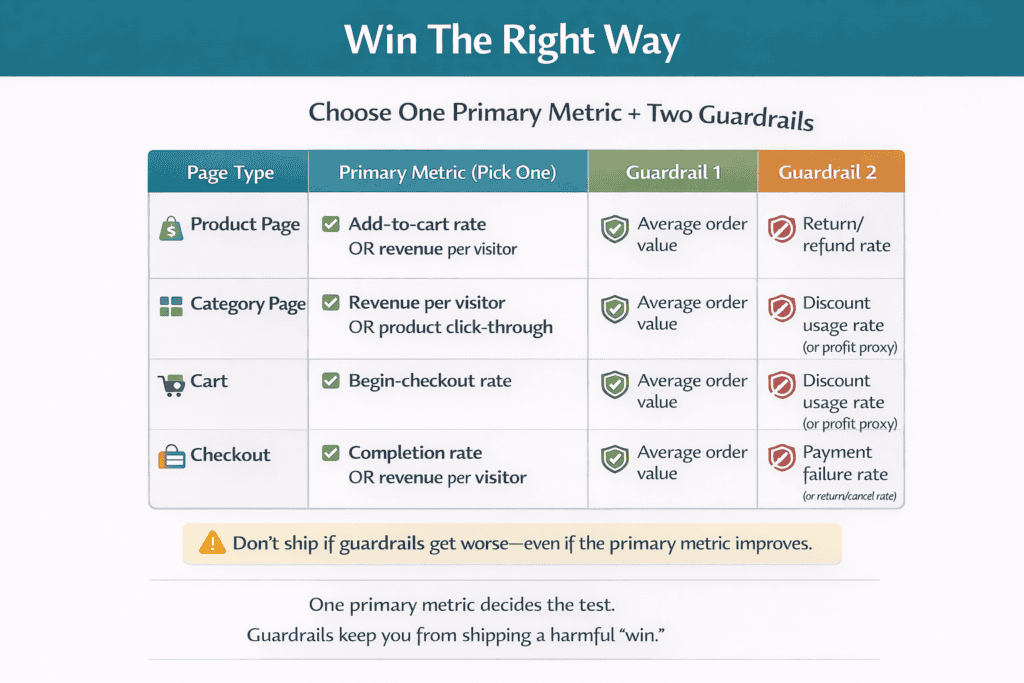
Common primary metrics by page:
-
Product page: add-to-cart rate, revenue per visitor
-
Category page: product click-through, add-to-cart rate, revenue per visitor
-
Cart: begin-checkout rate
-
Checkout: completion rate, revenue per visitor
Then add two guardrails so you don’t “win” in a way that hurts the business, such as:
-
Average order value (so you don’t win by pushing cheaper orders)
-
Refund/return rate (so you don’t win by creating buyer regret)
-
Profit proxy (margin after discounts and shipping costs, if you track it)
Keep the hypothesis short and testable
If your hypothesis needs a paragraph to explain, it’s probably too broad. A good hypothesis can fit in one sentence and still be clear. Here are a few ecommerce-ready examples you can copy and adapt:
-
If we add guest checkout, then checkout completion rate will increase, because forced account creation creates unnecessary effort at the final step.
-
If we place reviews and star rating above the fold, then add-to-cart rate will increase, because shoppers want proof before they commit.
-
If we show the free-shipping threshold in the cart, then average order value will increase, because shoppers will add items to reach the threshold instead of checking out early.
-
If we reduce address form fields, then checkout completion rate will increase, because fewer fields means less typing and fewer mistakes on mobile.
Turn the hypothesis into a test plan in two minutes
Before you build anything, answer these five points:
-
What page are we testing?
-
What is the single change in version B?
-
What evidence suggests this is a real friction point?
-
What is the primary metric?
-
What guardrails must not get worse?
If you can’t answer one of these, pause and tighten the idea. Strong hypotheses lead to clean tests. Clean tests lead to decisions you can trust, and decisions you can repeat.
Choose one primary metric and two guardrails to prevent “winning” the wrong way
A/B tests fail most often because teams measure the wrong thing. They choose a metric that looks good on a chart, ship the “winner,” and later discover revenue, profit, or customer quality got worse. The fix is simple: choose one primary metric that matches the page’s job, then add two guardrails that protect the business from accidental damage.
What a primary metric is (and why you only need one)
Your primary metric is the single number that decides whether B beat A. One metric keeps the test honest. If you track five “success” metrics, you can always find one that moved and call it a win, even when the overall outcome is negative.
For ecommerce, your best primary metrics are the ones closest to money:
-
Checkout completion rate (orders / checkout starts)
-
Revenue per visitor (total revenue / sessions)
-
Add-to-cart rate (add to cart / product page sessions)
-
Begin-checkout rate (begin checkout / cart views)
Avoid using clicks as your primary metric unless the click is the business outcome (for example, “start checkout”). Clicks are easy to inflate without increasing paid orders.
Match the primary metric to the page’s job
Pick the metric that reflects what the page is supposed to do in the customer journey:
Product page
-
Primary metric: add-to-cart rate or revenue per visitor
Category page
-
Primary metric: product click-through rate (to product pages) or revenue per visitor
Cart page
-
Primary metric: begin-checkout rate
Checkout page/steps
-
Primary metric: checkout completion rate or revenue per visitor
If you choose a metric that doesn’t match the page, you’ll “optimize” the wrong behavior. For example, a product page can increase button clicks while reducing orders if the change creates confusion later.
What guardrails are (and why you need two)
Guardrails are metrics that must not get worse, even if the primary metric improves. They stop you from shipping changes that raise conversions but harm profit, customer satisfaction, or long-term value.
Two guardrails are enough. More than that and you create endless debate. Fewer than that and you miss common failure modes.
Choose guardrails that reflect real business risk
The best guardrails depend on your business model, but these are the most practical options for ecommerce:
-
Average order value (AOV)
Why it matters: Some tests “win” by pushing smaller orders or encouraging discounts.
Good guardrail: AOV must stay flat or improve. -
Refund/return rate (or cancellation rate)
Why it matters: Some tests increase orders by overselling, creating buyer regret, or making terms unclear.
Good guardrail: Returns/cancellations must not rise.
Other useful guardrails (choose if they match your situation):
-
Profit per order (or gross margin per order) if you can track it
-
Discount rate (average discount per order) if promos are common
-
Payment failure rate (especially if testing checkout or payment UI)
-
Customer support contacts per order (if you log this reliably)
-
Page speed or error rate (if the test changes scripts or layout)
A good default guardrail pair for many stores:
-
Average order value
-
Refund/return or cancellation rate
Examples of “winning the wrong way” (and how guardrails stop it)
Checkout example
You remove a shipping step and completion rate goes up. Great—until you notice order value drops because people stop adding items, and cancellations rise because shipping terms are less visible. Guardrails catch both.
Product page example
You add a bold “limited stock” message and add-to-cart rises. But refunds rise because the message pushes rushed decisions. A returns guardrail prevents shipping a short-term lift that creates long-term cost.
Promotion example
A test that highlights a discount code field can increase conversions, but it can also increase discount usage and lower profit. A discount rate or profit guardrail keeps the test aligned with real business goals.
How to set a simple “don’t ship if” rule
Before the test starts, write two rules in plain language:
-
We ship B only if the primary metric improves and both guardrails do not get worse.
-
If the primary metric improves but a guardrail gets worse, we treat it as a failed test or redesign the idea.
This removes debate at the end. Everyone knows what outcome counts.
A quick cheat sheet you can reuse
If you want a simple starting framework, use this:
Primary metric (pick one)
-
Checkout: completion rate or revenue per visitor
-
Product: add-to-cart rate or revenue per visitor
-
Category: revenue per visitor or product click-through
Guardrails (pick two)
-
Average order value
-
Refund/return rate (or cancellation rate)
This setup prevents the most common trap in ecommerce testing: celebrating a “win” that increases conversion while quietly lowering the quality and profitability of the orders you worked so hard to earn.
Build clean variants: how to change one thing without breaking tracking
A clean variant means version B changes one clear thing, while everything else stays the same, including tracking. If you change multiple elements, or your analytics stops recording key events, you won’t know whether the result is real.
Keep the change tightly scoped. Copy the existing page and adjust only the single element tied to your hypothesis, like the delivery message, a form field, or the position of reviews. Do not bundle “nice-to-have” edits such as new images, extra copy rewrites, or layout cleanups. Those belong in separate tests.
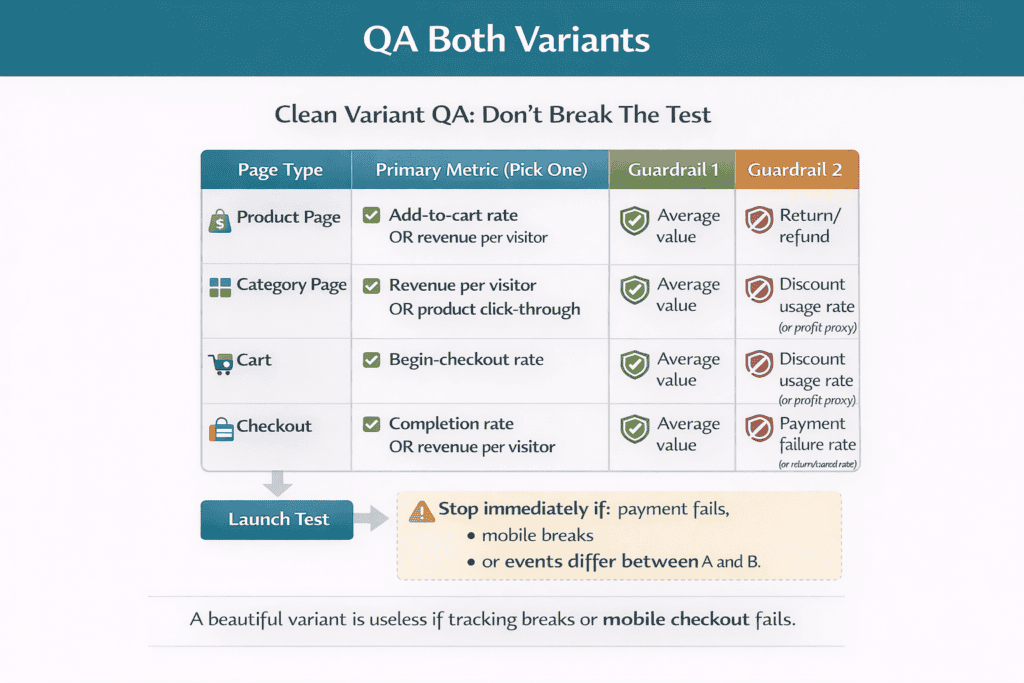
Before you launch, QA tracking like it’s part of the product. On both A and B, confirm the same events fire in the same places: product view, add to cart, begin checkout, purchase, and any key step events you rely on. Test on mobile and desktop, run through a full payment flow, and check that revenue, currency, shipping, and discount values pass correctly. If one version undercounts orders or misses add-to-cart events, the test becomes unusable, no matter how good the design looks.
Sample size and test length without the math headache: when to start, stop, or extend
You don’t need to be a statistician to run sensible A/B tests. You just need rules that stop you from ending too early, calling noise a win, or running tests so long that promotions and seasonality ruin the comparison.
What “enough data” really means
A test needs enough conversions, not just traffic. If only a handful of orders happen in each version, the result will swing wildly from day to day. As a practical rule, don’t judge a test until both versions have produced a meaningful number of completed outcomes (orders for checkout tests, add-to-carts for product page tests).
If your site has low order volume, focus on bigger changes (remove fields, clarify delivery, add guest checkout) rather than tiny copy tweaks. Bigger changes create a stronger signal with less data.
When to start a test
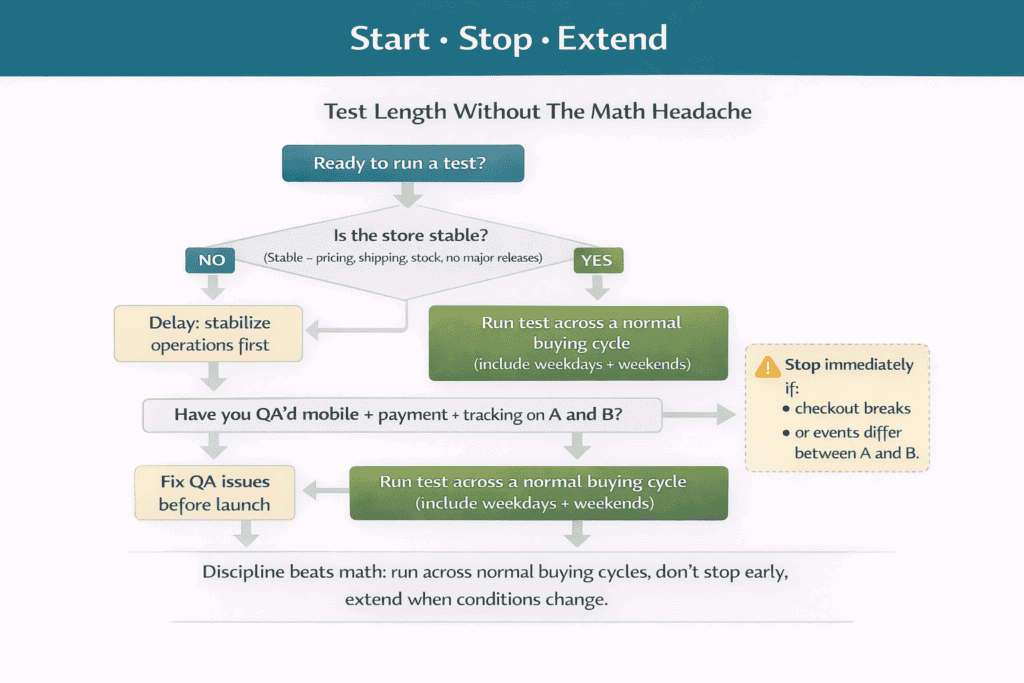
Start when your store is stable so you’re measuring customer behavior, not operational chaos.
Good time to start:
-
Normal pricing and shipping rules
-
No major site releases planned during the test window
-
Stock is stable on the items involved
-
No unusual campaign spikes you can’t repeat
Avoid starting:
-
Right before a big promo, holiday rush, or one-off influencer push
-
When key products are low stock or backordered
-
When you are changing checkout, payment, or shipping settings
How long to run it
Run tests long enough to capture normal buying patterns. Most ecommerce sites have different behavior on weekdays vs weekends, and paydays can change purchase intent too. A safe baseline is to run across at least one full weekly cycle so both versions see the same mix of days.
If your traffic is high, you may reach a decision faster, but still avoid stopping in the first day or two. Early data is the noisiest.
When to stop
Stop when all three of these are true:
-
The test has run across a full buying cycle (not just a couple of days)
-
Your primary metric has enough conversions to be trustworthy
-
The result is stable, meaning it hasn’t flipped back and forth every time you check it
Also stop immediately if there’s a clear customer-impacting problem:
-
Checkout errors, payment failures, broken forms
-
Major mobile layout issues
-
Tracking not firing correctly on one version
A broken variant doesn’t “need more time.” It needs a fix.
When to extend
Extend the test if any of the below happened:
-
Conversions are too low to call it with confidence
-
A big traffic mix change occurred mid-test (email blast, paid spike, press mention)
-
Pricing, shipping fees, or promos changed during the run
-
Results are close and keep flipping direction
Extending is normal. It’s better to extend than to ship a “winner” that was just a lucky week.
A simple stop rule you can reuse
Use this decision rule for most ecommerce tests:
-
Start with a minimum run time that covers normal buying behavior (include weekdays and weekends)
-
Don’t call a winner until you have enough completed outcomes in both versions
-
Ship only if the primary metric improves and your guardrails don’t get worse
-
If the result is unclear, extend or redesign the test to create a stronger signal
This keeps your testing program disciplined, repeatable, and less vulnerable to false wins.
Common A/B testing mistakes that waste traffic (and how to spot them early)
Most A/B tests fail for the same reason: they waste traffic on a test you can’t trust. The good news is you can spot most mistakes in the first day if you know what to check.
Common mistakes that waste traffic (and early warning signs)
-
Ending the test too early
Early sign: the “winner” flips every time you check, or the uplift looks huge on day one and shrinks fast. -
Testing too many changes at once
Early sign: the variant looks like a mini redesign, and you can’t describe the change in one sentence. -
Choosing the wrong primary metric
Early sign: clicks go up but orders or revenue per visitor stay flat, or average order value drops. -
Running tests during unstable periods
Early sign: traffic sources change mid-test (email blast, paid spike), promotions change, or key products go out of stock. -
Breaking mobile layouts
Early sign: mobile conversion rate drops, bounce rate spikes, or session recordings show rage taps and zooming. -
Breaking checkout or payment flows
Early sign: payment failure rate rises, orders in admin don’t match analytics, or customers report checkout issues. -
Tracking problems between A and B
Early sign: one variant shows fewer add-to-carts or purchases with no clear behavior reason, or revenue values look wrong.
How to catch issues before they ruin the test
Do a quick daily health check while the test runs:
-
Compare device split (desktop vs mobile) and traffic sources between A and B
-
Confirm key events fire on both variants (add to cart, begin checkout, purchase)
-
Check order counts in your admin against analytics for the same period
-
Watch for sudden jumps in errors, refunds, or support tickets
If any of these looks off, pause and fix. A “clean” test beats a fast test every time.
Turn results into a weekly routine: backlog, owners, and shipping one improvement at a time
A/B testing only pays off when results turn into a routine, not a one-off project. Keep a simple backlog of test ideas tied to real friction: drop-offs in checkout, top product pages with low add-to-cart, repeated support questions, and issues you see in session recordings. Each idea should be written as a short hypothesis, with one change and one primary metric, so it’s ready to build when it reaches the top.
Run a weekly rhythm that is easy to repeat. Start the week by checking a small scoreboard (conversion rate, revenue per visitor, and one or two guardrails like average order value and refunds). Then pick the next best test from the backlog based on revenue impact, not preference. Assign an owner for each test (one person responsible for build, QA, launch, and wrap-up) so nothing stalls in “we should.” Close the week by making a clear decision: ship the winner, archive the loser with a learning note, and add the next test. When you ship one improvement at a time, your store gets better every week without big redesign risk.