
The Top 10 Ecommerce SEO Tools
Here’s a practical top 10 list of ecommerce SEO tools that agencies and solo SEOs commonly rely on (covering research, crawling, index control, schema, speed, and reporting):
-
Google Search Console — performance by query/page, indexing signals, canonicals, rich result issues (the “source of truth” for what Google is doing).
-
Screaming Frog SEO Spider — technical crawling at scale (canonicals, status codes, duplicates, pagination, internal links).
-
Semrush — keyword research, competitor tracking, content gaps, position tracking, site audits (popular all-in-one stack for agencies).
-
Ahrefs — backlink analysis + competitive research + keyword discovery (common agency staple alongside Semrush).
-
Sitebulb — crawler + audit reports that are easier to explain to clients/teams (great for prioritising fixes).
-
Google Merchant Center — product data quality, feed issues, and (for many stores) visibility opportunities tied to product listings.
-
Rich Results Test / Schema validation tooling — validate Product, Breadcrumb, and Merchant listing markup so rich results don’t silently fail.
-
PageSpeed Insights (Lighthouse) — template and Core Web Vitals diagnostics that affect category/product performance.
-
GA4 — connect organic landings to revenue outcomes (category entry → product views → add-to-cart → purchase).
-
Looker Studio — client-ready dashboards that turn GSC + GA4 into a weekly workflow (not just charts).
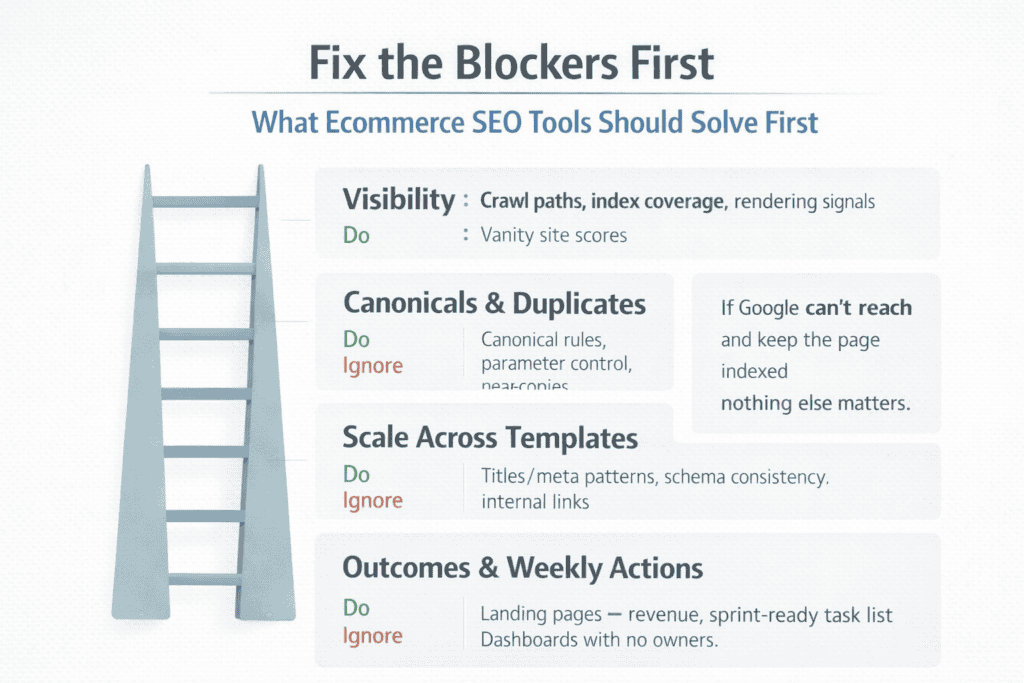
What problems ecommerce SEO tools should solve first (and what to ignore)
Ecommerce SEO tools are only useful when they remove friction between your catalog and Google. The first job is visibility: make sure Google can reach, understand, and keep your important pages in the index. If products aren’t being crawled, if category pages are treated as duplicates, or if faceted URLs create endless near-copies, no keyword tool will save you. Start with tools that surface crawl paths, canonical decisions, index coverage, and template issues, because those problems block everything else.
Next comes scale. Ecommerce isn’t “write one page and you’re done.” You need tooling that helps you manage repeatable work across hundreds or thousands of URLs without turning quality into a checkbox exercise. That means spotting missing or conflicting schema, thin category content that fails to explain the range, broken internal links after merch changes, and title/meta patterns that create duplicates. The right tools shorten the loop between “we changed the catalog” and “search reflects the change.”
A practical way to set priorities is to ask three questions before you add anything to your stack:
-
Can this tool show me what Google is doing with my pages (crawling, indexing, rendering)?
-
Can it help me fix issues across templates, not one URL at a time?
-
Will it turn findings into actions my team can complete this week?
What to ignore early on: tools that push vanity metrics, noisy “site health scores,” or endless keyword lists that don’t match shopping intent. Also be cautious with anything that produces generic recommendations without your platform context (filters, variants, pagination, out-of-stock handling). If a tool can’t connect its output to a clear fix like a redirect map, a canonical rule, a blocked parameter, a missing product property in schema it’s a distraction, not support.
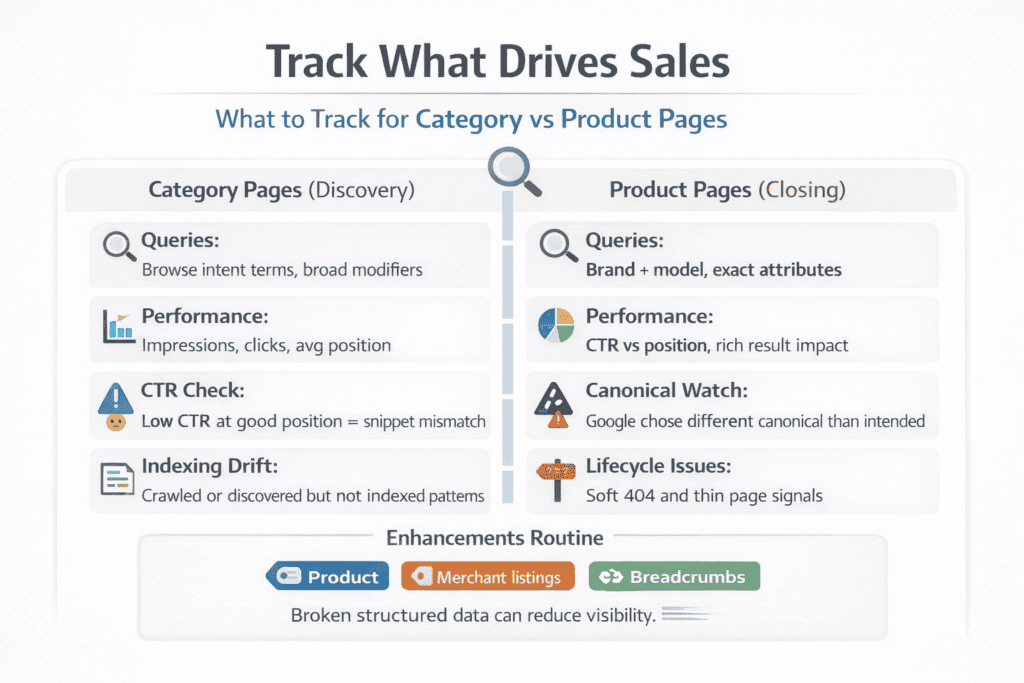
What to track in Google Search Console for product and category pages
Google Search Console is the closest thing you have to a direct conversation with Google, so your tracking should focus on what affects revenue pages: category listings that drive discovery and product pages that close the sale. Start with Performance for two reasons: it tells you what queries you already show for, and it shows where you’re almost winning.
For category pages, watch impressions, clicks, and average position for “shopping” terms that suggest browsing intent (for example, “men’s running shoes” rather than a specific SKU). For product pages, focus on queries that include brand + model, and compare click-through rate to position; if you rank but don’t get clicks, your title, price signals, availability cues, or rich results may not be pulling their weight.
Next, use Indexing as your early-warning system. Ecommerce sites change daily, which makes indexing drift common. Track how many category pages are indexed versus “Discovered currently not indexed” or “Crawled currently not indexed,” and look for patterns tied to templates, filters, or pagination. For product pages, pay attention to duplicates and canonical behavior.
If you have variants, tracking “Duplicate, Google chose different canonical than user” helps you catch situations where Google is ignoring your intended canonical and indexing the wrong version of a product. This is also where you spot soft 404s on out-of-stock items and thin pages that Google decides are not worth keeping.
Make Enhancements and rich results part of your routine, not a one-off audit. If Product structured data breaks, you don’t just lose a checkbox you can lose visibility and click-through rate. Watch Product snippets, Merchant listings (where available), Breadcrumbs, and any structured data reports your site triggers.
The goal isn’t “zero errors” for its own sake; it’s consistency. When schema, sitemaps, and internal links stay aligned with real inventory, your best category pages keep their reach and your best products keep their ability to earn the click.
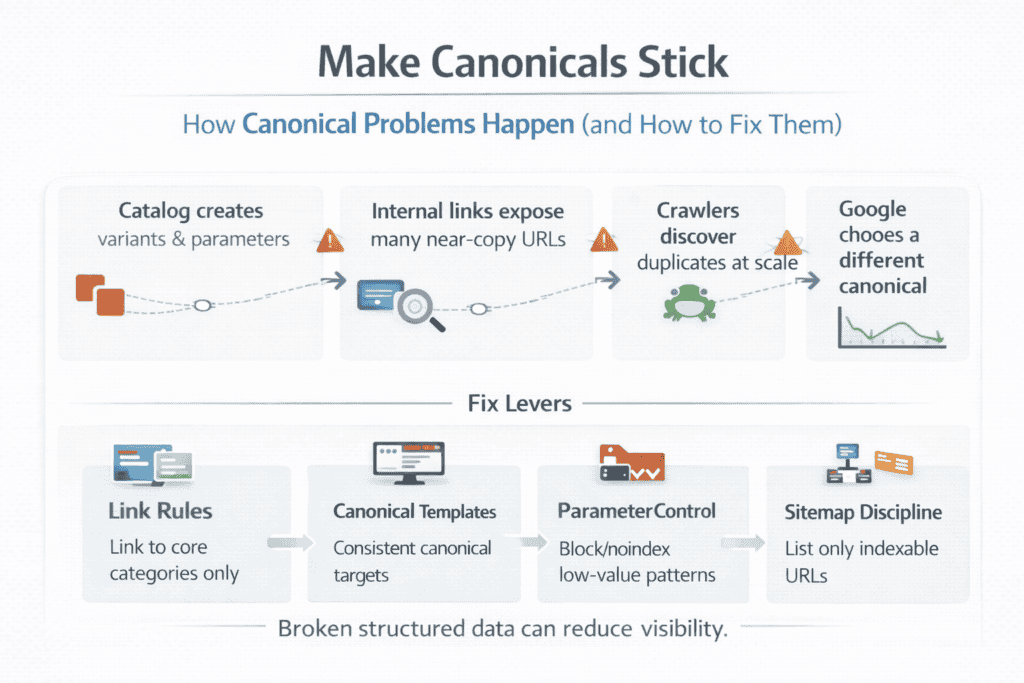
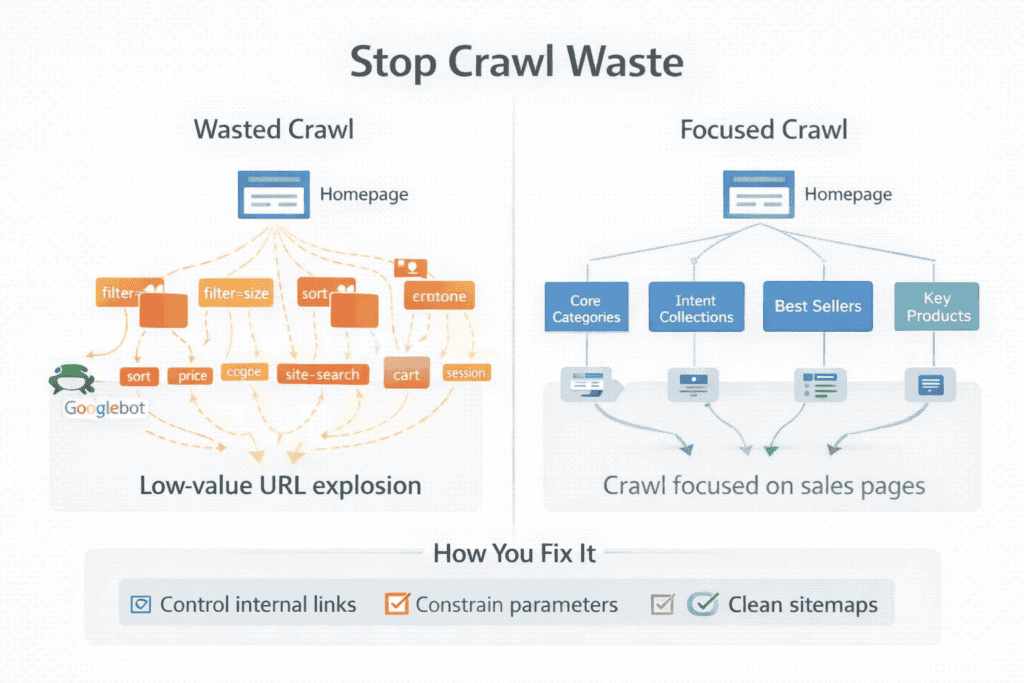
What technical SEO tools help you find indexing, canonicals, and crawl waste
Technical SEO tools earn their place in ecommerce when they answer three questions fast: what is being indexed, what Google thinks the canonical is, and where crawl time is being wasted. Start with Google Search Console because it shows reality, not guesses. The Pages report highlights patterns like “Crawled – currently not indexed,” “Duplicate without user-selected canonical,” or “Alternate page with proper canonical tag,” which often point to template-level duplication, inconsistent internal linking, or parameter URLs getting discovered. Pair that with the URL Inspection tool when a specific product or category is underperforming, because it reveals the chosen canonical and whether the page is eligible to be indexed.
Next, use a crawler such as Screaming Frog or Sitebulb to map your site the way a bot experiences it. These tools surface canonical conflicts at scale: canonicals that point to non-200 pages, canonicals that disagree with internal links, duplicate title/meta patterns caused by filters, and pagination setups that create near-copy category pages. They also help you spot crawl waste by showing how many URLs exist for each filter and sort combination, where infinite spaces can form, and whether your navigation exposes those URLs through links. In ecommerce, crawl waste rarely comes from one “bad page”; it comes from systems that generate thousands of low-value URLs.
For crawl waste specifically, the most decisive evidence comes from server log analysis or CDN logs, because it shows what Googlebot is actually spending time on. Even a simple log view can reveal if Google is repeatedly hitting parameter URLs, search-result pages, add-to-cart endpoints, or endless filtered variations instead of your core categories and best-selling products. When you combine logs with a crawl and Search Console patterns, you can make clean decisions: tighten internal linking, block or noindex certain parameter patterns, refine canonicals, and ensure sitemaps only list pages you truly want indexed. The goal is not a “perfect audit score”; it’s getting Google to crawl and index the pages that drive sales, consistently, without drowning in duplicates.
What keyword tools are actually useful for ecommerce intent and long-tail SKUs
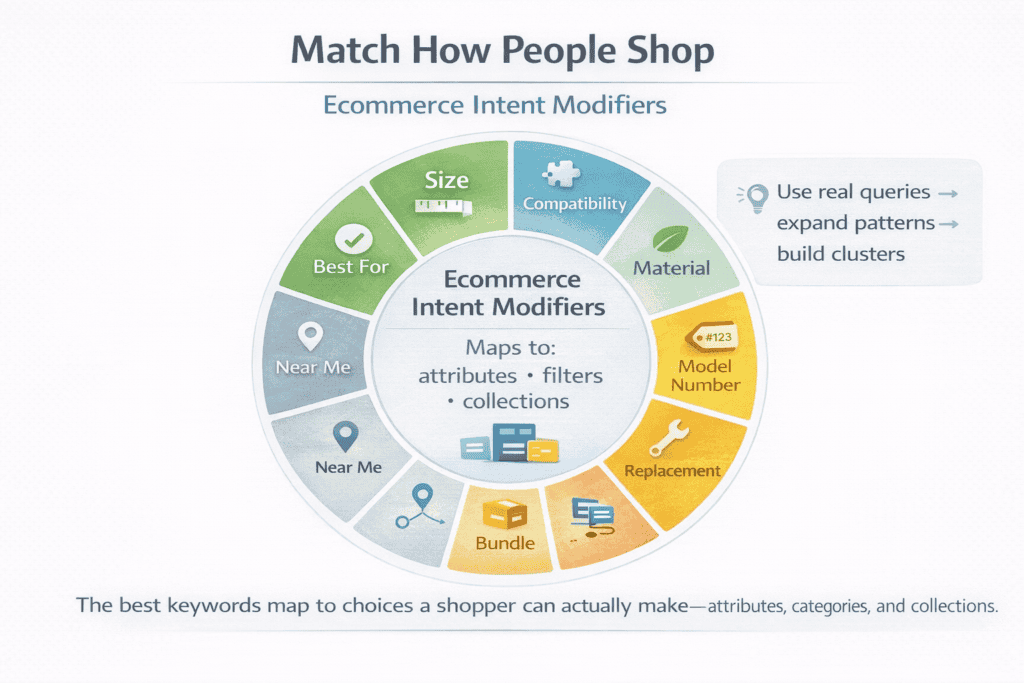
Keyword tools matter in ecommerce when they help you match how people shop, not how people browse articles. The useful ones are the tools that can show modifiers buyers add when they’re close to a decision size, compatibility, material, model numbers, “replacement,” “bundle,” “near me,” and “best for” use-cases and let you compare that demand to competitors. In practice, suites like Semrush or Ahrefs work well because they surface keyword variations and ranking gaps at scale, which is exactly what you need for category planning and merchandising.
For long-tail SKUs, the trick is combining tools instead of relying on one report. Use Google Search Console to pull the real queries your products and categories already appear for, then use a keyword suite to expand those patterns into clusters you can build into filters, collections, and landing pages. If the keyword doesn’t clearly map to a product attribute or a category choice a shopper can make, it’s usually noise especially for catalogs with thousands of SKUs.
What on-page tools help you scale titles, schema, and content blocks without quality drops
On-page tools are most useful in ecommerce when they help you control quality at scale, not when they generate filler. Start with a crawler like Screaming Frog or Sitebulb to audit titles, meta descriptions, headings, canonicals, and structured data patterns across the whole catalog, because you need to see where templates create duplicates or gaps. Then use schema validation tooling (Google’s Rich Results Test and Search Console enhancement reports) to keep Product and Breadcrumb markup consistent when prices, availability, variants, and reviews change. For content blocks on category and product templates, the best “tool” is often your CMS or theme builder paired with clear rules: reusable modules with manual overrides for priority pages, so you can roll out structured intros, FAQs, and internal links without turning every page into the same paragraph with swapped keywords.
What internal linking tools reveal gaps between categories, filters, and best-sellers
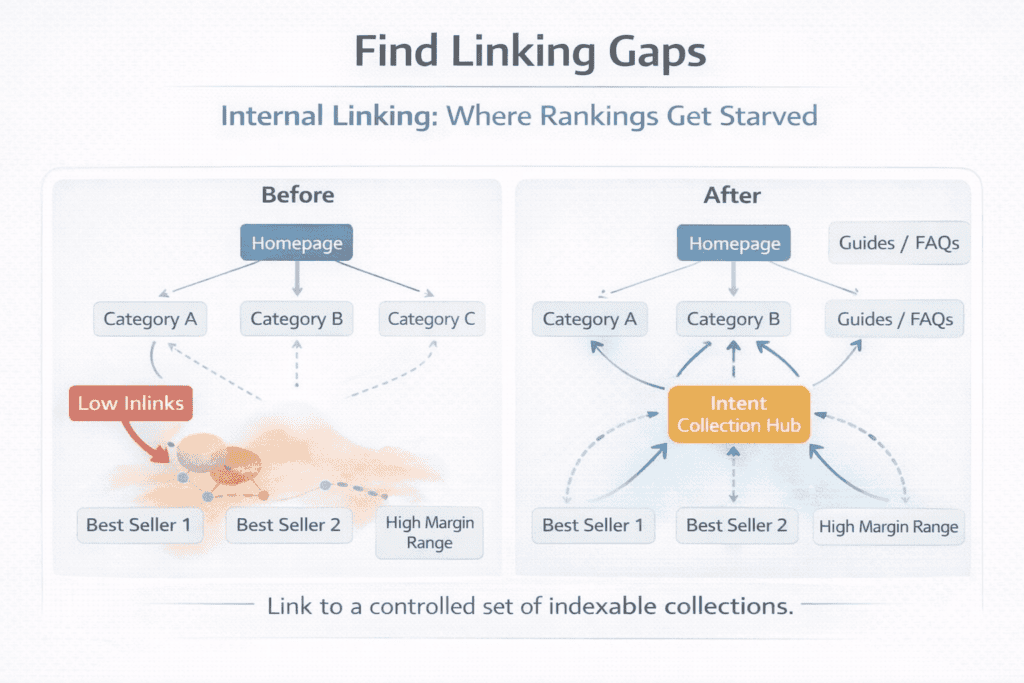
Internal linking tools are valuable in ecommerce because they show you the difference between what you think your site emphasizes and what your links actually push. A crawler like Screaming Frog or Sitebulb can surface pages with low inlink counts, products that are only reachable through on-site search, and category pages that sit too many clicks away from the homepage. When you export inlinks and outlinks, you can quickly see where best-sellers are buried, where seasonal collections have no supporting links once they leave the homepage, and where important categories don’t have enough contextual links from guides, brand pages, or related collections.
They also reveal when filters are stealing authority from core categories. If faceted URLs are internally linked in a way that creates thousands of crawlable variations, the crawler will show an explosion of near-duplicate pages and link paths that lead bots away from your main category URLs. That’s the moment to tighten navigation rules: link to a small set of intentional “indexable” collections, keep filter URLs controlled, and build clear hubs that connect top categories to best-sellers and high-margin ranges. The goal is a link structure that makes your catalog easy to understand and keeps ranking signals concentrated on the pages you actually want customers to land on.
What reporting tools turn SEO data into actions your team will follow weekly
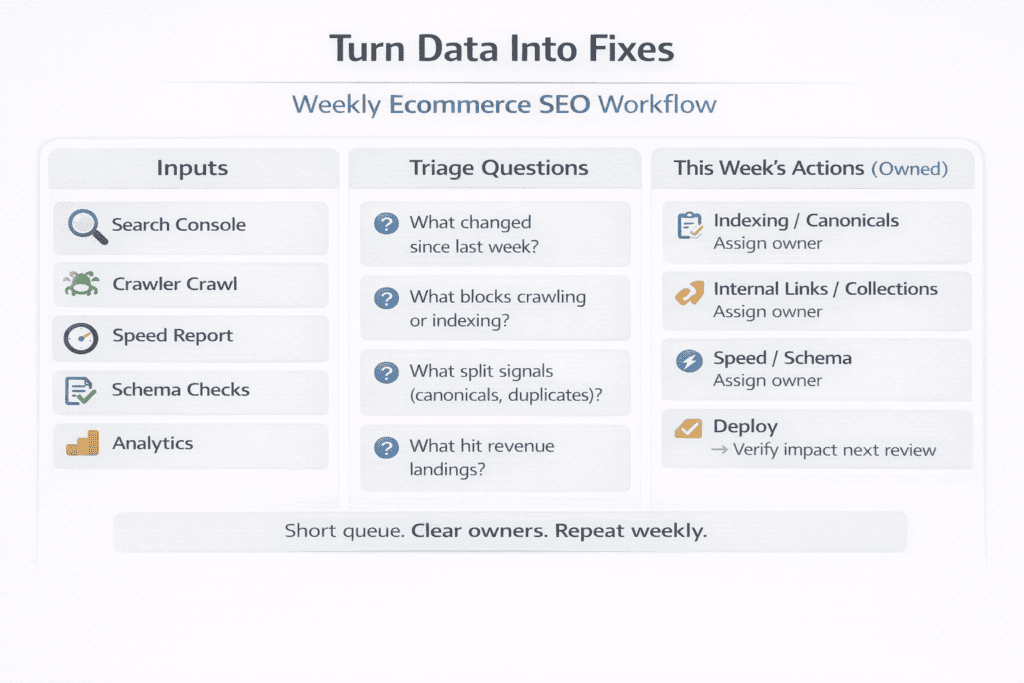
Reporting tools only work for ecommerce SEO when they make it obvious what changed, why it changed, and what to do next. The most practical setup is a Looker Studio dashboard pulling from Google Search Console and GA4, because it can show your team the same weekly story every time: which categories gained or lost impressions, which product groups improved or slipped, and which landing pages actually drove revenue or add-to-carts. Keep the dashboard tight top landing categories, top landing products, query clusters by intent, index coverage exceptions, and a simple “wins / losses” view so nobody has to hunt through charts to find what matters.
What turns data into action is the workflow around it. Pair the dashboard with a weekly checklist owned by named roles: one person reviews indexing and canonical anomalies, another checks internal linking and new collection visibility, and another audits template changes tied to speed or schema errors. The best reporting tools don’t just summarize performance; they create a short queue of fixes your team can complete in the next sprint, then confirm the impact in the next weekly review.