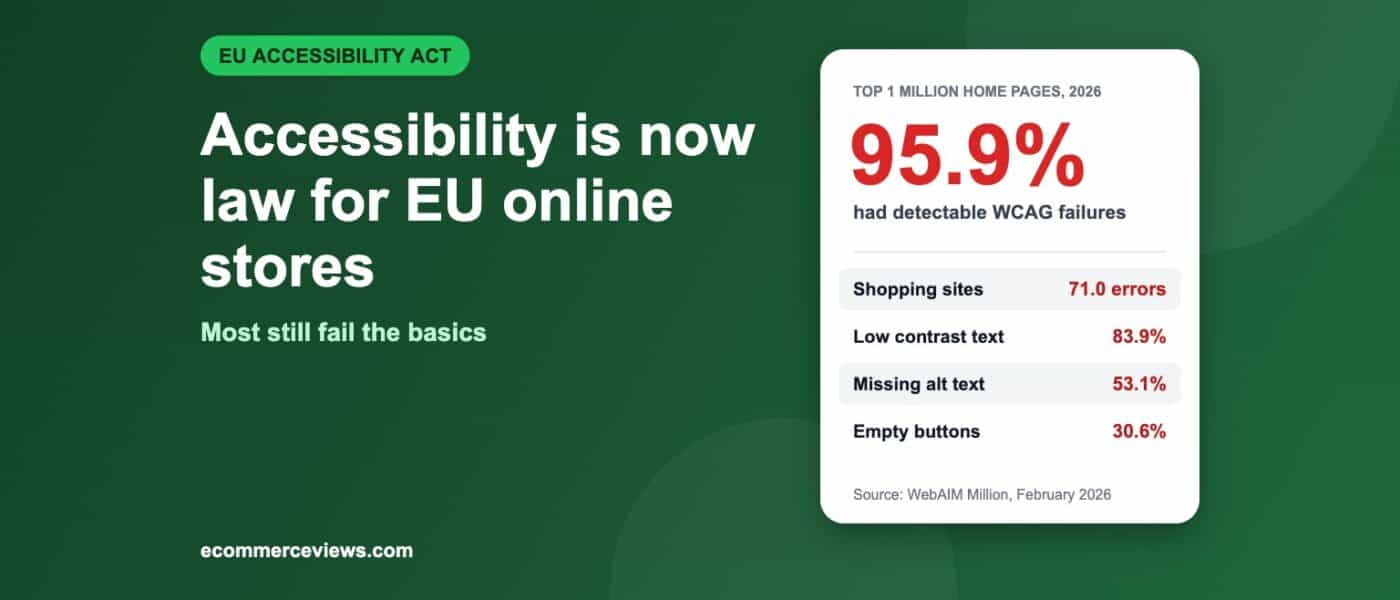
Since 28 June 2025, an online store selling to consumers in the European Union has had a legal duty to be usable by people with disabilities. The European Accessibility Act, Directive (EU) 2019/882, was adopted in April 2019, gave member states until June 2022 to write it into national law, and switched on its requirements for e-commerce services three years later. Many shop owners have never heard of it.
The data says that is a problem. In February 2026, WebAIM ran automated accessibility tests on the home pages of the top one million websites and found detectable failures on 95.9% of them. Shopping sites averaged 71 errors per home page, well above the 56.1 average for all sites. Meanwhile, Eurostat’s survey data shows that about one in four EU residents aged 16 or over lives with a long-standing limitation in everyday activities.
Key points
- The European Accessibility Act applies to e-commerce services offered to EU consumers from 28 June 2025. It covers websites and mobile apps used to conclude a consumer contract.
- Microenterprises that provide services, defined as fewer than 10 people and annual turnover or balance sheet of no more than €2 million, are exempt from the accessibility requirements.
- Enforcement is national, and each member state sets its own penalties.
- WebAIM’s 2026 scan found WCAG failures on 95.9% of the top million home pages, up from 94.8% in 2025. Shopping was the second worst category, at 71.0 errors per page.
- In 2025, 24.3% of EU residents aged 16 or over reported some or severe activity limitation, rising to 58.1% among those aged 75 and over.
My view is
Accessibility is cheap to start, it widens the market, and it is now the law. Those three facts point in the same direction, which is rare for a compliance topic.
Most compliance work is pure cost. A store pays for it, and the customer sees nothing. Accessibility is different. The fixes that matter most, readable contrast, labelled form fields, described images, buttons that say what they do, also make a store easier for everyone: the shopper on a phone in bright sunlight, the older customer whose eyesight has slipped, the person checking out with one hand while holding a child. A store that treats the European Accessibility Act as a one-off legal chore will spend money and get little back. A store that treats it as a usability project will likely sell more. European shoppers already report plenty of friction: one in three hits a problem when buying online.
Full conformance on a large catalogue with a custom checkout is real work. But most of the early gains come from fixing patterns in templates, not rewriting a site.
What the law actually requires
The directive defines e-commerce services as services provided at a distance, through websites and mobile device based services, by electronic means and at the individual request of a consumer, with a view to concluding a consumer contract. In plain terms: if a shopper in the EU can browse and buy from your site or app, you are in scope, unless an exemption applies. The European Commission’s overview lists e-commerce alongside banking, smartphones, e-books and transport services.
The obligations are built around four ideas taken from accessibility practice: content must be perceivable, operable, understandable and robust. In practice, most guidance maps these to the Web Content Accessibility Guidelines (WCAG) at level AA, through the European standard EN 301 549. Stores also need to provide information about how their service meets the requirements, which most businesses handle with an accessibility statement.
The key dates, from the directive itself:
| Date | What happened |
|---|---|
| 17 April 2019 | Directive (EU) 2019/882 adopted |
| 27 June 2019 | Directive entered into force |
| 28 June 2022 | Deadline for member states to transpose it into national law |
| 28 June 2025 | Requirements apply to products and services, including e-commerce |
| 28 June 2030 | End of the transitional period for services using products already in use before June 2025 |
The 2030 date is often misread. It gives service providers extra time to keep using products they were already using lawfully before June 2025, such as existing hardware. It is not a five year grace period for an online shop’s website.
Who is exempt
The microenterprise exemption is the part small sellers ask about first. Article 3 of the directive defines a microenterprise as an enterprise that employs fewer than 10 persons and has an annual turnover not exceeding €2 million, or an annual balance sheet total not exceeding €2 million. Article 4(5) then says microenterprises providing services are exempt from the accessibility requirements and the related obligations.
So a five person store turning over €800,000 a year is outside the duty. A twelve person store turning over €1.5 million is inside it, and so is a nine person store with €3 million turnover and a €2.5 million balance sheet.
There is also a disproportionate burden clause. A business that falls within scope can argue that a specific requirement would impose a disproportionate burden or would fundamentally alter the service, but it has to make and document that assessment, and authorities can ask to see it. It is a narrow door, not a general opt out.
Two practical notes. Growth past the thresholds brings a store into scope. And the exemption covers the legal duty, not the market: a disabled customer bounces off an inaccessible checkout whatever the size of the business.
Who enforces it
The act is a directive, not a regulation, so it works through national law. Each member state designates authorities to check that services comply, handle complaints and order corrections. Article 30 leaves penalties to member states, with the requirement that they be effective, proportionate and dissuasive, and that they come with remedial action where a business fails to comply.
The Commission says it monitors how member states transpose the rules, and runs an expert group that includes national market surveillance authorities. The result is 27 slightly different regimes, so a store selling across borders should check the rules in its biggest markets, not just at home.
The pattern will be familiar from other EU rules. Our piece on privacy and compliance for online stores covers how the same national enforcement model plays out for data protection.
How inaccessible are online stores?
WebAIM’s Million report is the largest public benchmark of web accessibility. Each year it runs automated WCAG tests on the home pages of the top one million websites. The 2026 edition, based on a February 2026 crawl, found:
- 95.9% of home pages had detectable WCAG 2 failures, up from 94.8% in 2025. That reverses six years of slow improvement from 97.8% in 2019.
- The average home page had 56.1 detected errors, up from 51 in 2025.
- Pages had an average of 1,437 elements, so there is more to get wrong every year.
The more uncomfortable finding for this audience is the category breakdown. WebAIM classified 95,039 of the home pages as shopping sites. They averaged 71.0 errors, 26.6% more than the overall average, and only sports sites did worse.
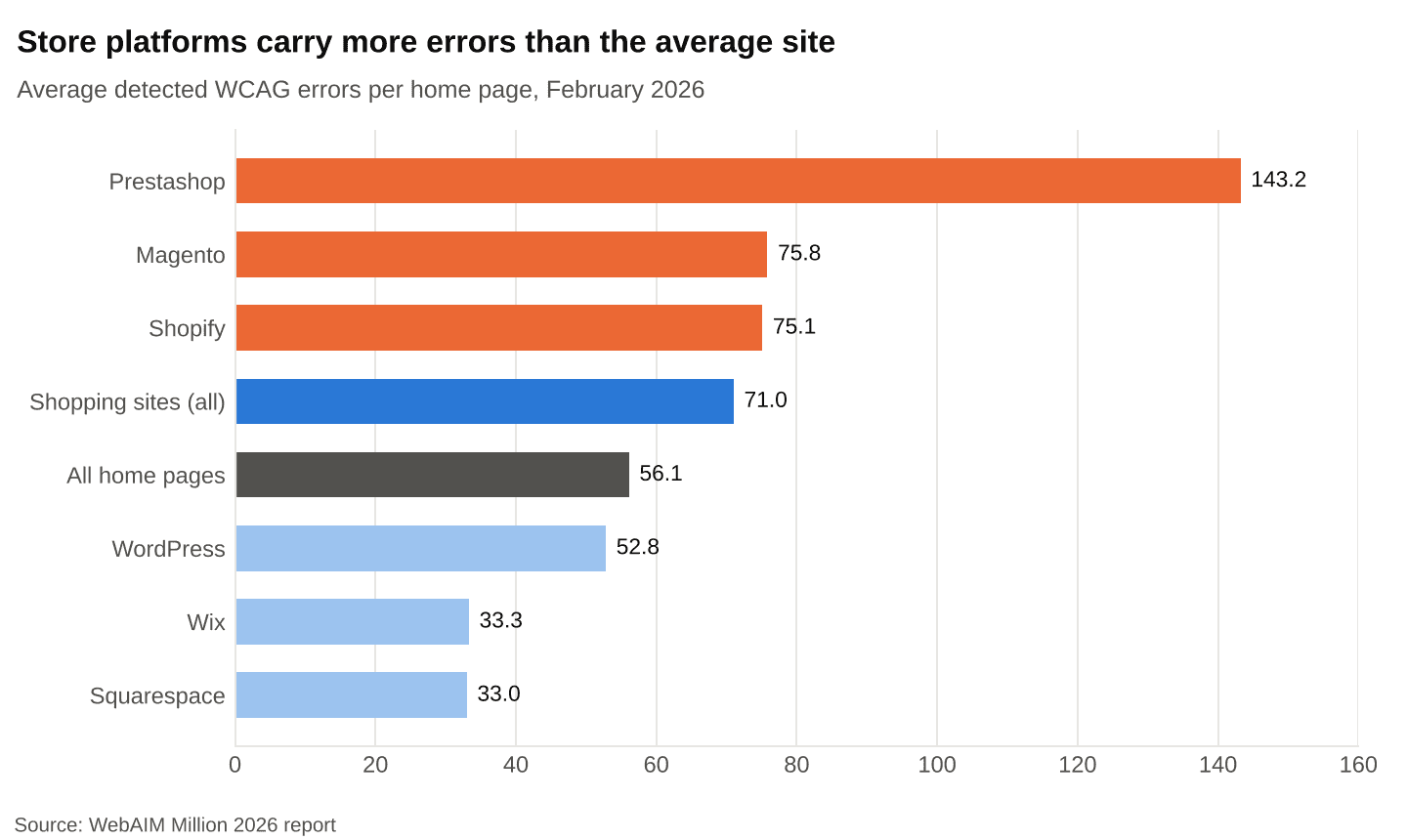
Average detected WCAG errors per home page by platform, February 2026
The platform figures need care. They describe sites built on each platform, not the platform software alone; themes, apps and custom code drive most of the errors. Still, the gap is wide. Shopify home pages averaged 75.1 errors and Magento 75.8, while Prestashop home pages averaged 143.2, more than two and a half times the overall figure. Wix and Squarespace sites, where the provider controls more of the template, came in around 33. If you run a Prestashop store, that number alone is a reason to audit your theme; our Prestashop vs OpenCart comparison covers the wider platform trade-offs.
The errors are boring, and that is good news
Six types of error made up 96% of all the errors WebAIM detected. None of them requires a specialist to understand.
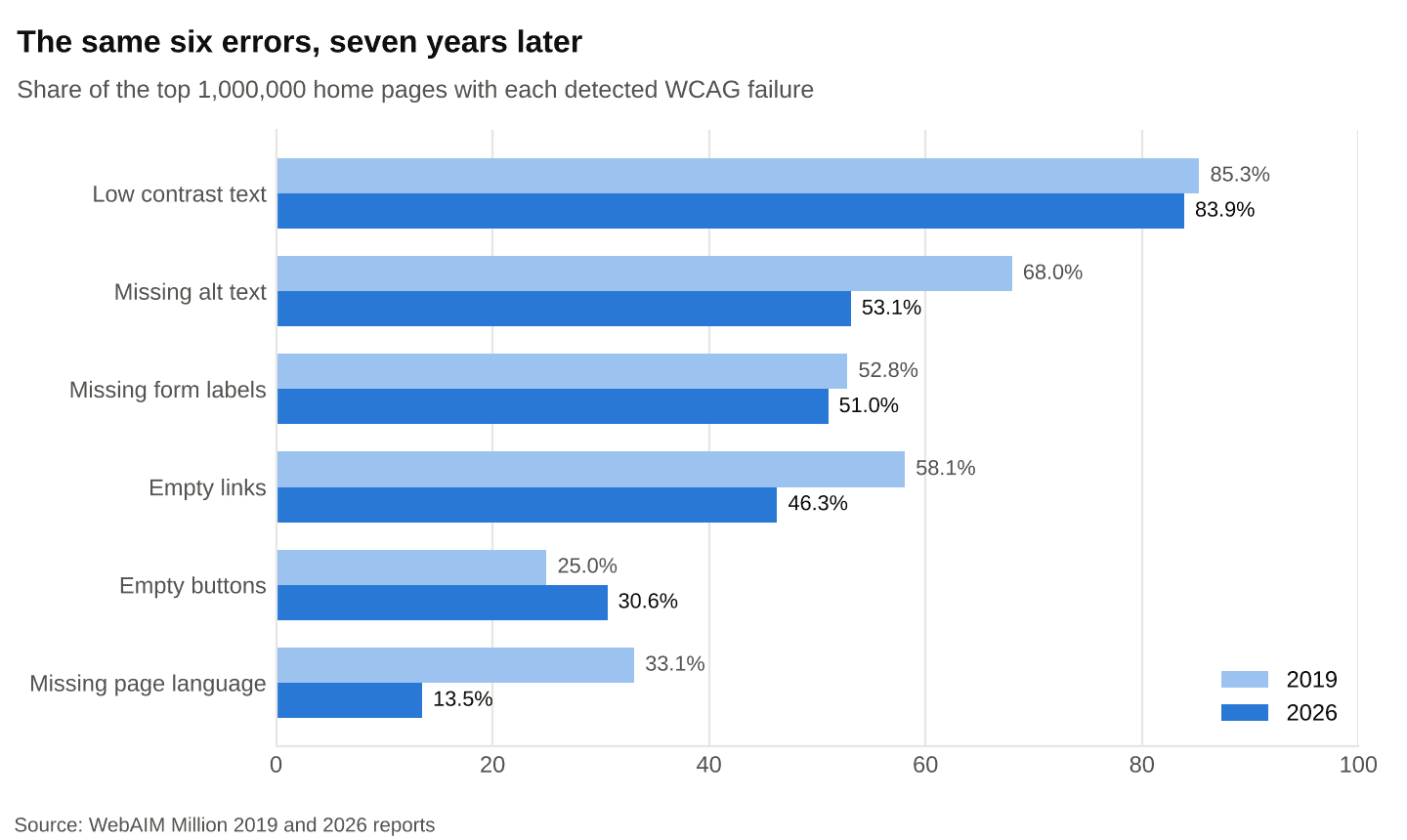
Share of home pages with each common WCAG failure, 2019 and 2026
Low contrast text was found on 83.9% of home pages in 2026, barely changed from 85.3% in 2019. Missing alternative text on images, which also matters for product description SEO, fell from 68.0% to 53.1%, and missing page language fell from 33.1% to 13.5%, which shows that platforms and themes can fix a pattern at scale when they decide to. Empty buttons went the other way, rising from 25.0% to 30.6%, probably because more interfaces use icon only buttons such as a bare cart symbol or a magnifying glass with no text label.
These errors hurt a store directly. An empty button means a screen reader user hears “button” with no idea whether it adds to cart or opens a menu. A missing label means the shopper does not know which box is the postcode. One caveat: WebAIM is clear that automated tools cannot detect every failure. A clean scan is a floor, not proof of compliance.
The market argument
Eurostat measures disability in the EU through the EU-SILC survey, which asks people whether they have been limited in activities people usually do, because of a health problem, for at least six months. In 2025, according to Eurostat table hlth_silc_06, 24.3% of EU residents aged 16 or over reported some or severe limitation, and 6.9% reported severe limitation. The share was 27.0% in 2022, so the exact figure moves between survey years, but one in four adults is a fair rule of thumb.
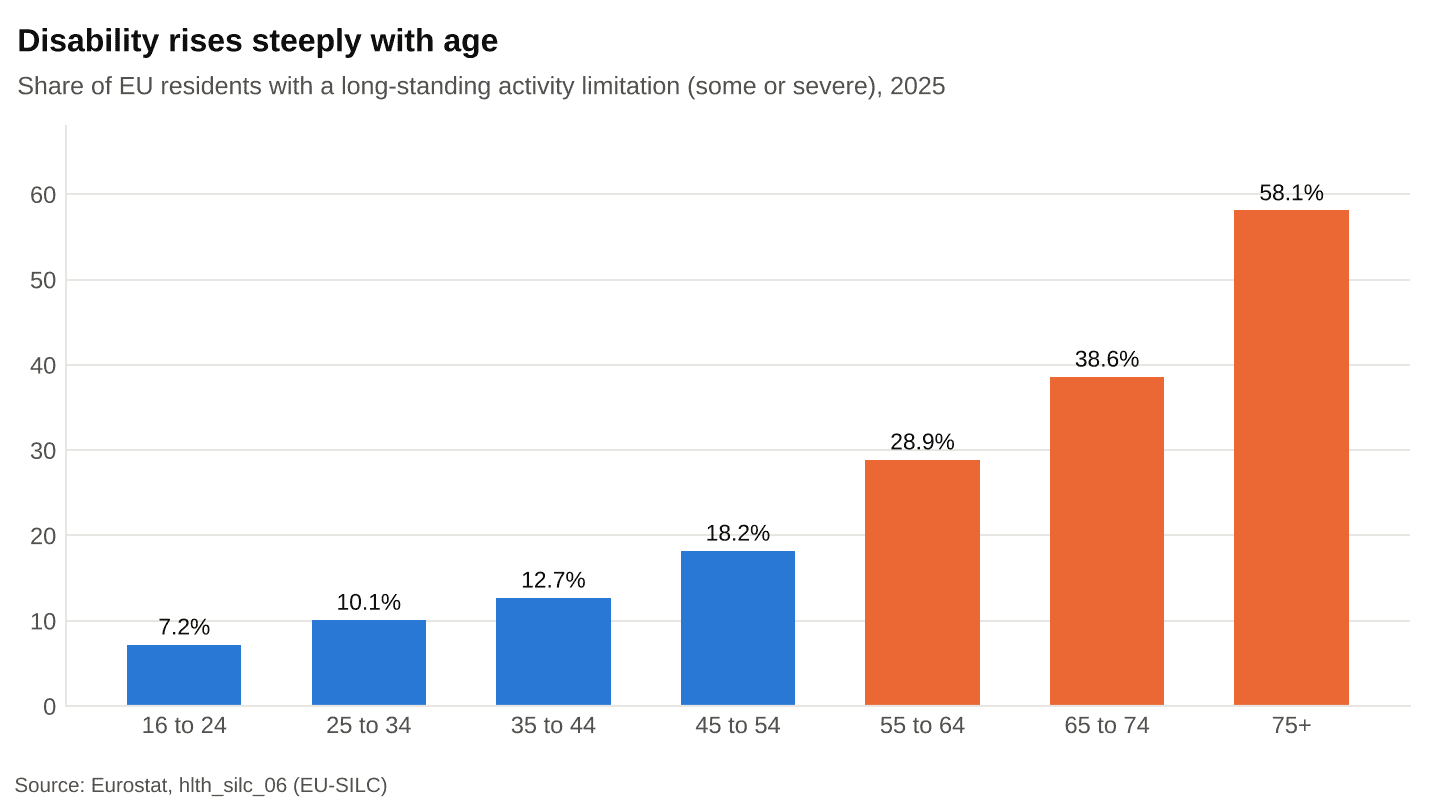
Share of EU residents with long-standing activity limitation by age, 2025
Age is the bigger story. The share rises from 7.2% among 16 to 24 year olds to 28.9% at 55 to 64, 38.6% at 65 to 74 and 58.1% at 75 and over. The EU population is also ageing, so this group grows every year. Many would not call themselves disabled; they just find small grey text hard to read.
The case against
The objections deserve a fair hearing.
Cost is real for some stores. A heavily customised theme with third party widgets and thousands of product images means a real bill for audit and remediation, and the store does not control every widget it embeds.
The rules are fragmented. Twenty seven national regimes mean different authorities and penalties, and early enforcement practice is thin.
Automated scores overstate and understate. A scanner flags things that matter little and misses things that matter a lot, such as a checkout that cannot be completed with a keyboard. Chasing a perfect score can waste money while real barriers remain.
Overlays promise a shortcut that does not work. Some vendors sell a script that claims to make a site compliant in minutes. WebAIM’s own data shows that pages using ARIA, the code attributes many such tools add, averaged 59.1 errors against 42 for pages without it. ARIA is not the cause of those errors, but more code is not the same as more access. A bolt on widget does not fix a missing label in your checkout template.
Those points are fair, but none changes the conclusion. Cost argues for doing the cheap fixes first. Fragmentation argues for meeting the common WCAG AA standard. Imperfect scanners argue for adding manual tests, not skipping testing.
What to do
A practical sequence for a small or mid sized store, roughly in order of cost:
- Check whether you are in scope against the staff, turnover and balance sheet thresholds.
- Run a free automated scan on your home page, a category page, a product page, the cart and each checkout step. Note the errors by type, not by page.
- Fix the contrast in your theme. Low contrast is the most common failure and is usually a handful of colour values in one stylesheet. WCAG AA asks for a contrast ratio of at least 4.5 to 1 for normal text.
- Label every form field, especially in checkout: name, address, postcode, email, card fields and discount code boxes.
- Give every button and icon link a text name. The cart icon, search icon, menu toggle and social links are the usual culprits.
- Write alt text for product images. Describe what the shopper needs to know: the product, colour and angle. Good alt text helps search too, so the effort pays twice.
- Set the page language in your template. It is one attribute.
- Test the checkout with a keyboard only. If you get stuck between cart and payment, so will a customer.
- Ask your payment, review and chat providers for their accessibility conformance statements.
- Publish an accessibility statement that says which standard you aim for, what you know is not yet fixed, and how a customer can report a problem or order another way.
Much of this overlaps with good conversion work. If you already run tests on your checkout, our conversion rate optimisation guide shows how to measure whether changes like clearer labels and buttons move the numbers.
Limits of this analysis
The WebAIM figures cover home pages of the most visited sites only, using automated tests. Eurostat’s measure is self reported activity limitation, broader than legal definitions of disability. Enforcement practice is still developing. None of this is legal advice.
The bottom line
The European Accessibility Act has applied to EU e-commerce since June 2025, and the data shows most online stores are not ready. The good news is that the common failures are dull, template level problems: contrast, labels, alt text, empty buttons. Fixing them costs far less than most store owners fear, makes the shop easier for a quarter of adult customers and many more, and moves the business toward compliance with a law that is not going away. Start with the checkout, because that is where an inaccessible store loses money first.