Most e-commerce stores spend time on content, backlinks, and product page optimization. Fewer think about how the site itself is organized. That turns out to be a costly oversight.
E-commerce site architecture is the structural layer underneath everything else you do in SEO. It determines how search engines discover your pages, how link equity flows between them, and whether your most important URLs even get indexed. According to Botify’s data, Google misses roughly half the pages on large websites. For e-commerce stores with thousands of product and category pages, that is not a technical footnote. It is a fundamental visibility problem.
This article covers what crawl budget means in practice, how poor site architecture wastes it, and what to fix first if your pages are not getting indexed.
What Crawl Budget Means for E-Commerce Sites
Every time Googlebot visits your site, it has a limited number of pages it will crawl before moving on. That limit is your crawl budget. It is determined by two things: how much capacity Google is willing to allocate, and how much demand there is to crawl your pages.
Google’s crawl budget documentation explains that capacity fluctuates based on site responsiveness. Faster servers get more crawling. Slow responses or server errors reduce it. Demand depends on content freshness, popularity, and whether Google perceives the URL as unique and worth revisiting.
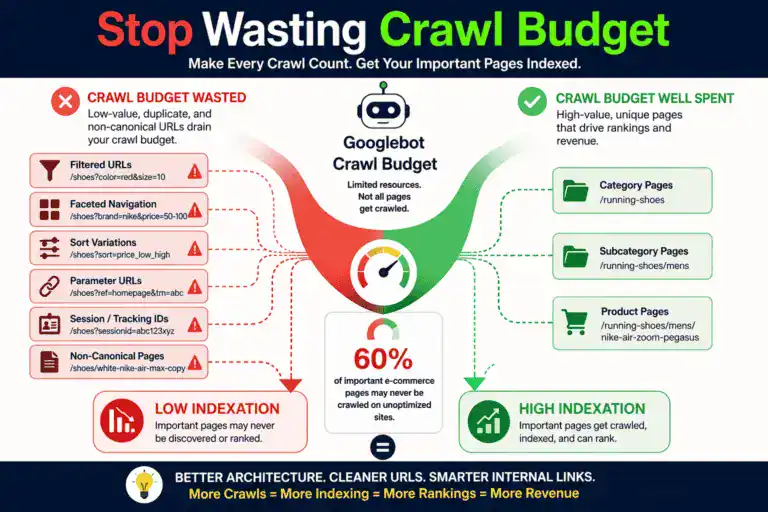
For small stores with a few hundred pages, crawl budget rarely matters. For stores with thousands of products, faceted navigation, and filtered URLs, it becomes a real constraint. Botify’s research shows that on unoptimized e-commerce sites, only about 40% of strategic URLs get crawled monthly. That means 60% of your pages may never even enter the running to rank.
The implication is straightforward. If Google cannot find your pages, nothing else you do in SEO matters for those pages. No amount of content optimization or backlink acquisition helps a page that has not been crawled and indexed.
How E-Commerce URL Structure Creates Crawl Waste
The most common crawl budget problem in e-commerce is not having too many products. It is having too many URLs that point to the same or similar content.
Faceted navigation is the usual culprit. Every filter combination (size, colour, price range, brand, material) can generate a unique URL. A store with 500 products and 10 filterable attributes can easily produce tens of thousands of indexable URLs, most of which add no unique value.
One Botify case study found an e-commerce site where non-canonical URLs represented 97% of the million pages Google crawled. Only 25,000 URLs were actually indexable, and Google managed to reach just over half of those. The site’s URL structure was actively preventing its own products from being found.
Parameter-based URLs are another source of waste. Session IDs, tracking parameters from ad campaigns, sort-order variations, and pagination all create duplicate pages that consume crawl budget without adding organic visibility.
The fix requires deliberate decisions about your URL structure. Use robots.txt to block crawling of filter and parameter URLs that should not be indexed. Use canonical tags to consolidate duplicates. Keep your XML sitemap clean by only including URLs you actually want Google to index. And review your platform’s default URL generation settings, because most e-commerce platforms create crawl waste out of the box.
Why Crawl Depth Affects E-Commerce Rankings
Crawl depth is the number of clicks it takes to reach a page from your homepage. Pages that sit one or two clicks deep get crawled frequently. Pages that require five or six clicks may not get crawled at all.
This matters for e-commerce site architecture because product pages often end up buried. A homepage links to top-level categories. Categories link to subcategories. Subcategories link to product listings. Product listings link to individual products. By the time a user reaches a product page, it can be four, five, or six levels deep.
That depth signals to Google that the page is low priority. It receives less frequent crawling, slower indexation of updates, and weaker transfer of link equity from the homepage.
The general recommendation across technical SEO research is to keep important commercial pages within three clicks of the homepage. That does not mean flattening everything into one level. A store with 10,000 products cannot realistically link to every product from the homepage. But it means being intentional about which pages get priority in navigation, internal linking, and sitemap structure.
For large catalogs, the practical approach is a hub-and-spoke model. The homepage links to category hubs. Category hubs link to subcategories and featured products. High-value products get additional internal links from blog content, related product modules, and cross-sells. This keeps crawl depth manageable without sacrificing organizational clarity.
E-Commerce URL Structure Best Practices
Google’s e-commerce URL guidelines recommend a clear hierarchy: domain.com/category/product-name. Lowercase letters, hyphens between words, HTTPS, and descriptive keywords.
Many e-commerce platforms generate URLs that look like domain.com/products/item-12847-variant-3?ref=cat19. Those tell neither the user nor Google what the page is about. A Backlinko study found that URLs containing a target keyword rank an average of 1.3 positions higher than those without. That is not dramatic on its own, but across hundreds of pages it compounds.
Keep URLs under 60 characters when possible. Avoid special characters, session IDs, and unnecessary parameters. Use a consistent pattern across the entire site so Google can predict and efficiently crawl your URL space.
Avoid changing URL structures once established unless you have a clear migration plan with proper 301 redirects. A messy URL migration can undo months of ranking progress overnight. If you are on Shopify, WooCommerce, or another platform that forces a specific URL pattern, work within those constraints rather than fighting them with redirects.
Internal Linking as E-Commerce Site Architecture
Most e-commerce stores rely entirely on navigation menus for internal linking. Categories link to products through default listings. Beyond that, there is very little strategic linking. That leaves significant value on the table.
Internal links do two things for SEO. First, they help Google discover pages that sit too deep in the default navigation. Second, they pass authority from high-value pages to pages that need ranking power.
If your blog content ranks well and brings in organic traffic, linking from those posts to relevant category and product pages transfers authority where it can drive revenue. If your homepage has the most backlinks, linking from it to priority categories helps those categories rank. This is how link building applies internally the same way it does externally.
The stores that handle internal linking well treat it as a separate discipline from navigation. Related product links, contextual links within blog content, breadcrumb navigation, cross-sell modules, and footer links to high-priority categories all contribute to a site architecture that search engines can parse efficiently and that distributes authority where it matters most.
A common mistake is orphaning new product pages. When a new product is added to the catalog but only accessible through one category listing at depth level four, it may take weeks to get indexed. Adding internal links from related blog posts or featured sections immediately gives Google a faster path to discover it.
Keyword Cannibalization and Site Architecture
Poor e-commerce site architecture often leads to keyword cannibalization, where multiple pages compete for the same search query. This is common because category pages, subcategory pages, and product pages can all target overlapping terms.
When Google sees two or more pages targeting the same keyword, it splits ranking signals between them. Neither performs as well as it could. Yoast’s analysis recommends deciding which page should own each keyword based on search intent. If the user wants to browse a range, the category page should rank. If they want to buy a specific product, the product page should rank.
Once ownership is clear, use internal linking, canonical tags, and on-page optimization to reinforce the right page. Consolidate thin pages that target the same term. And structure your category taxonomy so each level serves a distinct keyword cluster rather than overlapping with adjacent pages.
This is one of the most common first-year SEO mistakes in e-commerce. It often goes unnoticed because traffic is still coming in. It is just going to the wrong pages, converting at a lower rate than it should.
How to Audit Your E-Commerce Site Architecture
If you are reviewing your site architecture today, start with these priorities.
- Compare your indexed URL count against your intended index. Check Google Search Console’s coverage report. If the number of indexed pages is far higher than the number of products and categories you sell, you have a crawl waste problem from duplicate or parameter URLs.
- Run a crawl with Screaming Frog or Sitebulb. Map crawl depth for your top-selling products and highest-margin categories. If those pages sit more than three clicks from the homepage, restructure navigation or add internal links to bring them closer.
- Clean up your XML sitemap. Only include URLs that return a 200 status code and that you want indexed. Remove parameter URLs, permanently out-of-stock products, and pages returning soft 404 errors.
- Check for keyword cannibalization in Search Console. Filter by query and look for multiple URLs receiving impressions for the same term. Where that happens, decide on a single owner page and consolidate signals toward it.
- Review your URL patterns. If your platform generates non-descriptive URLs by default, invest time in creating readable, keyword-inclusive structures early. The longer you wait, the more painful migration becomes.
The Bottom Line
E-commerce site architecture is not the exciting part of SEO. It does not produce the immediate result of watching a blog post rank or a link campaign pay off. But it is the foundation that makes everything else work.
A well-structured site ensures Google can find your pages, understand their importance, and index them efficiently. A poorly structured one means you are investing in content and links that may never get seen.
One auto marketplace in Botify’s research achieved a 19x increase in crawl volume and doubled organic traffic within three months through architecture and crawl budget optimization alone. No new content. No new backlinks. Just making existing pages easier to find.
If your product pages are not ranking, the problem may not be the content on those pages. It may be that Google never found them in the first place. Fix the architecture first. Everything else works better once you do.
Keep reading: see our full guide to ecommerce SEO, or read about getting your store found on Google and ecommerce SEO audit checklist.